How to create a workflow diagram
How to create a workflow diagram: model the request, the approval gates, the work itself and the review that closes the loop, with each state owned by a role. With a live access-request example.
A workflow diagram shows how a unit of work moves between roles: what triggers it, which approvals it must pass, who performs it, and what state it ends in.
The short version
- The unit is the item (a request, a ticket, a document) and the states it moves through.
- Every gate names an approver and both outcomes.
- An item must never be in a state with no owner watching it.
- Rejections route somewhere explicit: back for amendment, or to a closed state.
- Draw the recurring review if there is one: plenty of workflows reopen on a timer.
What a workflow diagram shows that a process map does not
The words workflow and process get used interchangeably, and mostly that is harmless. Where the distinction earns its keep is in what you are drawing: a process map describes how work is done, while a workflow diagram describes how a specific item (a request, a ticket, a document) travels between the people who have to act on it. The unit of analysis is the item and the states it passes through, not the activity.
That shifts what belongs on the page. A workflow diagram lives on its gates: who has to approve, in what order, and what happens when one of them says no. It should be unambiguous about where an item can sit at any moment and who is holding it, because the most common workflow failure is not a wrong decision but an item parked in a state nobody is watching.
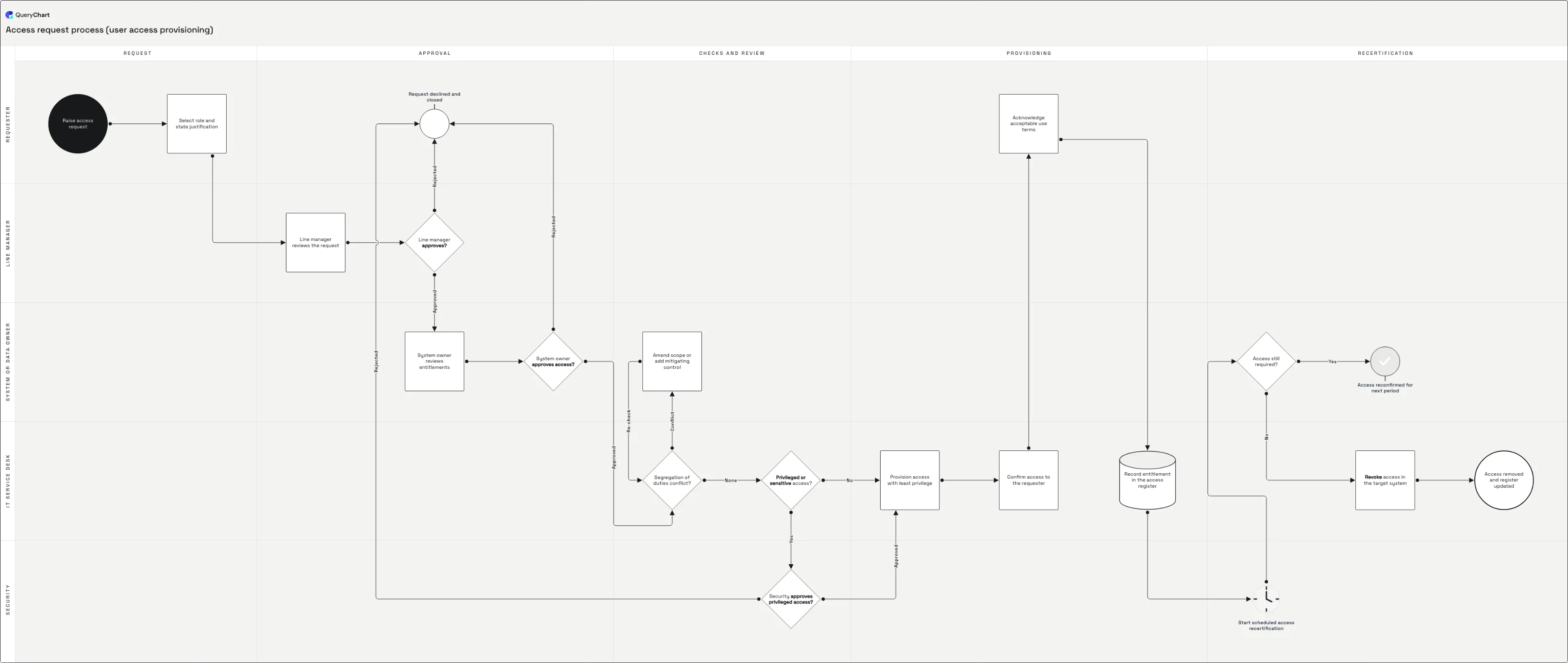
The example below is an access request. It has four separate approvers, a conflict check that can send an item backwards, and a recertification loop that reopens the workflow months after it appeared to finish, which is a good reminder that a workflow's last state is often not its last event.
A workflow with four gates
An access request moving from a form to a provisioned entitlement, and back out again at recertification.
Trigger and first gate
A request with a stated justification, then the line manager's decision. Note that the justification is captured before any approval: a gate can only be as good as what the approver is shown.
Approvals in series, not in parallel
The system owner reviews entitlements, a segregation-of-duties check can push the item back to be amended and re-checked, and privileged access adds a security approval on top. Each gate has one owner and a labelled route for a refusal.
The work itself
Provision with least privilege, confirm to the requester, capture the acceptable-use acknowledgement, and record the entitlement in the register. In most workflow diagrams the doing is the shortest section, which is usually the finding.
The loop that reopens it
Recertification restarts the workflow on a schedule, and the answer to "still required?" either reconfirms the access or drives revocation. A workflow that only runs forwards leaves entitlements accumulating for years.
How it works
Name the item and its states
Write down what is flowing (a request, an invoice, a document) and the states it can be in: submitted, approved, provisioned, revoked. States are what a reader will look for when they ask where something is, so agreeing them first keeps the diagram from turning into a task list.
List the gates in the order they apply
For each approval, note who owns it and what they are deciding. Then check whether the order is real: gates that could genuinely run in parallel are often drawn in series because that is how the ticketing system was configured, and that is worth surfacing rather than enshrining.
Build the states as rows and connect them
Put each state or action in a row, set the gates to Shape Decision, and connect them with the Line to column. Label both exits of every gate in Line text. At this point the diagram will already show you any state that cannot be left.
Give every state a lane
Put each row in the lane of the role that holds the item in that state. This is what turns the picture into an answer to "who is sitting on my request": the single most common question a workflow diagram gets asked.
Route the refusals
A rejected item goes somewhere: back to the requester for amendment, to a closed state, or to an exception owner. Draw it. Workflows that leave rejection implicit produce the failure where an item is neither live nor closed and nobody is chasing it.
Add the recurring review
If the item is revisited on a schedule (access recertified, a document reviewed, a contract renewed), draw that as a route back into the workflow with its own decision. Otherwise the diagram implies the work ends, and the register quietly fills up with entries nobody revisits.
Mistakes to avoid
States with no owner
"Pending review" in no lane means nobody is accountable for moving it. Every state belongs to somebody, even if that somebody is a queue with a named owner.
Drawing the tool instead of the work
Copying the ticket system's status list gives you a diagram of a configuration. Ask what actually has to happen, then compare: the differences are the interesting part.
Approvals stacked for comfort
Every extra gate adds cycle time and dilutes accountability, because approvers who are one of five sign quickly. Two meaningful gates beat five ceremonial ones.
No exit for a refusal
If the diagram does not say what happens when an approver says no, the workflow's most common non-happy outcome is undefined.
Create your own workflow diagram
Open the access request example as your own chart and swap in your gates, your approvers and your states.
Related guides
Frequently asked questions
What is the difference between a workflow diagram and a process flowchart?
A process flowchart describes how work is performed; a workflow diagram describes how a particular item moves between the people who act on it, with the emphasis on states, ownership and approval gates. In practice they overlap heavily and the same notation serves both. The distinction is useful mainly as a prompt: if you cannot say what item is flowing and what states it can be in, you are drawing a process map, not a workflow.
How many approval steps should a workflow have?
As few as carry real decisions. Each gate adds queue time and, past two or three, dilutes accountability: approvers who are one of five tend to sign without looking, which is worse than having no gate because it produces evidence of a review that did not happen. If a gate has never rejected anything, it is a notification, and should be drawn as one.
Should a workflow diagram use swimlanes?
Almost always. The question a workflow diagram gets asked most often is who is holding this item now, and lanes answer it without anyone reading the boxes. The exception is a workflow that never leaves one team, where lanes add a dimension carrying no information.
How do I show a workflow that repeats on a schedule?
Draw the trigger as a step and route it back into the flow with a decision on the outcome. In the access example, recertification is a scheduled step feeding an "access still required?" decision that either reconfirms or revokes. Modelling it explicitly is what stops a workflow diagram from implying that an item, once processed, is finished with forever.