How to create an approval workflow
How to design an approval workflow: decide what each gate is really deciding, set thresholds from your delegation of authority, route rejections somewhere, and record who approved what.
An approval workflow is a sequence of gates, each with one accountable approver, a stated decision, a route for a refusal, and a record of who approved what and when.
The short version
- If a gate has never said no, it is a notification. Draw it as one.
- One accountable approver per gate, with the information needed to decide.
- Thresholds come from the delegation of authority, and belong on the decision.
- A refusal routes somewhere: amendment, escalation, or an explicit closed state.
- Record approver, timestamp and version: an approval that cannot be evidenced did not happen.
Every gate should be able to say no
The test of an approval workflow is not how many signatures it collects. It is whether any of them could realistically be refused. A gate that has never rejected anything is a notification with extra latency, and it is worse than no gate at all, because it produces an approval record implying a review that did not happen, which is exactly the evidence an auditor will sample and a court will read.
Good approval design is therefore mostly subtraction. Two meaningful gates beat five ceremonial ones, because approvers who are one of five sign without looking. Each remaining gate needs three things: one accountable approver, a stated question they are answering, and enough information in front of them to answer it. Where those are missing, adding a gate simply moves the risk somewhere less visible.
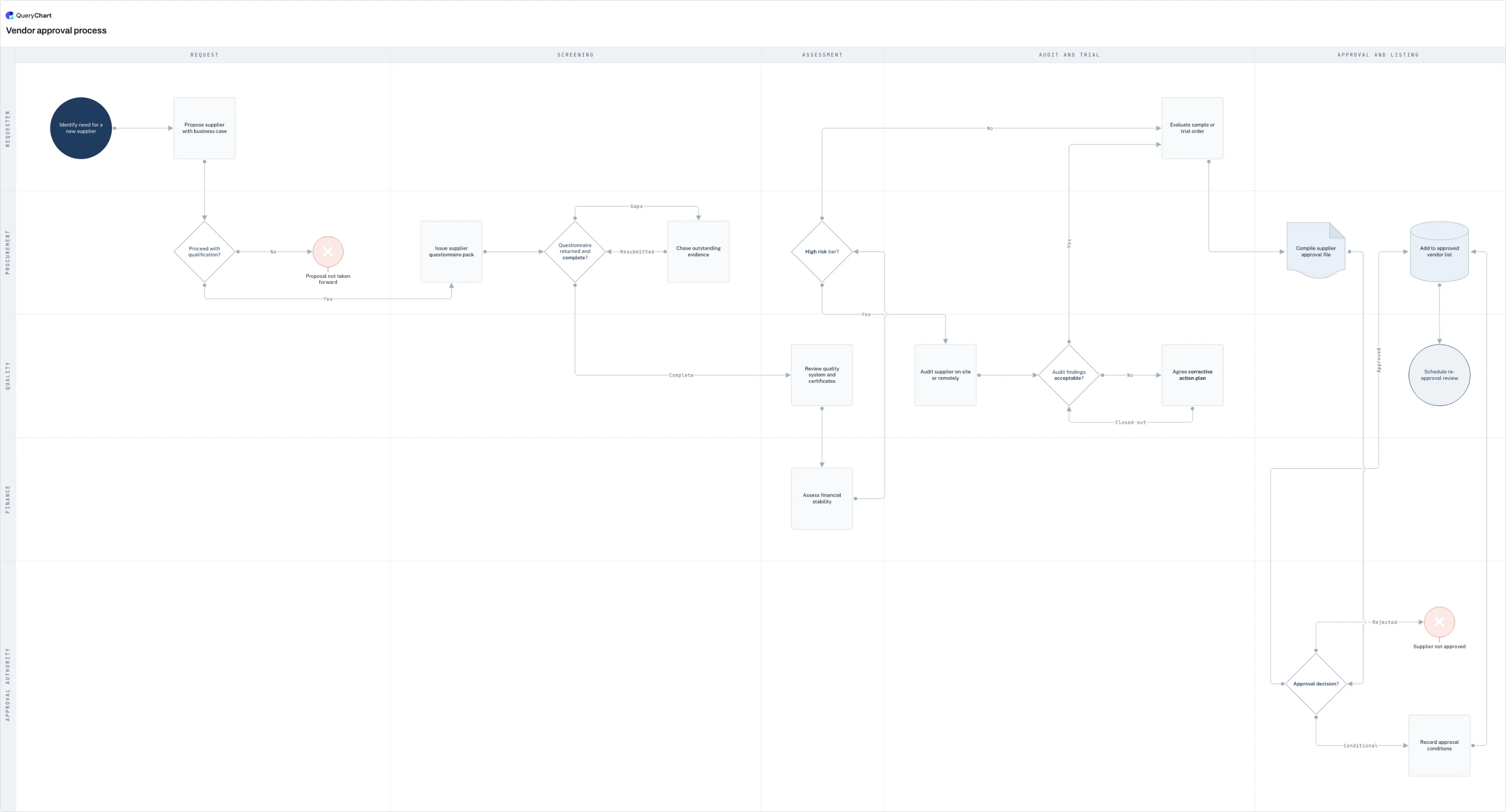
The example below is a vendor approval process, which is an approval workflow with unusually honest structure: a screening gate that can loop for missing evidence, a risk-tier decision that determines the depth of review, an audit gate with a corrective-action loop, and a final three-way decision (approved, conditional, or rejected) rather than the usual binary.
An approval workflow with real gates
Vendor approval from proposal to listing. Four gates, each able to refuse, each with a route out.
Screen before you spend review effort
A business case and a proceed decision that can stop the process on the first step. The cheapest gate goes first: reviewing a supplier nobody has agreed to pursue is the most common waste in approval workflows.
Chasing is part of the workflow
The questionnaire gate loops back for missing evidence rather than failing. Most real approval processes spend more elapsed time chasing incomplete submissions than deciding, and drawing that loop is how it becomes measurable.
Depth of review follows risk
A risk-tier decision routes high-risk suppliers to an on-site audit with its own corrective-action loop, while lower tiers skip straight ahead. Uniform review depth is the most common design error: it over-reviews the trivial and under-reviews the dangerous.
Three outcomes, not two
The approval authority can approve, approve with conditions, or reject, and conditional approval records its conditions before listing. Binary gates force approvers to choose between blocking legitimate work and waving through something imperfect.
How it works
Write down what each gate is deciding
One sentence per approval: what question is this person answering, and on what evidence? Gates that cannot be stated this way are usually there for visibility rather than decision, and visibility is better served by a notification that does not hold the work up.
Take the thresholds from your delegation of authority
Value bands, risk tiers and materiality limits belong to the delegation schedule, not to the workflow designer. Put the figures and the currency on the decision itself so the routing is auditable, and set them high enough that the extra gate triggers rarely.
Give each gate exactly one accountable approver
Others may be consulted; one person answers for the decision. Committees can approve, but then the committee is the approver and its quorum and chair need naming. Two independent approvers at the same level is the shape that produces neither reviewing carefully.
Route every refusal
Draw where a rejected item goes: back for amendment with the reason recorded, up for escalation, or to an explicit closed state. Workflows that leave rejection undrawn produce items that are neither live nor closed, sitting in a state nobody is chasing.
Make the depth of review follow the risk
Add a routing decision before the expensive reviews, as the example does with its risk tier. Applying full diligence to everything means either the process is too slow or the diligence is not real, and it is usually both.
Capture the evidence of approval
Each approval needs an approver, a timestamp and the version it applied to. In QueryChart the chart itself carries an approval workflow and an immutable history, so "who approved the version in force in March" has an answer without anyone searching an inbox.
Mistakes to avoid
Gates that cannot say no
An approval that has never been refused is a notification, and recording it as an approval overstates the control to anyone reading the evidence later.
Approvers without information
A gate is only as good as what the approver is shown. If the justification is captured after the approval, the approval is decorative.
Thresholds set too low
A limit that triggers on most transactions trains approvers to click through and encourages people to split requests to stay underneath it.
No route for a refusal
Undrawn rejection produces the most common workflow failure: the item that is neither approved nor closed and that nobody owns.
Create your own approval workflow
Open the vendor approval example as your own chart and replace the gates with the decisions your organisation actually makes.
Related guides
Frequently asked questions
How many approval levels should a workflow have?
As few as make real decisions: usually one, with a second above a threshold taken from your delegation of authority. Each additional gate adds queue time and dilutes accountability: approvers who are one of five review less carefully, not more, so a five-gate workflow can be a weaker control than a two-gate one while costing considerably more. If a gate has never rejected anything, that is the evidence it should be a notification.
What is the difference between an approval and a review?
An approval is a decision that can block the work and carries accountability for the outcome; a review is an examination that produces comments. Conflating them is a common design fault: reviewers get given a veto they were not meant to have, or approvers are treated as reviewers and their sign-off means nothing. Draw reviews as steps and approvals as decisions, and the distinction becomes structural rather than a matter of convention.
Should approvals be parallel or sequential?
Sequential when a later approver relies on an earlier one's decision, parallel when they are assessing independent things. Most workflows are drawn sequentially out of habit, adding days for no analytical reason: legal reviewing contract terms and finance assessing credit do not need each other's outcome. Parallel gates are harder to represent in some ticketing tools, which is a tooling constraint worth naming rather than encoding as process design.
How do I record approvals for an audit?
Capture the approver, the timestamp, and the exact version approved: the last is the part usually missing. An approval that cannot be tied to a specific revision proves only that someone approved something at some point. QueryChart records approvals against a chart revision with an immutable history, so the question an auditor actually asks (which version was in force, and who signed it) is answerable directly.