User provisioning process flowchart (joiner, mover, leaver)
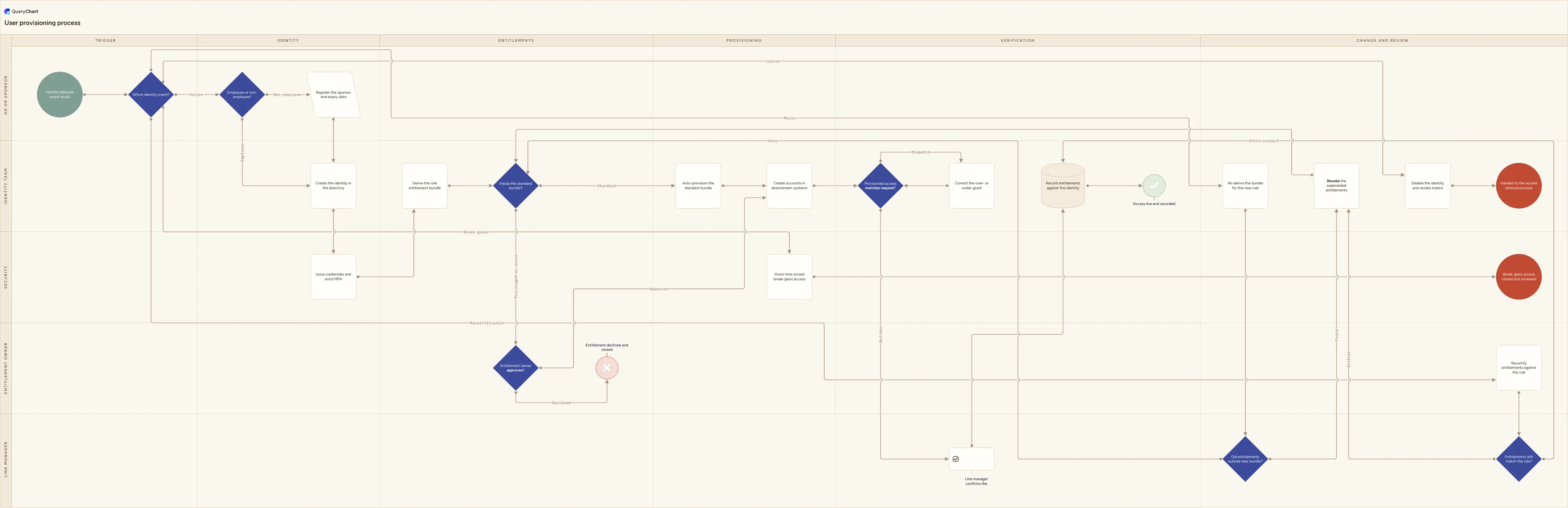
User provisioning process flowchart: HR event, identity created in the directory, credentials and MFA, role entitlement bundle, owner approval for privileged access, downstream accounts, verification and recertification.
What the user provisioning process flowchart (joiner, mover, leaver) process is
User provisioning fails quietly, which is why it usually gets fixed after an audit rather than before one. The joiner half is visible: a new starter without a mailbox complains on day one and somebody sorts it out. Everything else is invisible. Access gets copied from whoever sat in the chair last, so one over-provisioned account becomes the department's baseline. Contractors arrive with no HR record, no expiry date and a sponsor who has since left. Half the estate sits behind single sign-on and is provisioned automatically, while the other half (the finance package, the tool a team bought on a card, the supplier portal) is a manual queue nobody measures. And an internal move adds without ever subtracting, because nothing anywhere reports access that has merely become unnecessary. None of this produces an incident. It produces a slow accumulation that surfaces years later as an access review finding, a failed control test, or a former employee's account still authenticating.
This chart is the identity and account machinery, not the request form and not the approval chain. A single person already in post asking for one more entitlement, with the approvals and the recertification cycle around it, is the access request process at /templates/access-request-process; the same request triggered by an HR joiner or mover event and scoped by a role profile is at /templates/employee-access-request-process. Access to a dataset, where a data owner decides on classification and purpose rather than job role, is at /templates/data-access-request-process. The leaver path here is deliberately short and then hands over: the full deprovisioning flow, with shared and service accounts, disable versus delete and evidence capture, is at /templates/user-access-removal-process. Contracts, screening, equipment and day one belong to /templates/employee-onboarding-process. What is left is everything between the event and a working, verified, recorded set of accounts (the identity, the credential, the entitlement bundle, the downstream estate) plus the one population none of those pages carries: the non-employee who arrives with no HR record at all. In control terms this is the identity half of ISO/IEC 27001:2022 Annex A (A.5.16 identity management, which governs an identity's whole life, and A.5.17 authentication information, which governs the credential issued against it) rather than A.5.15 and A.5.18, which govern what that identity is then allowed to reach.
Three decisions are drawn here that most provisioning procedures leave implicit. "Employee or non-employee?" comes before the identity exists, because a contractor needs a named sponsor and an expiry date that an HR feed will never supply, and an identity created without them is the orphan an access review finds two years later. "Inside the standard bundle?" splits the flow in two: everything in the role's bundle is auto-provisioned with nobody in the path, and only privileged or out-of-bundle entitlements go to an owner, which is what stops approval degenerating into a rubber stamp applied to mailboxes. And "Provisioned access matches request?" is a gate rather than a closing formality, because it reads back what the target systems actually grant and compares that with what was asked for; entitlements that landed without approval are never reported by the person who received them. The mover branch adds a fourth, "Old entitlements outside new bundle?", and recertification a fifth, "Entitlements still match the role?", and both answer into the same revocation step, so there is one way out of an entitlement however the need to remove it was found.
What this flowchart covers
In this template
- Six phases (Trigger, Identity, Entitlements, Provisioning, Verification, and Change and review) across five swimlanes: HR or sponsor, Identity team, Line manager, Entitlement owner and Security.
- One entry point for five events. "Which identity event?" routes a joiner, a mover, a leaver, a break-glass request and a scheduled recertification down the same chart, so the machinery is shared rather than reinvented for each case.
- The identity phase in full: "Employee or non-employee?" routes contractors, agency staff and service partners through "Register the sponsor and expiry date" (the only step that gives them an accountable owner and an end date) before both routes meet at "Create the identity in the directory" and "Issue credentials and enrol MFA".
- "Inside the standard bundle?": the standard branch runs straight to "Auto-provision the standard bundle" with no approver in the path, while privileged and out-of-bundle entitlements go to "Entitlement owner approves?", whose declined branch ends at "Entitlement declined and closed".
- Provisioning in the order the chart runs it: "Auto-provision the standard bundle", then "Create accounts in downstream systems" across the automated and the manual estate alike, then "Provisioned access matches request?", whose mismatch branch runs through "Correct the over- or under-grant" and re-checks rather than closing the ticket.
- The change half: a mover is asked "Old entitlements outside new bundle?" and anything found goes to "Revoke the superseded entitlements" before rejoining "Inside the standard bundle?"; a leaver reaches "Handed to the access removal process"; and "Entitlements still match the role?" sends a drifted answer to that same revocation step.
When to use this template
- You are writing the identity and access section of an IT operations manual and need one picture of what happens between an HR event and a set of working accounts.
- You are about to buy or configure an identity governance tool, and want the branches settled (what auto-provisions, what needs an owner, what stays a manual queue) before a vendor's default workflow settles them for you.
- Access reviews keep turning up entitlements from jobs people left years ago, and you need the mover removal step drawn with an owner and a deadline against it.
- Your estate is full of non-employees (contractors, agency staff, auditors, partners, service accounts) and none of them come from the HR feed that the rest of the process depends on.
- An auditor, a customer security questionnaire or an ISO 27001 reviewer has asked how identities are created, how entitlements are granted, and how you know the access that exists is the access that was approved.
How it works
Rename the lanes to your own roles
Replace HR or sponsor, Identity team, Line manager, Entitlement owner and Security with the roles you actually have. Keep HR and sponsor in one lane on purpose: they are the same job done for different populations, and splitting them is how non-employees end up with nobody accountable for them. The entitlement owner lane is the one most organisations find they have not filled. If you cannot name an owner for your privileged entitlements today, that gap is a finding rather than a drafting problem, and the lane should stay in the chart, visibly empty, until it is closed.
Declare your source of record, and what it is not
The chart assumes an authoritative feed of joiners, movers and leavers. Write down which system that is, which fields it carries — job role, manager, start date, effective date of a change, last day — and how quickly a change appears in it. Then write down who is not in it. Contractors, board members, agency staff, interns and machine identities usually are not, and every one of them needs a register and a sponsor of its own before the rest of the process can run.
Write the entitlement bundles before you publish
"Derive the role entitlement bundle" is inert until the bundles exist. Start with the ten roles you hire into most often and write down what each genuinely needs on day one. Where you have sign-in or last-used data, build from what current holders actually use rather than from what they hold; the gap between the two is usually wide, and it is the whole reason the bundle is worth writing. Keep each one a floor rather than a ceiling, so anything outside it stays visible enough to be worth asking for.
Set the bar for owner approval
"Inside the standard bundle?" only works if the criteria sit beside it. Typical triggers for the approval branch are administrator and root rights, production access, payment or payroll systems, personal and health data, and anything that can change another person's access. Test that list against last quarter's grants before you publish it: a criterion that catches most of them is not a criterion. If everything routes to an entitlement owner, approvals arrive faster than anyone can read them and the control becomes a queue people learn to click through.
Make the mover removal a tracked obligation
"Revoke the superseded entitlements" is the step that decides whether access accretes in your organisation. Give it the same ticket, the same owner and the same deadline as the grant, and close the mover event only when both halves are done — a ticket that closes on the joining half is the mechanism by which removal never happens. The chart puts the comparison with the line manager rather than the identity team on purpose: the team can produce the list of differences, but only the manager knows whether an entitlement is genuinely superseded or still needed for a handover.
Walk it through with the people who run it, then publish a version
Settle the two branches nobody owns by default before you publish. Decide who may invoke break-glass out of hours and who reads the session log afterwards, and decide who acts on a "Drifted" answer at recertification and by when, since a review that produces a list nobody revokes from is worse than no review at all. Then take the chart to a service desk engineer, a line manager who has recruited recently, and whoever last ran an access review, and correct it to what really happens. Publish the corrected version, keep its predecessors readable, and cite it from your access control policy.
Frequently asked questions
What are the steps in a user provisioning process?
Take a joiner, mover or leaver event from the system of record; decide whether the person is an employee or a non-employee, and give non-employees a sponsor and an expiry date; create or match an identity in the directory with an identifier that is never reused; issue credentials and enrol multi-factor authentication against that identity; derive the entitlement bundle for the job role; auto-provision everything inside that bundle and route privileged or out-of-bundle entitlements to the entitlement owner for approval; create accounts in the downstream systems, both the automated ones and the manual queue; verify that what the systems actually grant matches what was asked for; have the line manager confirm it; and record the entitlements against the identity. After that the process keeps running: a move re-derives the bundle and revokes what the old role no longer justifies, a leaver is disabled and handed to removal, and recertification checks periodically that the entitlements and the role still agree.
What is a birthright or role-based entitlement bundle?
It is the set of access a job needs on its first day, attached to the role rather than to the person: mail and calendar, the intranet, the core line-of-business systems for that function, the shared drives for that team. Because it is derived from the job role, it can be granted without an approver in the path, which is the point — it removes the routine grants from the approval queue so the exceptions get read properly. Two rules keep bundles honest. Build them from what the job requires, never by exporting the access of the person who last held it, since that copies every accumulated extra along with the necessities. And give each bundle a named owner and a review date, because an unowned bundle only ever grows: every request that could not be refused gets added to it, and within two years it grants far more than any single job needs.
How is a user provisioning process different from an access request process?
They meet in the middle and own different halves. The access request process at /templates/access-request-process starts with a person already in post who needs one more system: they raise a request, the line manager and the system owner approve it, and it is provisioned and later recertified. The employee access request process at /templates/employee-access-request-process covers the same request when an HR joiner or mover event triggers it and a role profile scopes it. Both are about deciding. This page is about doing: creating the identity, issuing the credential and enrolling multi-factor authentication, deriving the bundle, creating accounts in every downstream system, and reading the entitlements back out of the target systems to check they are the ones that were approved. If you are designing a request form or an approval chain, use those two. If you are building or documenting the provisioning machinery behind them, including contractor identities and the removal half of an internal move, use this one. If the question is access to a dataset rather than to a system, see /templates/data-access-request-process.
How much of user provisioning can actually be automated?
More than most organisations have automated, and never all of it. Systems behind single sign-on can run without a ticket: the directory identity is created from the HR record, the role's bundle is applied, group membership follows. What defeats full coverage is the estate nobody planned for — the payroll system with no API, the lab instrument that keeps its own local user list, the partner extranet where an account is created by replying to an email. Those need a queue with a named owner and a target time, and they need to be listed, because a manual system that is not on the list is provisioned late for a joiner and missed entirely for a leaver. Keep a register of which systems are connected and which are not, revisit it whenever anything is bought, and treat shortening the manual list as the actual programme of work. Automating the grant without automating the read-back is its own trap: connectors fail silently, which is why the verification step reads entitlements from the target system rather than from the ticket.
How do you provision contractors and other non-employees?
The same way as employees, except that nothing upstream tells you they exist. Contractors, agency staff, auditors, partner engineers, interns and machine identities rarely appear in the HR system, so the two attributes that make an identity manageable have to be captured deliberately: a named internal sponsor who is accountable for it, and an expiry date taken from the contract or the engagement rather than left open. Make expiry automatic — the account disables itself on the date, and renewal is an explicit act by the sponsor with a fresh end date. Reassign the sponsorship when a sponsor leaves, because a sponsored identity whose sponsor has gone is exactly the account nobody reviews. Non-employees usually deserve tighter bundles and a shorter recertification interval than staff too, since their work is narrower and their turnover is faster. Most orphaned accounts an access review turns up belong to somebody the organisation never employed.
Where this process fits
In most operations this process follows Provider credentialing process flowchart and hands off to User access removal process flowchart (deprovisioning).
It is one step in Access governance.
Step 1: User provisioning process flowchart (joiner, mover, leaver) You are here
User provisioning process flowchart: HR event, identity created in the directory, credentials and MFA, role entitlement bundle, owner approval for privileged access, downstream accounts, verification and recertification.
Step 2: Access request process flowchart
Access request process flowchart: role-based request, line manager and system owner approval, segregation of duties check, provisioning and recertification.
Step 3: Employee access request process flowchart (joiner and mover)
Step 4: User access removal process flowchart (deprovisioning)