User access removal process flowchart (deprovisioning)
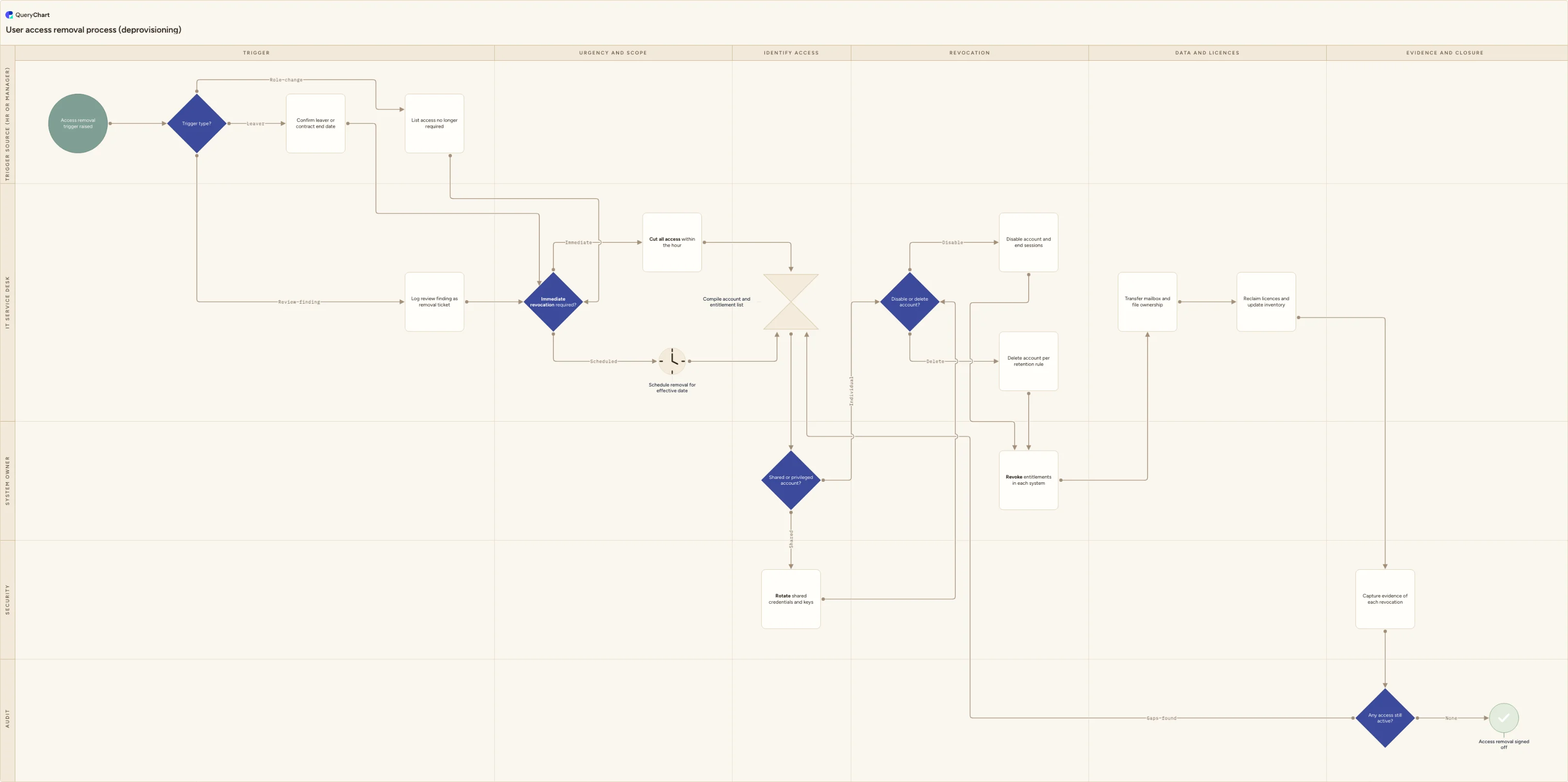
User access removal process flowchart: leaver and role-change triggers, immediate revocation branch, shared accounts, licence reclaim and audit evidence.
What the user access removal process flowchart (deprovisioning) process is
User access removal, also called deprovisioning or revocation, is the process of taking away access someone no longer needs and being able to show it was taken away. It runs from a trigger, which may be a leaver, a role change, a contract or engagement ending, or an access review that found an entitlement nobody can justify, through to a record showing every account and entitlement was dealt with. It is time-critical in a way most administrative processes are not: the risk window opens the moment the trigger occurs and stays open until the last session is closed.
This is not the whole leaver process. Handover, the exit interview, asset return and final pay belong to employee offboarding, which is a broader coordination job owned by HR. This process is the access half of it, and it also runs for people who are not leaving at all, which is why the trigger lane is named for the source rather than for a departure. It is also not the grant side: how access is requested, justified, approved and provisioned is the access request process. Removal starts where those two leave off, and one flow serves all four triggers rather than being written properly for leavers and improvised for everything else.
The template maps the flow across five lanes, namely Trigger source (HR or manager), IT service desk, System owner, Security and Audit, over six phases from trigger to evidence and closure. It includes the branch that decides whether revocation happens immediately or on the effective date, the handling of shared, service and privileged accounts that cannot simply be switched off, the disable-versus-delete decision, and a reconciliation check at the end that compares what was actually removed against the list compiled at the start. The shape follows the removal half of the access lifecycle described in ISO/IEC 27001:2022 Annex A control A.5.18, which requires access rights to be removed or adjusted when employment or an engagement ends or changes.
What this flowchart covers
In this template
- Four ways in, one flow: a "Trigger type?" decision in the Trigger source lane routes a leaver or contract end, a role change, and an access review finding onto the same removal path, so nothing depends on whether HR happened to raise the ticket.
- An "Immediate revocation required?" decision in the IT service desk lane, with an immediate branch that cuts all access within the hour for dismissals and privileged accounts, and a scheduled branch that sets removal for the effective date. Both rejoin at the same identification step.
- A single identification step that compiles the full account and entitlement list before anything is switched off, with a node comment naming the sources people miss: local accounts, service and shared accounts, VPN and remote access, cloud and database consoles, third-party SaaS bought on a card, and building access.
- A "Shared or privileged account?" decision owned by the system owner, routing shared, service and privileged accounts to Security to rotate credentials and keys, because those accounts cannot be disabled without breaking something that depends on them.
- A "Disable or delete account?" decision in the revocation column, with both branches rejoining at revocation of entitlements in each target system by the system owner.
- Data and licences in the order that avoids orphaned files, transferring mailbox and file ownership before licences are reclaimed and the inventory updated, then evidence capture in the Security lane and an "Any access still active?" reconciliation in the Audit lane that sends gaps back to the identification step before sign-off.
When to use this template
- You are writing or reviewing a deprovisioning procedure and need the access steps separated out from the wider offboarding checklist, with an owner against each one.
- Access reviews keep finding live accounts for people who left, changed team or finished a contract, and you need to show where in the process removal happens and who confirms it.
- You are configuring joiner-mover-leaver automation in an identity provider or service desk tool and want the process agreed before it is encoded in workflow rules.
- Your environment is contractor or third-party heavy, so contract end dates rather than an HR feed are the main trigger, and there is no leaver record to work from.
- You are answering an auditor or a customer security questionnaire that asks how access is removed on termination and what evidence exists that it happened.
How it works
Name your real trigger sources
The chart takes four triggers: leaver, contract end, role change and access review finding. Write down which system or person is authoritative for each, for example the HR system for employees, the contract register for suppliers and contractors, and the review output for findings. Where a trigger has no owner today, that is the gap worth fixing first, because a process nobody starts cannot be measured.
Write down the immediate-revocation rule
The "Immediate revocation required?" decision only works if the criteria sit next to it. Typical triggers are dismissal, suspected misconduct, and anyone holding administrator, production or payment-approval rights. Add your own target time and say who can invoke it out of hours. For a dismissal, revocation is normally timed with the conversation itself, so the branch is about sequencing as much as speed.
Attach your system inventory to the identification step
Replace the generic account list with the inventory you actually maintain, and mark which systems are behind single sign-on and which are not. Everything outside the identity provider is where missed access lives: local admin accounts, database logins, SSH keys, API tokens, and tools a team bought on a card. Ask the leaver's manager to name anything IT does not manage.
Decide disable versus delete before you need it
Set the default to disable and define when deletion is allowed, for example after a stated retention period, or at contract end where an agreement requires it. Record who makes that call. Deleting early destroys mail data, file ownership and the audit history that the reconciliation step and any later investigation depend on.
Keep the data and licence steps in this order
Transfer mailbox and file ownership first, then reclaim licences. Reversing the two orphans shared files and mailboxes, and recovering them afterwards is slow. If you set forwarding or a delegate, give it a named owner and an end date in the same step, otherwise the temporary arrangement quietly becomes permanent.
Agree what evidence counts, and who reconciles
Decide what the revocation record must contain, typically the system, the action, the timestamp and who performed it, and where it is stored. Then name who runs the "Any access still active?" check and against what, since reconciling against the original account list rather than against memory is the only part that catches an omission. Publish the approved chart alongside your access control policy so the process people follow and the process you show an auditor are the same one.
Frequently asked questions
What is the user access removal process?
It is the defined route that removing someone's access takes, from the trigger to a confirmed and evidenced close. A complete process has five parts: a trigger with a named source, a decision on how urgently access must go, identification of every account and entitlement the person holds, revocation across each system with the data and licence consequences handled, and a reconciliation showing nothing was left active. The triggers are wider than most teams assume. As well as leavers, the process should run on role and team changes, on contract or engagement end, and on any access review finding, because those are the paths that create the entitlements nobody can later explain.
How quickly should access be removed when someone leaves?
Standards set the requirement rather than the clock. ISO/IEC 27001:2022 control A.5.18 requires access rights to be removed or adjusted on termination or change of employment, but does not prescribe an interval, so the target is yours to set and justify. A common pattern is removal at the end of the last working day for a planned departure, and immediate removal timed with the conversation for a dismissal or for anyone holding privileged access. Whatever you choose, write it into the process, measure the actual time from trigger to last revocation, and treat the gap between the two as the number worth reporting.
Should we disable or delete the account?
Disabling is the safer default and is what most organisations do first. It closes the account, ends active sessions and blocks sign-in, while preserving mailbox contents, file ownership, group membership and the audit history that an investigation or a later access review may need. Deletion belongs at the end of a stated retention period, or at contract end where an agreement or a data protection commitment requires it. Whichever you pick, ending active sessions and revoking tokens matters as much as the account state: a disabled account with a live session or a valid refresh token still has access until that session expires.
How do you remove access to shared, service and privileged accounts?
You cannot deprovision a shared or service account by disabling it, because other people and systems depend on it. The removal action is to rotate the credential instead: change the password or key, remove the person from the vault or group that holds it, revoke API tokens, SSH keys and personal access tokens they created, and end any active sessions. Privileged individual accounts need the same session and token handling on top of the normal disable step. The template puts this on its own branch, owned by Security, because it is the case most often missed and the one with the widest consequences if it is.
What evidence should this process produce?
At minimum, a ticket or record per removal showing the trigger and its date, the account and entitlement list that was compiled, the action taken in each system with a timestamp and the person who performed it, and the outcome of the reconciliation check. That record is what an auditor samples, and what lets you answer a security questionnaire with a date rather than a description. It is worth being clear about what a flowchart does here: it documents the intended process and who owns each step, but the evidence of compliance is the records the process produces when it runs.
Where this process fits
In most operations this process follows User provisioning process flowchart (joiner, mover, leaver).
It is one step in Access governance.
Step 1: User provisioning process flowchart (joiner, mover, leaver)
Step 2: Access request process flowchart
Step 3: Employee access request process flowchart (joiner and mover)
Employee access request process flowchart for joiners and movers: HR-triggered request, role access profile, manager and owner approval, old-role removal.
Step 4: User access removal process flowchart (deprovisioning) You are here
User access removal process flowchart: leaver and role-change triggers, immediate revocation branch, shared accounts, licence reclaim and audit evidence.