Employee access request process flowchart (joiner and mover)
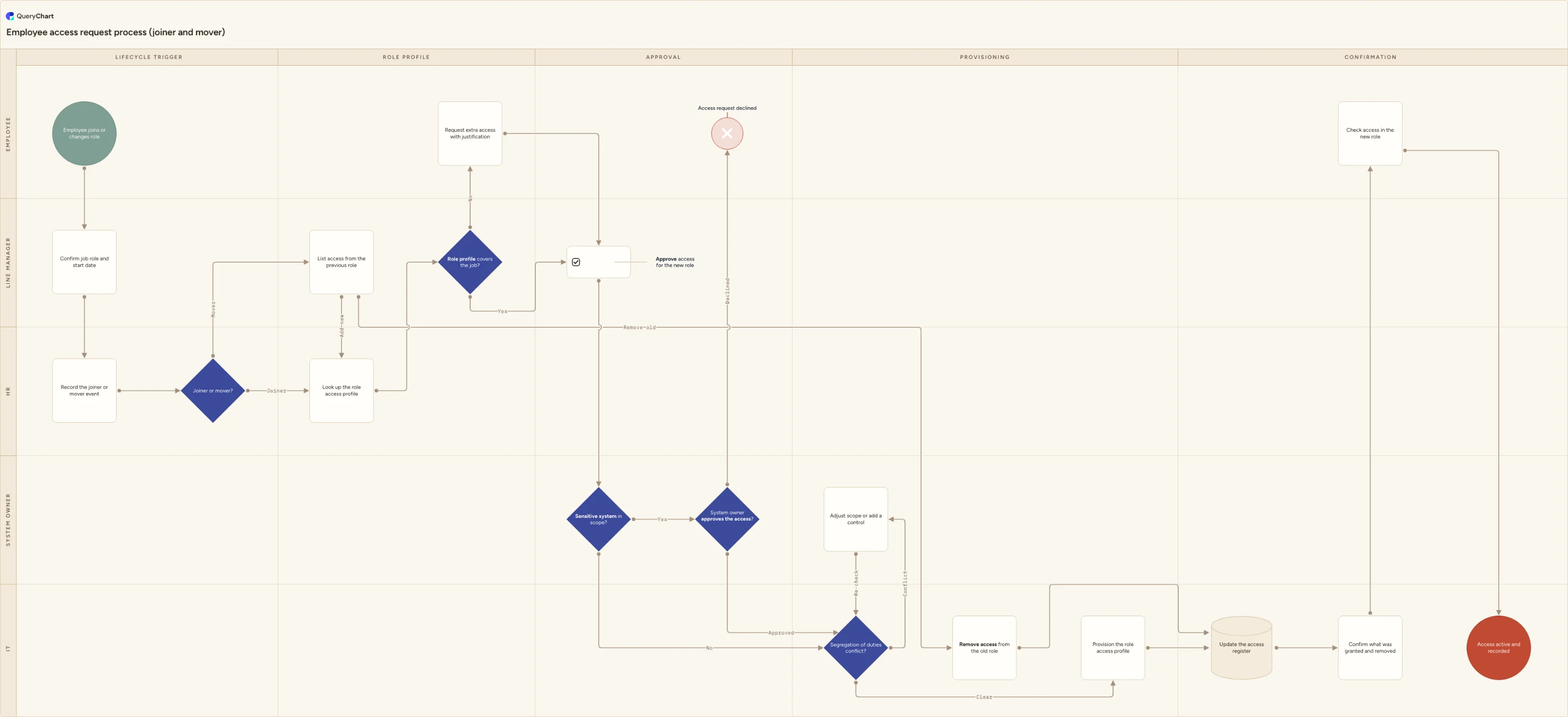
Employee access request process flowchart for joiners and movers: HR-triggered request, role access profile, manager and owner approval, old-role removal.
What the employee access request process flowchart (joiner and mover) process is
An employee access request process grants access because of an employment event, not because somebody asked. HR confirms that a person has started or changed job, the role profile attached to that job says what the role should be able to do, the line manager confirms it is the right role, the system owner approves anything sensitive, and IT provisions it. The unit of request is a job rather than a system, which is what keeps the result reviewable a year later: "this person holds the finance analyst profile" is a statement someone can test, while "they asked for database access in 2023" is not.
This is not the general access request process, where somebody already in post needs one more system and raises the request themselves. That flow, together with the periodic recertification cycle, is covered by the separate access request process template, and it is the better starting point if you are designing a service desk form. It is also not employee onboarding, which covers the contract, screening, equipment and day one, nor offboarding, which handles leavers. This template covers what those three leave in the middle: the first grant of access to a new starter, and the rebuild of access when someone moves internally.
The internal move is where most access processes quietly fail. A role change is a joining and a leaving happening at once, and in practice only the joining half runs. The new entitlements are added, nobody names the old ones, and after two or three moves a long-serving employee holds access from jobs they left years ago. The process itself never reports a problem, because nothing in it broke; the accumulation surfaces later in an access review or an audit finding. The chart below therefore splits the mover path into two labelled edges, add new and remove old, and brings both back to the same access register entry so the removal is as visible as the grant.
What this flowchart covers
In this template
- Five swimlanes, namely Employee, Line manager, HR, System owner and IT, across five phases: lifecycle trigger, role profile, approval, provisioning and confirmation.
- A trigger in the HR lane instead of a request form: the line manager confirms the job role and start date, HR records the joiner or mover event, and a "Joiner or mover?" decision routes from there.
- A mover branch that forks into two labelled edges out of "List access from the previous role": "Add new" continues to the role profile, while "Remove old" goes directly to IT to remove the old role's access.
- A "Role profile covers the job?" decision, whose "No" branch sends the employee to request extra access with a written justification before rejoining line manager approval.
- A "Sensitive system in scope?" decision that routes only those requests to the system owner, whose "Declined" branch ends at "Access request declined"; ordinary role-profile access passes straight to the duties check.
- A "Segregation of duties conflict?" check in the IT lane before provisioning, with a conflict branch that adjusts scope or adds a control and re-checks, then provisioning, a single access register update covering both the grant and the removal, confirmation of what changed, and a check by the employee in the new role.
When to use this template
- You are writing the access half of a joiner, mover and leaver procedure and need the joiner and mover paths on one page rather than in two separate checklists.
- Internal moves keep leaving people with access from previous jobs, and you need to show where the removal step sits and who owns it.
- You are configuring HR-driven provisioning, where a record in the HR system starts a workflow in an identity or service management tool, and want the agreed process settled before the automation is built.
- An auditor, a customer security questionnaire or a certification reviewer has asked how access is granted on hire and adjusted on a change of role.
- Responsibility is split between HR, line managers, system owners and IT, and nobody currently owns the mover event end to end.
How it works
Point the trigger at your real HR record
Replace "Record the joiner or mover event" with the record that actually fires the process, for example a new starter form or an effective-dated job change in your HR system. Note who enters it and how far ahead of the effective date it has to exist, because that lead time is what decides whether access is ready on the first day in the role.
Write the role profiles before you publish the chart
"Look up the role access profile" only works if the profiles exist. Start with the roles you hire and move people into most often, list the entitlements each one needs, and give every profile a named owner and a review date. Profiles nobody owns drift into a superset of everything anyone has ever asked for, which defeats the point of requesting a job rather than a system.
Define what counts as a sensitive system
The "Sensitive system in scope?" branch needs written criteria beside it. Typical triggers are payroll and finance systems, personal or health data, production environments, and any entitlement carrying administrator rights. Set the bar so the branch fires on a minority of requests; if it fires on everything, system owner approval becomes a rubber stamp and slows down the ordinary cases.
Make the removal half a task with an owner and a date
The "Remove old" edge is the step most organisations do not have. Decide who produces the list of the previous role's access, usually the outgoing manager or an export from your identity tool, who executes the removal, and by when relative to the move date. If a mover needs old access to finish a handover, grant that as a dated extension rather than leaving the entitlement open.
Agree the segregation of duties rules and who may accept a conflict
List the combinations one person may not hold, for example creating a supplier and approving its payments, or writing code and releasing it to production. Without that list the check is decorative. Then name who may accept an unavoidable conflict and what compensating control they have to record against the entitlement, since in a small team a conflict is sometimes the only workable answer.
Publish it, then test it against your next few movers
Share the chart with HR, the managers named in it, the system owners and IT so everyone works from one version. After the next few internal moves, walk a real case back through the diagram and check whether the removal half actually ran. Keeping the map under version control with recorded approvals means the process people follow and the process you show a reviewer are the same one.
Frequently asked questions
What is an employee access request process?
It is the route access takes when it is driven by an employment event rather than by an ad hoc request. HR records that someone has joined or changed job, the role profile for that job defines the entitlements, the line manager confirms the role is right, a system owner approves anything sensitive, a segregation of duties check runs, and IT provisions the access and records it. For a mover it also removes the access attached to the previous role. The distinguishing feature is the trigger: the process starts from an HR record, so access follows the job rather than the inbox.
Why do employees who change role end up with too much access?
Because a move is handled as an addition. The receiving manager asks for what the person needs now, and nothing in that conversation names the access they no longer need. The previous manager has moved on, system owners only see the new request, and the old entitlements are never revoked. Repeat that two or three times and a long-serving employee holds access spanning several jobs, usually described as privilege creep or access accumulation. The fix is procedural rather than technical: make the removal a step with an owner and a due date, as the "Remove old" branch in this template does, and record both halves against the same move.
Should HR or IT own access requests for new starters and movers?
HR owns the trigger and IT owns the execution, and the process breaks when either is asked to do both. HR is the only function that reliably knows someone has joined or changed job, and the HR record carries the effective date the whole timeline depends on. IT holds the administrative rights and is the only function that can provision or remove anything. The judgement in between belongs to the line manager, who confirms the role, and the system owner, who is accountable for a particular system. Keeping those four in separate lanes is also what prevents anyone requesting and granting their own access.
What do access control standards expect when someone changes role?
ISO/IEC 27001:2022 Annex A includes controls on access control (A.5.15), identity management (A.5.16) and access rights (A.5.18); the last covers provisioning, review, modification and removal of access rights and treats a change of role as a point at which rights should be adjusted. Annex A also covers the responsibilities that remain after employment changes or ends (A.6.5). The SOC 2 common criteria on logical access take a similar position, expecting access to be authorised before credentials are issued and modified or removed when a role changes. None of them prescribes a review interval or a particular tool, and none of them treats a diagram as evidence: what gets tested is the approvals, the provisioning records and the access register the process produces.
Where this process fits
In most operations this process follows Access request process flowchart and hands off to User access removal process flowchart (deprovisioning).
It is one step in Access governance.
Step 1: User provisioning process flowchart (joiner, mover, leaver)
Step 2: Access request process flowchart
Access request process flowchart: role-based request, line manager and system owner approval, segregation of duties check, provisioning and recertification.
Step 3: Employee access request process flowchart (joiner and mover) You are here
Employee access request process flowchart for joiners and movers: HR-triggered request, role access profile, manager and owner approval, old-role removal.
Step 4: User access removal process flowchart (deprovisioning)
User access removal process flowchart: leaver and role-change triggers, immediate revocation branch, shared accounts, licence reclaim and audit evidence.