Data access request process flowchart (request to revocation)
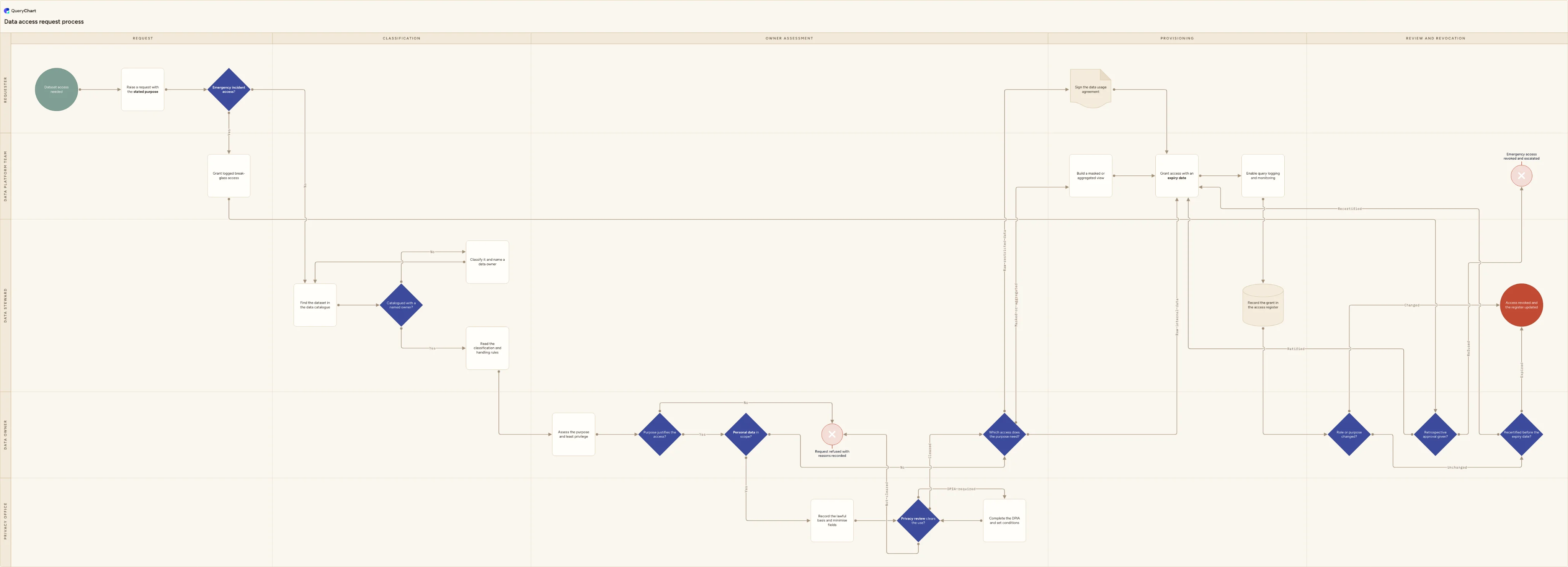
Data access request process flowchart: state the purpose, read the dataset's classification, let the data owner decide, run the personal-data checks, grant time-boxed access, then recertify or revoke.
What the data access request process flowchart (request to revocation) process is
Requests for data are usually handled as though they were requests for software. A ticket arrives asking for access to the warehouse, whoever holds the credentials grants it, and somebody who needed one table to answer one question ends up able to read every schema on the cluster, including the ones carrying salaries, patient identifiers or card numbers. Three habits cause most of the damage. The approver is chosen by who can technically grant the access rather than by who is accountable for the data. The request names a system instead of a purpose, so there is nothing to test least privilege against. And the grant has no end date, so it outlives the project, then the change of team, and occasionally the employment. Data access is also the one kind of access where a smaller answer is nearly always available (a masked column, a row-level filter, a pre-aggregated table) and nobody offers it, because offering it takes longer than granting the raw table. The result is an estate where nobody can say who can read what, and not one individual request was ever unreasonable.
This chart is about datasets, not accounts. If somebody already in post needs one more application and the question is who approves it and who provisions it, that is the general access request process at /templates/access-request-process, and the version driven by a joiner or mover event in the HR system is at /templates/employee-access-request-process. Creating, changing and disabling the identity itself (the account, the directory group, the licence) belongs to the user provisioning process at /templates/user-provisioning-process; everything here assumes the requester already has a working account and asks only what that account may read. It is also not a request from outside the organisation: an individual asking for a copy of their own personal data triggers a statutory obligation with its own clock, its own identity checks and its own refusal grounds, and that is drawn at /templates/gdpr-data-subject-request-process. And if data has already reached somewhere it should not have, this is the wrong chart entirely: containment, the risk-to-individuals test and the 72-hour notification decision are at /templates/data-breach-response-process. What is left here is narrow and specific: an internal person, a named dataset, a stated purpose, and an owner who decides.
The decisions most written data access procedures leave to habit are drawn here explicitly. "Catalogued with a named owner?" sits before any assessment, because a dataset with no owner cannot be approved by anybody, and the honest position in most organisations is that the first request against a table is what finally gets it classified; the No branch loops back through cataloguing rather than escalating to whoever happened to build the pipeline. "Which access does the purpose need?" is a three-way branch rather than a yes or no, so the masked or aggregated route exists on the diagram and has to be ruled out instead of never being mentioned. And the process does not end at the grant: "Recertified before the expiry date?" makes expiry the default and renewal the exception, which is the opposite of how most access is actually held, while "Role or purpose changed?" gives the owner a second reason to revoke that does not wait for a review date. The emergency route is drawn for the same reason: an engineer with a production incident will reach the data one way or another, so "Retrospective approval given?" puts ratification and revocation behind break-glass access rather than pretending it does not happen.
What this flowchart covers
In this template
- Five swimlanes (Requester, Data steward, Data owner, Privacy office and Data platform team) laid across five phases: Request, Classification, Owner assessment, Provisioning, and Review and revocation.
- A request that has to carry a reason: "Raise a request with the stated purpose" is the only ordinary way in, while an "Emergency incident access?" branch sends production-incident cases straight to "Grant logged break-glass access" rather than leaving them to happen off the diagram. That grant then faces "Retrospective approval given?", and ends at "Emergency access revoked and escalated" if nobody ratifies it.
- "Catalogued with a named owner?" in the Data steward lane, whose No branch runs "Classify it and name a data owner" and loops back to the catalogue lookup, so an unowned dataset cannot be approved by default.
- The data owner holding the decision rather than IT: "Assess the purpose and least privilege", then "Purpose justifies the access?" whose No branch ends at "Request refused with reasons recorded", and "Personal data in scope?" routing into the Privacy office lane.
- A personal-data branch with real teeth: "Record the lawful basis and minimise fields", then a three-way "Privacy review clears the use?" that clears the request, refuses it against the same rejection ending, or sends it through "Complete the DPIA and set conditions" and back for a second answer once the residual risk is known.
- A three-way "Which access does the purpose need?": masked or aggregated, raw restricted data (which adds "Sign the data usage agreement") or raw internal data, all converging on "Grant access with an expiry date", query logging and a register entry. "Role or purpose changed?" and "Recertified before the expiry date?" then loop back to a fresh grant or out to "Access revoked and the register updated".
When to use this template
- You are writing the access section of a data governance or data management policy for a warehouse, lakehouse or reporting layer, and need one page showing that the data owner decides rather than the team holding the credentials.
- Your analysts hold access granted for projects that finished two years ago, and you want expiry and recertification built into the process instead of run as an annual clean-up nobody enjoys.
- You are configuring request workflow in a data catalogue or an access governance tool, and want the approval path and the classification thresholds agreed before they are encoded.
- Engineers have a break-glass route into production data that nobody reviews afterwards, and you need the ratification and revocation steps drawn where the data owners and the on-call rota can both see them.
- Your privacy team and your data platform team keep disagreeing about who decides on personal data, and you want the lawful basis, minimisation and DPIA steps placed inside the flow rather than bolted onto the end of it.
How it works
Rename the lanes to your own organisation
Replace Requester, Data steward, Data owner, Privacy office and Data platform team with the roles you actually have. Keep the data owner separate from the platform team even when the same person does both jobs today, because merging them is what produces a process where the grantor is also the approver. If you have no privacy office, name the person who carries the responsibility rather than deleting the lane, and if stewardship is informal, put the domain lead there and say so in writing.
Write your classification scheme into the chart
"Read the classification and handling rules" is inert until the tiers exist. Name them — public, internal, confidential, restricted, or whatever your scheme uses — and beside each one record what it permits: query in place only, extraction allowed, masking mandatory, signed agreement required. Then say which tier triggers the usage agreement branch and which tier can never leave the analysis environment. Without that table, every request is argued from first principles and the answers drift by approver.
Make the purpose statement do real work
Define the minimum a request has to say: the question being answered, the tables and columns needed, whose records are in scope, how long the access is wanted for, and where any extract will be stored. "For analysis" should be returned rather than approved. This is the cheapest control on the page, because a purpose written properly makes the least-privilege assessment, the masking decision and the expiry date almost mechanical, while a vague one makes all three arbitrary.
Set default expiry periods by classification
Attach a default to "Grant access with an expiry date" for each tier: something like the incident window for break-glass, ninety days for restricted data, six or twelve months for internal data, and the end date of the project where one exists. Let requesters ask for shorter, and make anything longer than the default an explicit decision by the owner. Expiry is the control that survives reorganisations, tool migrations and everybody forgetting the process existed.
Agree the emergency route before you need it
Decide who may invoke break-glass access, what it grants, which account it runs from, how the session is logged, and who is alerted at the moment of the grant. Then set the ratification deadline — a small number of working days — and, more importantly, decide what happens when nobody ratifies. Automatic revocation on the deadline is the only version of this that holds, because a retrospective approval queue with no consequence becomes a permanent backlog within a quarter.
Walk it through, then publish a version
Take the finished chart to a data owner, an analyst who requests access often, the platform engineer who executes the grants and whoever handles privacy, and test it against three real requests from the last quarter, including one that was refused and one that went through break-glass. Correct the diagram to what actually happened rather than what the policy says. Then publish that revision, keep the earlier ones, and link it from the data governance policy so readers know which version they are looking at.
Frequently asked questions
What are the steps in a data access request process?
Raise a request that states the purpose rather than the system; locate the dataset in the catalogue and read its classification and handling rules; confirm it has a named owner, and classify it first if it does not; have that owner assess the purpose against least privilege and decide; where personal data is in scope, record the lawful basis, minimise the fields and take it through a privacy review or a DPIA; offer a masked or aggregated view before raw access; add a signed usage agreement for restricted data; grant the access with an expiry date; enable query logging; record the entitlement in the access register; and then either recertify it before expiry or revoke it, immediately if the person's role or the purpose changes. The steps most often missing in practice are the masked alternative, the expiry date and the revocation trigger on a change of role.
Who should approve access to a dataset — IT or the data owner?
The data owner, meaning the accountable person in the business area the data describes, not the team that operates the platform it sits on. The judgement being made is whether this purpose justifies this data, and only somebody who understands what the records mean can make it. The platform team executes the grant, sets the expiry and turns on the logging; it should not also be deciding who is entitled to read payroll, patient or customer records. A line manager's approval is worth adding as a first gate, because it confirms the request is part of the person's job, but it does not replace the owner's decision. Where a dataset genuinely has no owner, that is a finding in itself, which is why this chart puts "Catalogued with a named owner?" before the assessment rather than after it.
How long should data access last before it expires?
Long enough for the stated purpose and no longer, with the default set by classification rather than negotiated per request. A workable pattern is the duration of the incident for break-glass access, around ninety days for restricted or personal data, six to twelve months for ordinary internal data, and the project end date where the request is tied to a project. The mechanism matters more than the numbers: an expiry date makes removal the default and renewal the deliberate act, so access decays on its own when the process is neglected. Access with no expiry accumulates instead. When you ask an owner to recertify, send the query counts with the request — an entitlement nobody has used in six months is removed without argument, while a list of names with no usage data attached is almost always approved wholesale.
When does a data access request need a DPIA?
Under UK and EU GDPR a data protection impact assessment is required where the processing is likely to result in a high risk to individuals, and it is expected in particular for large-scale processing of special category data, systematic monitoring, and automated decisions with legal or similarly significant effects. Supervisory authorities publish their own lists of operations that always require one. For an internal analytics request, the honest triggers are usually the scale of the population involved, whether the data is special category or criminal-offence data, whether individuals would reasonably expect this use, and whether the output feeds a decision about them. Two things help in practice: screen every personal-data request rather than waiting for someone to raise a concern, and treat the outcome as conditions on the grant — the masked columns, the retention period, the prohibition on re-identification — rather than as a document that is filed and forgotten.
How is this different from a general access request process?
The general access request process at /templates/access-request-process covers systems and applications: somebody needs a role in a business system, a line manager and a system owner approve it, a segregation of duties check runs, and IT provisions it. This page covers datasets, and three things change as a result. The approver is the data owner rather than the system owner, because the question is about the meaning of the records rather than the function of an application. A classification step sits in the middle, because the answer depends on what is in the table. And a masked or aggregated alternative exists, which has no equivalent in application access — you cannot grant somebody sixty per cent of a finance module, but you can grant them a view with the identifiers stripped out. If you are designing a service desk form for application access, start with the general process; if you are governing who can query the warehouse, start here.