Spreadsheet process map template (tender response)
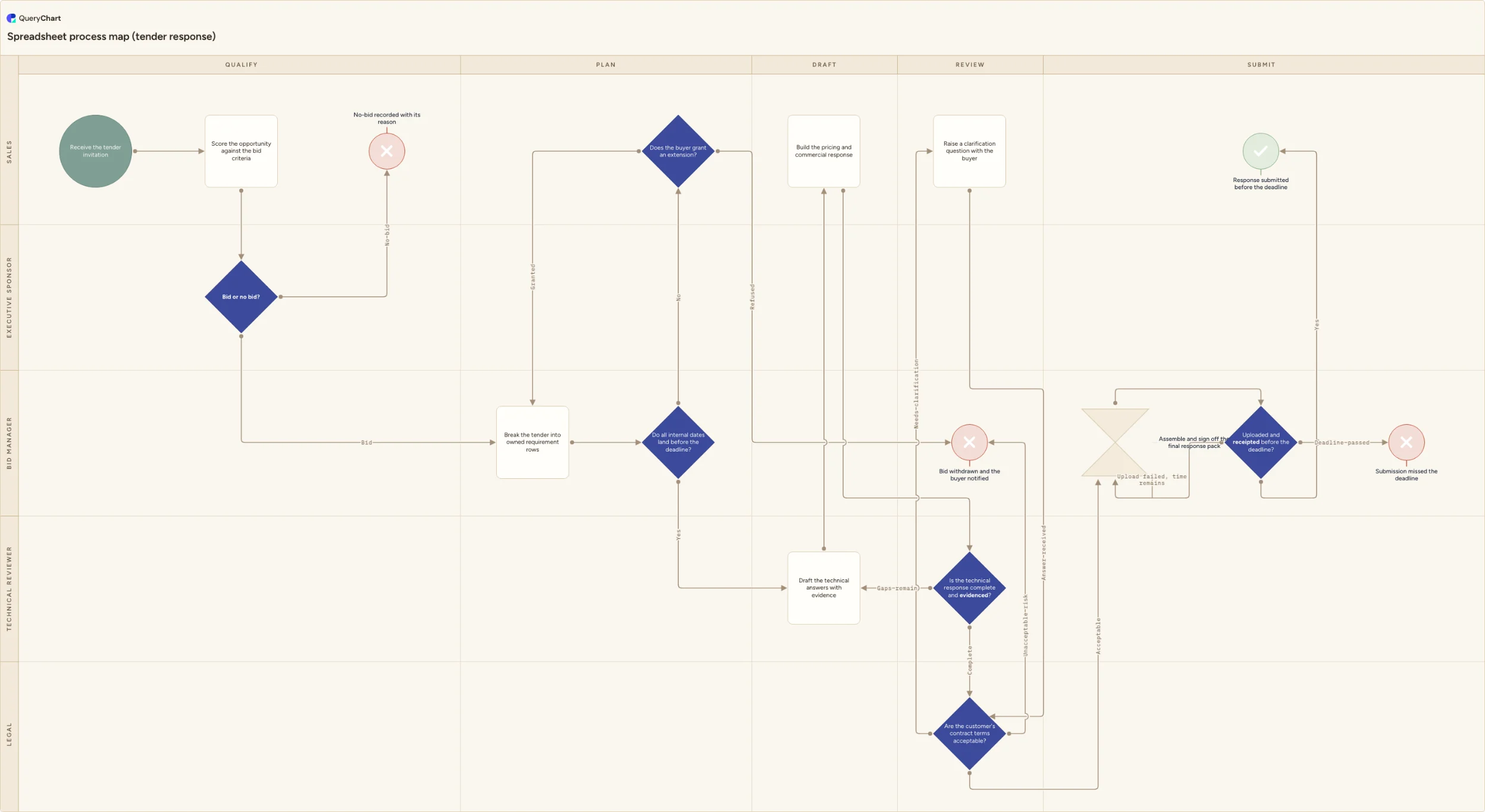
A spreadsheet process map template built on a tender response: five phase columns, five owner lanes, a date-feasibility gate that catches internal dates falling after the submission deadline, and four recorded endings.
What the spreadsheet process map template (tender response) process is
Most processes of this kind are already written down. Not as a diagram: as a sheet. There is a tab with one row per requirement, a column of owner names, a column of internal dates and a colour for status. Sometimes it is a full RACI matrix, with roles across the top and an R or an A in each cell. It tells you who does what, and for the length of a bid it is genuinely useful. What it does not tell you is order. A task list is a set, not a sequence, and nothing in it records that legal cannot read a schedule before the schedule exists, or that the clarification window shuts long before anyone reaches the contract terms.
So the failure, when it comes, is arithmetic, and a sheet is very good at hiding arithmetic. Each date looks reasonable on its own line. Read the rows together, against the submission deadline and against the order the work actually has to happen in, and three of them turn out to be impossible: the technical review is due the day after drafting ends, the legal read is booked after the clarification deadline has closed, and the final day carries both assembly and upload. Nobody has lied. Every owner agreed to a date set forwards from today rather than backwards from the deadline, and the sheet never asked what follows what.
The chart below is that sheet mapped. A tender response runs across five phase columns (Qualify, Plan, Draft, Review, Submit) and five owner lanes, because the owner column was doing real work all along and every name in it marks a handoff. It goes from an invitation to one of four recorded endings, and it puts the arithmetic on the page as a gate: the date check sits immediately after the requirements are split into owned rows, and a no leads to an extension request rather than to hope. Each review that can refuse has somewhere to send the work back to.
What this flowchart covers
In this template
- Five phase columns (Qualify, Plan, Draft, Review, Submit) crossed with five owner lanes (Sales, Bid manager, Technical reviewer, Legal and Executive sponsor) so the sheet's owner column becomes a visible handoff instead of a cell.
- Qualification in the Sales lane: "Receive the tender invitation", then "Score the opportunity against the bid criteria", then "Bid or no bid?" taken by the executive sponsor, whose refusal ends at "No-bid recorded with its reason" rather than in silence.
- The date-feasibility gate the task list cannot provide: "Do all internal dates land before the deadline?" runs immediately after "Break the tender into owned requirement rows", and a no goes to "Does the buyer grant an extension?", which either returns the bid to re-planning or withdraws it.
- Two review gates in different lanes: "Is the technical response complete and evidenced?" sends unproven answers back to "Draft the technical answers with evidence", while "Are the customer's contract terms acceptable?" has three exits, one of them a loop through "Raise a clarification question with the buyer".
- Submission treated as a checked event: "Uploaded and receipted before the deadline?" separates a failed upload with time still on the clock, which returns to "Assemble and sign off the final response pack", from a deadline that has passed.
- Four explicit endings ("Response submitted before the deadline", "No-bid recorded with its reason", "Bid withdrawn and the buyer notified" and "Submission missed the deadline") so no path in the sheet trails off without an outcome anybody can report.
When to use this template
- The work already lives in a tracker with an owner column and a date column, and you need to know whether those dates survive being put in order.
- You have a RACI matrix for the process and it still cannot tell you what happens next when a reviewer says no.
- A submission went in late, or nearly late, and the post-mortem needs to name a handoff rather than a person.
- Two people believe they own the same requirement row, and nobody owns the gap between drafting and the legal read.
- You are handing a live bid to whoever is covering for you next week, and the task list carries the tasks but not the sequence.
How it works
Rename the five owner lanes to your functions
Replace Sales, Bid manager, Technical reviewer, Legal and Executive sponsor with the functions in your own bid team. Give a lane to anything that can hold the work up: if pricing sits with Finance in your company, Finance gets a lane rather than leaving "Build the pricing and commercial response" in the Sales lane. A lane you cannot name a decision for is a lane you can merge.
Paste your requirement rows in, one per numbered requirement
Keep the buyer's own numbering so the response can be checked against the specification, and put a named person in the owner column of every row. A team name in that column is an unassigned row, and it is the row that goes missing in the last week.
Set the reserve behind the date gate
A date gate with no reserve behind it passes every plan. This chart reserves at least two working days at the end for assembly, sign-off and upload, because procurement portals queue and time out. Change that figure to whatever your last three submissions actually needed, and plan backwards from the deadline rather than forwards from today.
Say who signs the bid decision, and at what value
"Bid or no bid?" sits in the Executive sponsor lane here. If a sales director can decide below a contract value in your organisation, write the threshold and the currency into the decision and add the second route. An unstated threshold means every bid escalates or none does.
Trim the contract-terms exits to the ones you have
The terms decision offers three: acceptable, needs clarification, unacceptable risk. Delete the clarification branch if the buyer runs no question window, and keep the withdrawal branch even if you have never used it — it is the branch that makes walking away a decision rather than a missed deadline.
Move legal to where your clarification window forces it
On the step where the requirement rows are created, this chart tells you to hand legal the contract schedules then rather than waiting for the review gate, because the clarification deadline usually closes first and after that a term can only be accepted or declined. If your buyers work differently, move that instruction to wherever legal actually reads, then re-read the date gate: changing when one owner starts changes whose dates are now impossible.
Frequently asked questions
What are the stages of a tender response process?
Five, and they map onto the phase columns in this chart. Qualify: log the invitation, score the opportunity and take a bid or no-bid decision. Plan: break the tender into owned requirement rows with internal dates, and check those dates against the deadline. Draft: write the technical answers with evidence and build the pricing. Review: test the response for completeness and the contract terms for acceptable risk. Submit: assemble the pack, obtain sign-off, upload it and keep the receipt. Small bids compress the middle three, but a bid that skips the planning phase is the one that discovers on the last morning that a reviewer was never booked.
Who owns a tender response, and who owns each step?
The bid manager owns the process end to end: the requirement rows, the internal dates, the chase, the assembly. Sales owns the buyer relationship, the qualification score, the pricing and the clarification questions. The technical reviewer owns whether an answer is complete and evidenced. Legal owns the risk position on the contract terms. The executive sponsor owns the bid or no-bid decision and nothing else, which is why that lane holds a single step; sign-off on the assembled pack sits with the bid manager, who is the only person in a position to say whether the pack is finished. Splitting it this way matters because the owner column in most bid trackers records who drafts a row, not who is accountable for the bid arriving on time.
What happens if the internal dates do not fit before the deadline?
You ask, and the chart makes you ask early. When the date check fails, the flow goes to an extension request with the buyer. If the extension is granted, the bid returns to re-planning and the requirement rows are re-dated against the new deadline. If it is refused, the bid is withdrawn and the buyer is notified, which is a worse outcome than winning and a much better one than submitting nothing on the day. The point of putting the gate immediately after the rows are owned is that an extension can still be requested then. A week later, it usually cannot.
Can I run a tender response from the spreadsheet alone?
You can run the tasks from it. You cannot see the sequence, and the sequence is where bids fail: a row's date is only meaningful next to the row it waits on. The map is what makes an impossible date visible, and what makes an unowned handoff look like a gap instead of a blank cell. Readers who reached for the Data Visualizer add-in for Excel were after this same shape; the route Microsoft recommends instead is Visio Plan 2 and a Data Visualizer diagram created in the Visio desktop app. The reason to look elsewhere on a bid specifically is that five owners have to work on one document at once: Microsoft documents desktop co-authoring as requiring Visio Plan 2 for every author, and says a web author and a desktop author cannot edit the same file at the same time. Here the whole team edits one URL, and the sheet is still the chart, so nothing has to be redrawn when a date moves.