Laboratory notebook review process flowchart
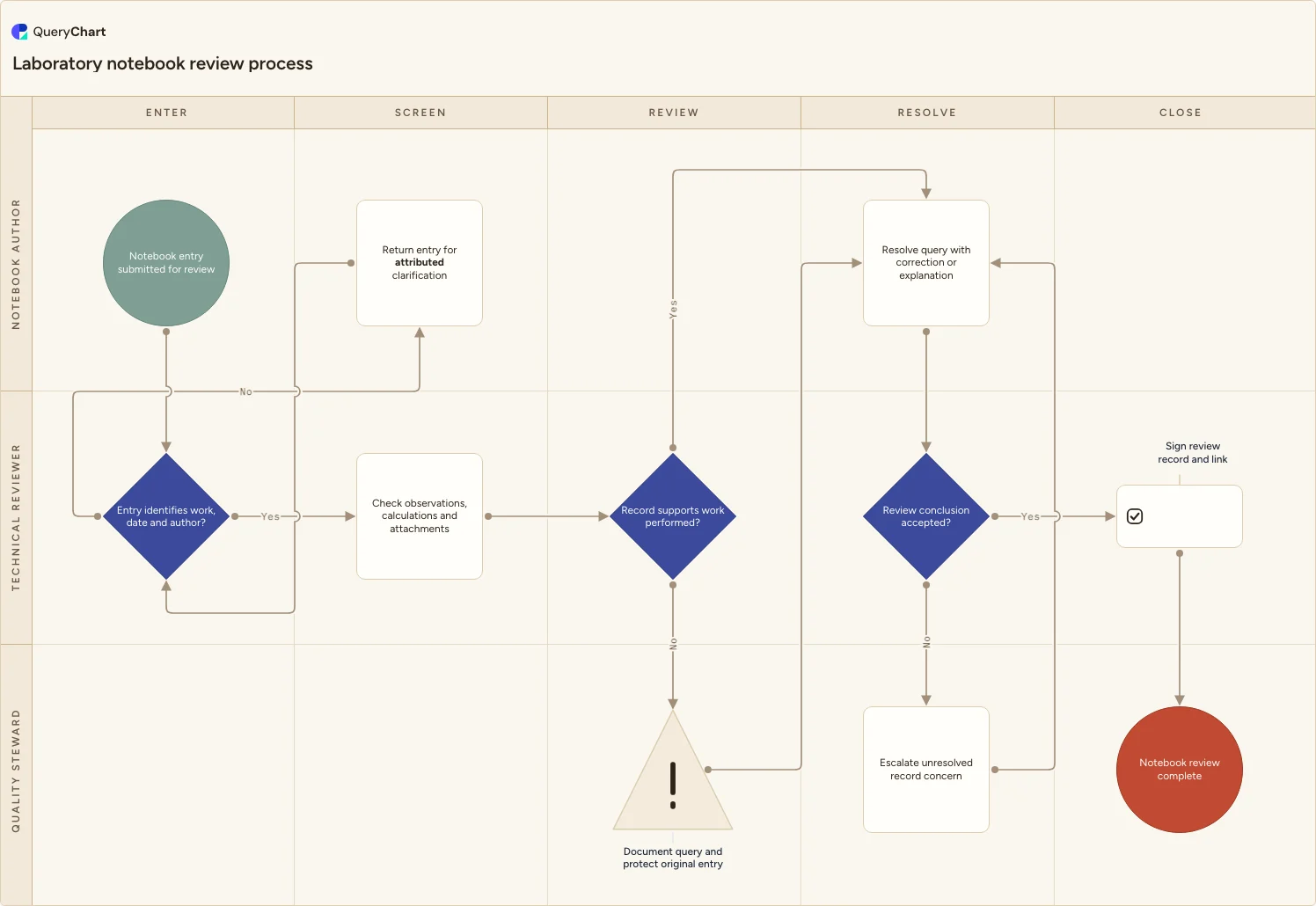
A laboratory notebook review process chart for screening entries, checking calculations and attachments, resolving queries, escalating record concerns and signing the review.
What the laboratory notebook review process is
Notebook review is more than a signature at the end of a page. A reviewer needs enough context to understand who recorded the work, what observations and calculations support it, and how attachments or associated data connect to the entry.
This chart creates a defined route when that review raises a question. The author provides an attributed clarification, the reviewer accepts the conclusion or escalates an unresolved record concern, and the completed review links the notebook to its supporting data without overwriting the original record.
What this flowchart covers
In this template
- Notebook Author, Technical Reviewer and Quality Steward lanes separate entry ownership, technical review and escalation.
- Entry identifies work, date and author? returns incomplete context for attributed clarification.
- Record supports work performed? distinguishes a supported entry from one that needs a documented query and resolution.
- Review conclusion accepted? either signs the review record or escalates an unresolved concern back through resolution.
When to use this template
- You need a visible review path for paper, electronic or hybrid laboratory notebooks.
- Reviewers currently correct or clarify entries through informal messages with no clear link to the original record.
- Laboratory staff need a shared process for handling calculation questions, missing context and record-quality concerns.
How it works
Set the notebook boundary
Define which notebooks, record systems and supporting attachments use this workflow. If certain work is reviewed in a separate electronic system, make that handoff explicit rather than forcing every record into one route.
Name the review checks
Replace the example checks with the context, observations, calculations and attachments your reviewers actually assess. Link the local record-correction instruction so authors know how to respond without obscuring the original entry.
Define escalation ownership
Specify what distinguishes an ordinary review query from an unresolved record concern and who decides the next action. Keep the decision based on local procedures rather than a generic severity claim.
Link the final record
Add the notebook identifier, review sign-off and supporting-data location required at your site. This makes the final step useful for someone reconstructing the work later.
Frequently asked questions
What does a laboratory notebook review process check?
This template checks that the entry identifies its work, date and author, then routes observations, calculations and supporting attachments through technical review. Laboratories should define their own detailed review checks and record-correction rules.
How should a reviewer handle a notebook question?
The chart records a query and preserves the original entry, then sends it to the author for an attributed correction or explanation. If the conclusion remains unresolved, the Quality Steward escalation path keeps the concern visible rather than closing it with a signature.
Can this workflow support electronic notebooks?
Yes. Rename the roles, decisions and links to match the electronic notebook's review, audit-trail and correction features. The process is about accountable review and traceable resolution, not a particular notebook format.
Where this process fits
In most operations this process follows Laboratory data review process flowchart and hands off to Laboratory report approval process flowchart.
It is one step in Laboratory data review.
Step 1: Laboratory data review process flowchart
A laboratory data review workflow for completeness and traceability checks, calculation verification, discrepancy assessment, corrections, reviewer approval and a controlled result record.
Step 2: Laboratory notebook review process flowchart You are here
A laboratory notebook review process chart for screening entries, checking calculations and attachments, resolving queries, escalating record concerns and signing the review.
Step 3: Laboratory report approval process flowchart
A laboratory report approval process chart for clarifying the request, preparing reports from approved data, resolving technical issues, obtaining authorization and recording distribution.