Customer Project Delivery SOP: Instrumentation & Automation Solution
A customer project delivery SOP for a full instrumentation and automation solution: engineering, instrument selection, customer approval, procurement, FAT, installation, commissioning, documentation and operator training.
What the customer project delivery SOP: instrumentation & automation solution process is
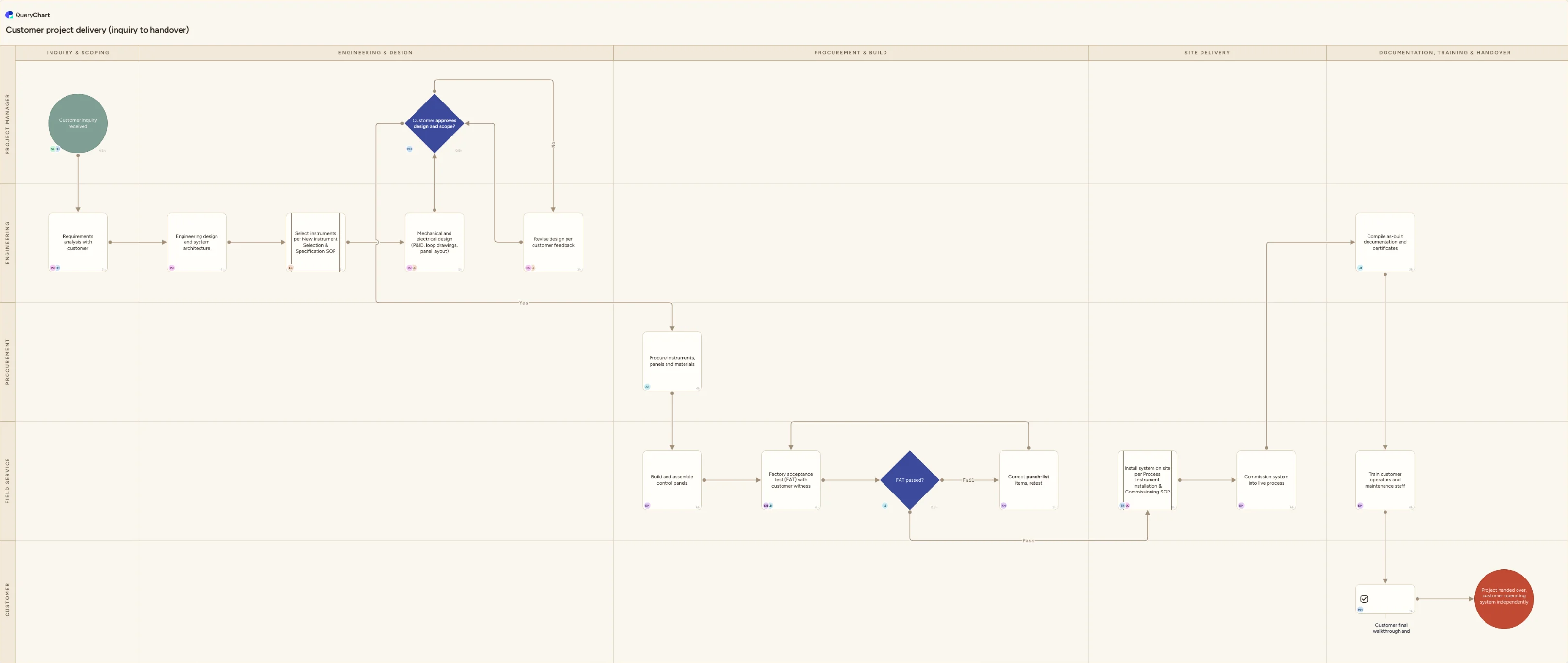
The other nine SOPs in this set each cover a bounded piece of Insatech's work: calibrate one instrument, install one instrument, dispatch a technician to one job. This chart sits above all of them, because a project inquiry is not a request for one instrument, it is a request for a working system, control panels, wiring, logic and the instrumentation feeding it, delivered on a schedule and a price the customer signed off on before a single part was ordered. That is why "Customer inquiry received" and "Requirements analysis with customer" come before any engineering starts: a solution-scale project that begins from an unclear or unwritten scope is the single most common way a services company ends up building the wrong thing, and the cost of that mistake is not one instrument, it is the whole build.
Rather than re-describing work that already has its own SOP, this chart absorbs it as a single row and moves on. "Select instruments per New Instrument Selection & Specification SOP" and "Install system on site per Process Instrument Installation & Commissioning SOP" both name the SOP they hand off to instead of repeating its steps, the same way "Calibrate instrument per Instrument Calibration & Documentation SOP" does inside the installation chart. That is deliberate: instrument selection and instrument installation are real engineering and field work with their own decisions and their own tolerances, and duplicating them here would let the two versions drift apart. What this chart owns instead is the project-level structure around them: the "Customer approves design and scope?" gate before a cent is spent on procurement, and the "FAT passed?" gate before a system that failed its own factory test is ever loaded onto a truck.
The chart closes on "Train customer operators and maintenance staff", which is the row that makes this SOP genuinely different from every sibling in the set. None of the other nine ever teach the customer's own people anything; they calibrate, they repair, they maintain, and Insatech's own staff carry the knowledge back to Insatech. A delivered solution is different: the customer has to be able to run it without Insatech in the room, so "Customer final walkthrough and sign-off" only closes the project once that training has actually happened, not once the system is merely running. Every row also carries a named owner and an hours figure through the built-in People and Workload columns, so the workload BI panel can show, for a project where the FAT failed and had to be retested, that Karim Haddad's build and commissioning hours genuinely ran longer than on a project that passed FAT first time, instead of every project looking the same size on paper.
What this flowchart covers
In this template
- Intake and scoping, from "Customer inquiry received" through "Requirements analysis with customer", the record everything downstream, the engineering, the FAT, the training, keys off
- Engineering and design across the "Engineering & Design" lane: "Engineering design and system architecture", "Select instruments per New Instrument Selection & Specification SOP" and "Mechanical and electrical design (P&ID, loop drawings, panel layout)" before a single part is ordered
- The customer approval gate: "Customer approves design and scope?" either releases the project into procurement or routes it to "Revise design per customer feedback", re-checked until the customer signs off
- Procurement, build and factory testing: "Procure instruments, panels and materials" and "Build and assemble control panels" feed "Factory acceptance test (FAT) with customer witness" and the FAT-passed decision, which loops back through "Correct FAT punch-list items, retest" until the system passes
- Site delivery handed off to the installation and commissioning discipline by name: "Install system on site per Process Instrument Installation & Commissioning SOP" and "Commission system into live process"
- Documentation, training and handover: "Compile as-built documentation and certificates" and "Train customer operators and maintenance staff" close the project at "Customer final walkthrough and sign-off", the step no other Insatech SOP includes because no other SOP hands the customer's own staff the keys
When to use this template
- You're standardising how Insatech scopes, engineers and delivers a full instrumentation-and-automation solution and want the handoffs between the project manager, engineering, procurement, field service and the customer fixed on one chart instead of living in one project manager's head
- A project's schedule is slipping and you need to see, row by row, whether the delay sits in engineering and approval, in procurement and FAT, or in site installation and commissioning
- A factory acceptance test failed and you want a documented retest path with a named owner, instead of an informal "we'll fix it before it ships" with no record of what was wrong
- You're onboarding a new project manager or project engineer and need a reference for exactly which gates, customer approval and FAT, have to clear before the project is allowed to move to the next stage
- You want the boundary between this project-delivery chart and the standalone instrument selection and installation SOPs to be explicit, so a project engineer knows which chart to open for which decision
How it works
Replace the lanes with your actual project roles
This chart uses Project Manager, Engineering, Procurement, Field Service and Customer. If Insatech splits panel build from field commissioning, or has a dedicated documentation role separate from QA, give that role its own lane rather than folding it into Field Service, the handoff is usually where a step gets assumed done by someone who assumed someone else did it.
Put your own sign-off criteria on both decisions
"Customer approves design and scope?" and "FAT passed?" both need a stated standard, not just "looked fine", the specific drawings and datasheets the customer is approving against, and the specific acceptance criteria the FAT is scored against. Write the actual criteria into the row's comment field so nobody is relying on memory of what was promised.
Keep the instrument-selection and installation rows as handoffs, not rewrites
"Select instruments per New Instrument Selection & Specification SOP" and "Install system on site per Process Instrument Installation & Commissioning SOP" are deliberately one row each. Link to those SOPs rather than re-describing their steps here, so the project chart and the specialist charts don't drift out of sync with each other.
Set People and Workload on every row before you rely on the BI panel
The workload panel can only total hours for rows that carry them. Fill in People and Workload for each step as you adapt the chart, using realistic effort hours rather than elapsed time, so a project with a failed FAT and a retest actually shows up as more hours than one that passed first time.
Don't let training become an afterthought row
"Train customer operators and maintenance staff" is what makes this SOP different from every other Insatech SOP in the set. Treat it as a scheduled, resourced step with its own hours and owner, not something squeezed into the last afternoon of commissioning, because it's what the customer actually remembers about the handover.
Frequently asked questions
What triggers the start of the project delivery process?
The process starts at "Customer inquiry received": a request for a full solution, multiple instruments plus a control system and integration, rather than a single instrument. Everything downstream, the engineering, the FAT, the training, keys off the record captured at "Requirements analysis with customer", so a gap there surfaces as a scope disagreement much later in the project.
How is this different from the New Instrument Selection & Specification SOP?
That SOP covers choosing and dimensioning a single instrument for a customer's process conditions. This chart absorbs that whole decision into one row, "Select instruments per New Instrument Selection & Specification SOP", because a project-scale delivery needs it as one input among many: architecture, panel design, procurement and FAT all sit around it. Use the standalone SOP when a customer needs one instrument specified; use this chart when they need a system delivered.
What happens if the customer doesn't approve the design?
The "Customer approves design and scope?" decision routes a No to "Revise design per customer feedback", which loops back to the same decision rather than forcing a single approve-or-lose-the-project call. Nothing moves to procurement until the customer has actually signed off against the P&IDs, loop drawings and panel layout produced at "Mechanical and electrical design (P&ID, loop drawings, panel layout)", not a verbal description of the solution.
What happens if the system fails its factory acceptance test?
The "FAT passed?" decision sends a fail to "Correct FAT punch-list items, retest", which loops back to "Factory acceptance test (FAT) with customer witness" rather than letting the system ship anyway. Catching a fault in the shop, with the customer witnessing the retest, is deliberately earlier and cheaper than catching the same fault after the system is installed on site.
Why does this SOP include customer training when the others don't?
The other nine SOPs are all things Insatech does to or for a customer's existing instrumentation, calibrate it, repair it, maintain it, and Insatech's own staff keep the knowledge. This SOP delivers a system the customer has to operate themselves once Insatech leaves, so "Train customer operators and maintenance staff" is a required step before "Customer final walkthrough and sign-off" closes the project, not an optional add-on.
Does this SOP replace the Process Instrument Installation & Commissioning SOP for a project?
No. "Install system on site per Process Instrument Installation & Commissioning SOP" hands that work to the specialist chart by name rather than repeating its equipment checks, loop testing and calibration steps. This chart is responsible for the project structure around that work, the approval gate before it starts and the documentation and training after it finishes, not the technical detail of the install itself.