CNC wood machining process flowchart
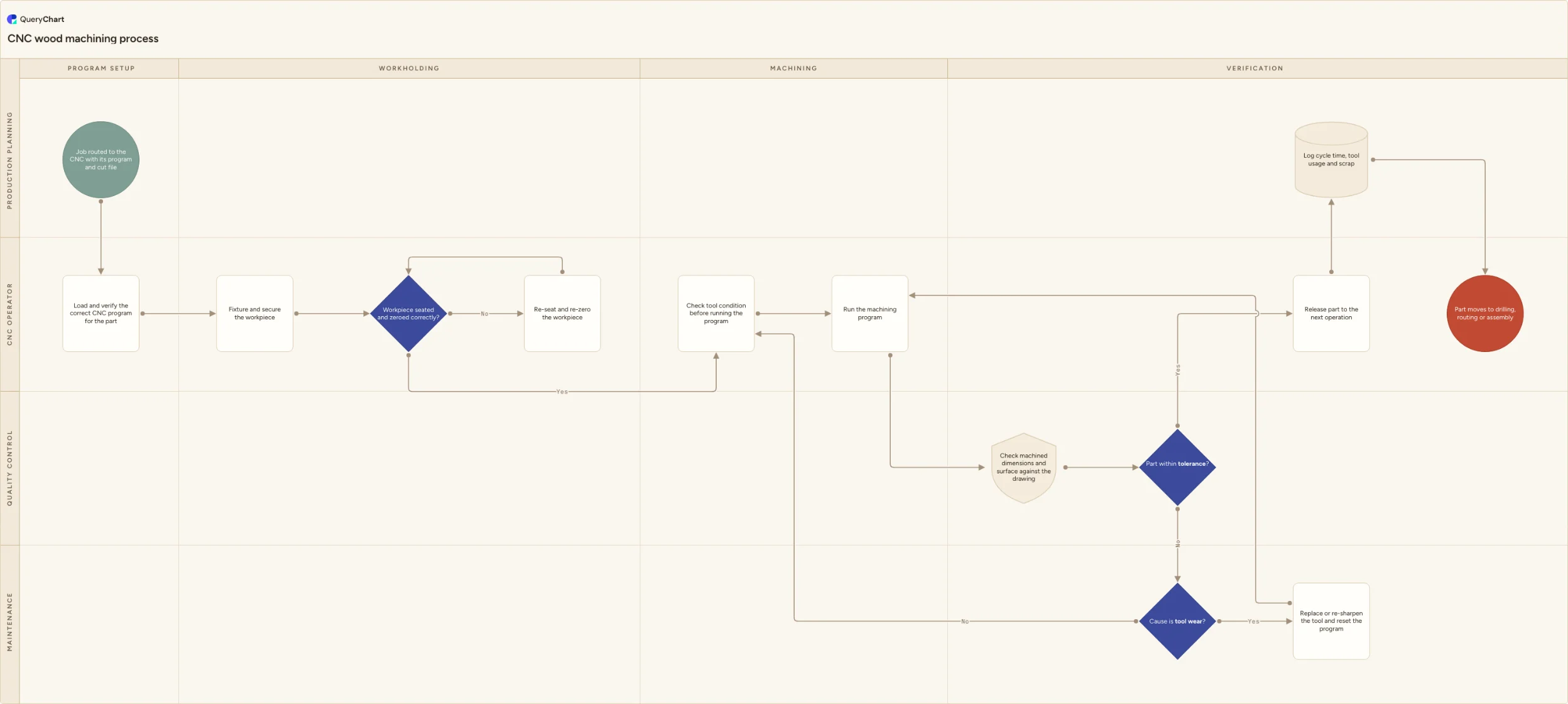
A CNC wood machining process flowchart covering program verification, workholding, tool condition checks, and a tolerance decision that separates tool wear from setup error.
What the CNC wood machining process is
A CNC router doesn't fail randomly — it fails because the wrong program loaded, the workpiece wasn't seated where the program expects it, or a tool has worn past its usable life, and each of those has a completely different fix. A process that treats every out-of-tolerance part the same way, as 'check the machine,' sends an operator looking for a setup error when the real cause was a worn bit, or vice versa.
The workholding check in this template exists because a part that's fixtured correctly but not zeroed to the program's origin will machine perfectly — in the wrong place. That failure mode produces a part that's dimensionally consistent but positioned wrong relative to the stock, which looks different on inspection than a program or tool problem does.
The process runs across four phases (program setup, workholding, machining and verification) and four lanes (Production planning, CNC operator, Quality control and Maintenance), with a tool-wear decision that routes a wear-caused failure to maintenance and a non-wear failure back to re-checking tool condition and setup.
What this flowchart covers
In this template
- Program verification before fixturing, confirming the correct file is loaded for the specific part rather than assuming the last job's program still applies.
- A workholding check — "Workpiece seated and zeroed correctly?" — that catches a positioning error before the program ever runs.
- Tool condition checked before each run, not only after a part comes out wrong.
- A "Cause is tool wear?" decision that separates a worn-tool failure, routed to maintenance for replacement, from any other cause, routed back to re-checking tool condition and setup.
- Cycle time, tool usage and scrap logged per part, giving maintenance and planning real data on tool life rather than a general sense that bits 'wear out eventually.'
When to use this template
- You are documenting your CNC department's process and out-of-tolerance parts are currently diagnosed by guesswork rather than a stated decision sequence.
- You need to distinguish a positioning or workholding error from a program error or a tool-wear issue, since each needs a different person to fix it.
- Tool replacement happens reactively, after several bad parts, rather than being triggered by a documented wear check.
- You want tool usage and scrap data captured per part so tool life and program efficiency can actually be analyzed.
How it works
Verify the program before fixturing the part
Confirming the correct program is loaded before the workpiece is even fixtured catches the cheapest possible mistake — running the wrong file — before any material or setup time is committed to it.
Check zero position, not just physical fixturing
"Workpiece seated and zeroed correctly?" is a different question from whether the part is physically clamped. A securely fixtured part that's zeroed to the wrong origin will still machine incorrectly, just consistently so.
Separate tool wear from every other cause of an out-of-tolerance part
"Cause is tool wear?" needs real diagnostic criteria — edge condition, cut quality, dimensional drift pattern — not a coin flip between calling maintenance and re-checking the setup yourself.
Log tool usage against every part, not just failures
Recording tool usage and cycle time on every part, not only when something goes wrong, is what lets you predict tool replacement instead of reacting to it after a part fails.
Frequently asked questions
Why check the program before fixturing the workpiece?
Because it's the cheapest mistake to catch. A wrong program discovered before the part is fixtured costs nothing; the same mistake discovered after the machine has cut into a fixtured, potentially expensive piece of stock wastes both the material and the machine time.
What's the difference between a workholding error and a program error?
A program error means the machine is running the wrong instructions entirely. A workholding error means the instructions are correct but the physical part isn't positioned where the program expects it — it might be securely clamped but zeroed to the wrong reference point, which produces a part that's internally consistent but positioned wrong relative to the stock.
How do you tell whether an out-of-tolerance part is caused by tool wear?
Look at the cut quality and the pattern of the deviation — a worn tool typically produces a gradual dimensional drift and a rougher or burned cut surface, while a setup or program error tends to produce a consistent, immediate deviation from the very first part. Tracking tool usage against parts produced also lets you flag a tool approaching its expected wear life before it causes a failure.
How does this fit with the wood cutting and drilling/routing processes?
Cutting reduces boards to sized blanks, CNC machining shapes and profiles those blanks with precision the saw can't achieve, and drilling and routing then adds hardware holes and joinery features — often on a separate machine or a different operation on the same CNC. This template covers the CNC machining step specifically, including its own verification and tool-wear logic.
Where this process fits
In most operations this process follows Wood cutting process flowchart and hands off to Cutting tool replacement process flowchart.
It is one step in Woodworking.
Step 4: Wood cutting process flowchart
A wood cutting process flowchart covering rough-cutting, defect handling, dimensional checks, saw adjustment, and offcut sorting.
Step 5: CNC wood machining process flowchart You are here
A CNC wood machining process flowchart covering program verification, workholding, tool condition checks, and a tolerance decision that separates tool wear from setup error.
Step 6: Drilling and routing process flowchart
A drilling and routing process flowchart covering hardware hole patterns, joinery and profile routing, tolerance checks, and a salvage-or-scrap decision.
Step 7: Wood sanding process flowchart