Recruitment Process Flowchart: Steps and Editable Template
Build a recruitment process flowchart from vacancy approval to accepted offer. Edit the example with screening, interviews, declined offers and reopen loops.
A recruitment process flowchart follows the vacancy from approval and advertising through screening, interviews and an accepted offer. The example also shows what happens when the shortlist fails, the salary needs approval or the candidate declines.
The short version
- Funnels count people; flowcharts carry the routes that send the work backwards.
- The two decisions that set time-to-hire are both taken before anyone is interviewed.
- Reposting an unchanged vacancy returns the same shortlist; put the required change on the loop.
- A turned-down applicant is an ending with work attached, so give it a terminator.
- Convening a panel is work in its own right, and it is repeated for every candidate.
Use the recruitment example
Four returns, one accepted offer
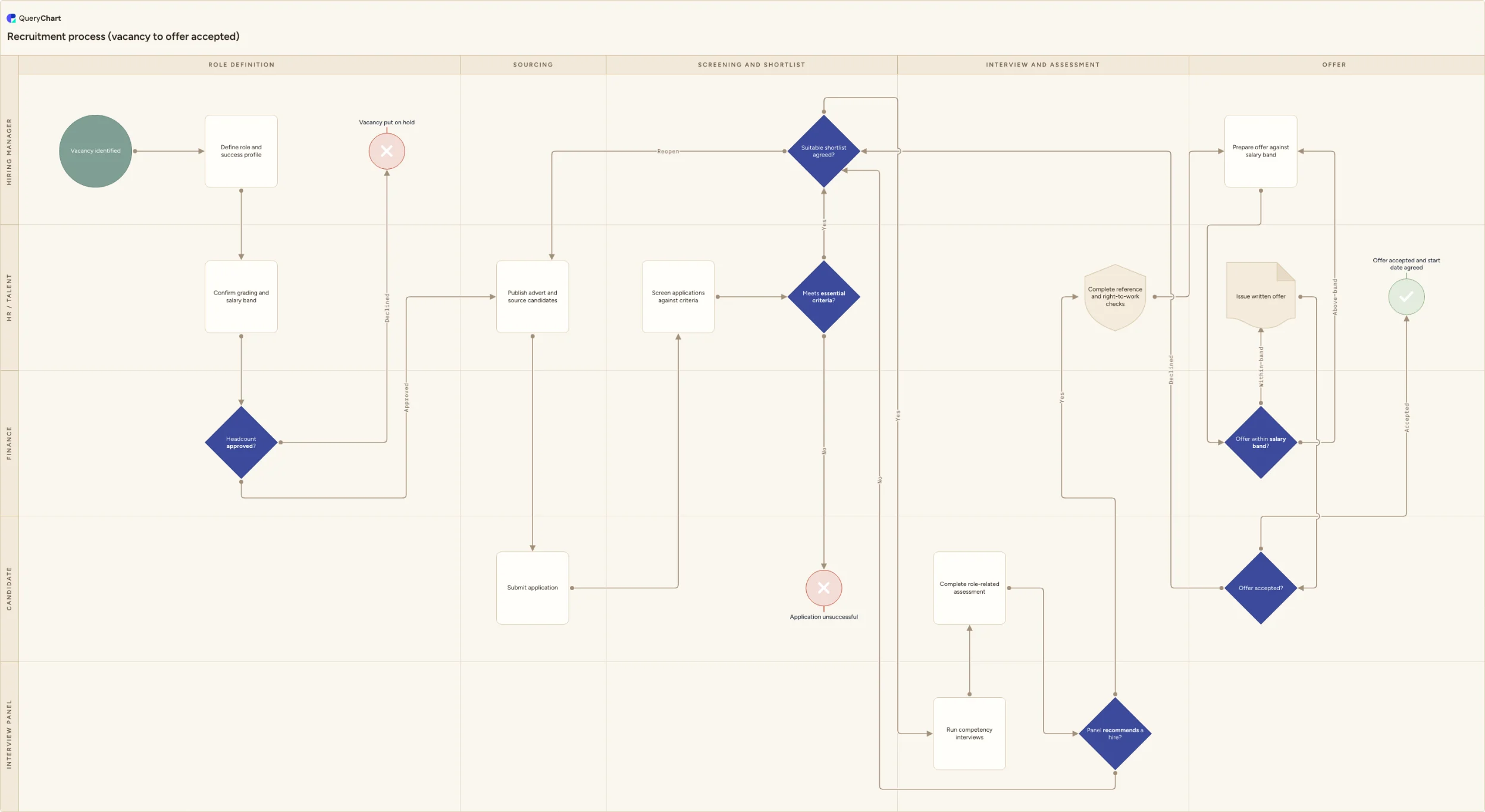
Which gate is actually holding the vacancy up? Five owner lanes, an identified vacancy through to an agreed start date, four routes running backwards.
A funded role, or an ending
Definition takes three rows, then "Headcount approved?", where "Declined" is already an ending at "Vacancy put on hold" and only "Approved" reaches "Publish advert and source candidates". The profile and the band the panel will score against are fixed before anything is published.
A refusal is work, not a line
The advert produces "Submit application" (the candidate's own row, in their own lane), then screening against the criteria set at the top of the chart. Of the two answers to "Meets essential criteria?" only "No" renders yet, landing on "Application unsuccessful": somebody writes that letter.
Not every no reaches the advert
"Suitable shortlist agreed?" sends "Reopen" back to "Publish advert and source candidates"; three rows later "Panel recommends a hire?" sends its No only as far as the shortlist. Re-interviewing the next name costs a week of diary negotiation, re-advertising a fortnight.
The offer is where hires are lost
Both remaining returns leave the offer. "Above band" sends the offer back to "Prepare offer against salary band": days if the exception is documented, weeks if it needs a pay review. "Declined" returns to "Suitable shortlist agreed?" and the second name. Four backward routes; a funnel draws none.
A funnel cannot draw a candidate who declines
Recruitment is nearly always drawn as a funnel: five tapering bands from applicants down to a hire. That is a reporting shape, and it can express exactly one thing: how many are left. It has no notation for a shortlist nobody was happy with, an offer that was refused, or a panel that could not find a free hour for three weeks. Those events are what set time-to-hire, so the standard picture omits the part the reader opened it for.
Turning a candidate down is an ending; turning down a shortlist is a loop. Most recruitment charts draw both as a line labelled no, which hides the fact that one costs a letter and the other a repeat of everything since the advert. The loop must also say where it lands (back at sourcing, or back at the panel) because those are different overruns with different owners. A chart that routes every no to the same place has flattened the difference between a process that is slow and one that is stuck.
A vacancy runs through to an accepted offer below, across five lanes that include "Candidate" and "Interview panel" as owners in their own right. Four of its routes point backwards. Both decisions that dominate the outcome ("Headcount approved?" and "Suitable shortlist agreed?") are settled before a single interview is held, which is why a chart that begins at the interview round explains nothing about time-to-hire.
How it works
Write the criteria before the stages
Stages are easy to list and tell you nothing. Begin with the essential criteria and the scorecard the panel will use, because screening, the shortlist gate and the panel recommendation are the same criteria applied at three depths. Criteria nobody can score turn all three gates into opinions.
Classify what each no actually does
Walk every refusal in your process and decide its route: an ending, a return to sourcing, a return to the shortlist, or a re-price. A turned-down applicant ends; a rejected shortlist reopens the advert; a refused offer usually goes to the second name on the list. Those three cost very different amounts of time.
Type the stages as rows, then number the returns
Each row is a box, and the Line to column takes the row numbers it leads to, so a route that goes backwards is simply a lower number, row 11 pointing at 6. Set Shape to Decision on each gate and list the answers in Line text in the same order, putting Approved and Declined on the right arrows.
Assign the lane that holds each gate
Put every row in the Vertical lane column of whoever really acts: Hiring manager, HR / Talent, Finance, Candidate, Interview panel. Then read the decisions back against those lanes: finance holds the funding gate, the hiring manager the shortlist, the panel the recommendation. No single lane can move a vacancy on its own.
Close both rejection routes with a shape
Reject belongs in the Shape column wherever the process genuinely stops (an application that misses the essential criteria, a vacancy that was never funded), and Success on the accepted offer. A terminator makes it explicit that somebody must write to the candidate, which is the work that most often goes unassigned.
Price each loop against the start date
Take your last few hires and write the real duration of the reopen loop and the offer loop into the comments on those decisions. Then set both figures against the date the role is needed by: if one reopen no longer fits, the hiring manager chooses between the start date and the criteria before the advert goes out, not after it returns empty.
Mistakes to avoid
Drawing the funnel and calling it a process
Tapering bands report volume. They cannot show a reopened advert, a repeated interview round or a refused offer, so the diagram agrees with the dashboard and explains none of the delay.
Reopening with nothing changed
A reopen loop with no change attached (band, essential criteria, channels or advert copy) returns the same shortlist a fortnight later. Put the required change on the branch so reopening is a decision, not a repetition.
Assuming only the organisation says no
Candidates leave at every stage and most expensively at offer. A chart without a withdrawal route implies the process only ends when the organisation says so, and the recovery gets improvised every time.
One approval box for two approvals
Funding the role and pricing it are separate decisions with separate owners (finance holds one, the hiring manager the other) and merging them into a single box hides which of the two is holding the vacancy up.
Build your own recruitment flowchart
Take the example as your own chart, put your essential criteria on the gates, and time each loop against your last few hires.
Related guides
Frequently asked questions
What are the stages of a recruitment process?
Five, and a useful drawing gives them very unequal weight. Role definition (the success profile, the grading, the funded headcount) largely determines the outcome. Sourcing publishes and attracts. Screening and shortlist applies the essential criteria and holds the gate that decides whether the vacancy proceeds or reopens. Interview and assessment produces a panel recommendation. Offer prices it, checks it and issues it. Three of the five can send work backwards, which is what a funnel drawing cannot show.
How do you show a rejected candidate in a flowchart?
As a terminator, not a trailing arrow. An application that misses the essential criteria ends at its own end shape: in the example a Reject row reading "Application unsuccessful," because somebody has to write to that candidate and that is real work with a service standard attached. The same applies to a role that was never funded: it ends at "Vacancy put on hold", an ending with a review date rather than a failure. Lines that merely stop leave the reader guessing who closes them.
What happens when a candidate declines a job offer?
The route goes back to the shortlist, not back to the advert: in the example "Declined" leaves "Offer accepted?" and returns to "Suitable shortlist agreed?", where the next name is considered. Whether that works depends on how old the shortlist is: a second choice from six weeks ago has usually accepted something else, so a shortlist is perishable stock rather than a reserve. Draw the route, then decide the date after which it expires and the vacancy reopens instead.
Who owns the recruitment process, HR or the hiring manager?
HR or talent owns the process, the compliance steps and the candidate experience; the hiring manager owns the judgements (the profile, the shortlist and the recommendation) and finance owns the funding gate. The split is worth writing down because of the routes that go backwards: reopening the advert spends HR's effort on a decision the hiring manager took, and an offer above the band returns to "Prepare offer against salary band" to be re-priced under a limit finance set. Name who may take each of those routes.
Where does recruitment end and employee onboarding begin?
In this example, recruitment ends when the candidate accepts the offer and the agreed checks are complete. HR hands the confirmed start date, role, manager and required documentation to the onboarding owner. Keep rejected candidates and declined offers on the recruitment route; do not send them into onboarding.