How to create a flowchart from text
How to turn a written description into a flowchart: split the text into one action per step, convert conditional sentences into decisions, name the actor in every passive clause, and close the gaps.
Turning text into a flowchart is a translation with three rules: one action per step, every conditional becomes a decision, and every passive clause has to name whoever performs it.
The short version
- One action per step; "review and approve" is two steps and one hidden handoff.
- Every conditional word is a decision that needs both outcomes drawn.
- The passive voice hides the actor: resolve it or mark it as an open question.
- Text can end at a failure; a flowchart cannot.
- Expect the translation to produce questions. Those are the point.
Prose hides three things a diagram cannot
Written descriptions of processes are comfortable to produce and hard to follow, because prose lets you be vague in ways a diagram will not tolerate. Three things in particular hide well in a paragraph: the actor, which the passive voice removes entirely; the condition, which a subordinate clause can bury; and the alternative outcome, which a sentence can simply decline to mention. Turning text into a flowchart is mostly a matter of dragging those three into the open.
The translation itself is nearly mechanical. Each sentence with a verb becomes a step, and a sentence with two verbs joined by "and" is usually two. Each "if", "where", "unless", "should" and "in the event that" becomes a decision with labelled exits. Each "is then reviewed by" becomes a lane change. Work through a page of text this way and you will produce more steps than you expected, several of which turn out to be the same step described twice.
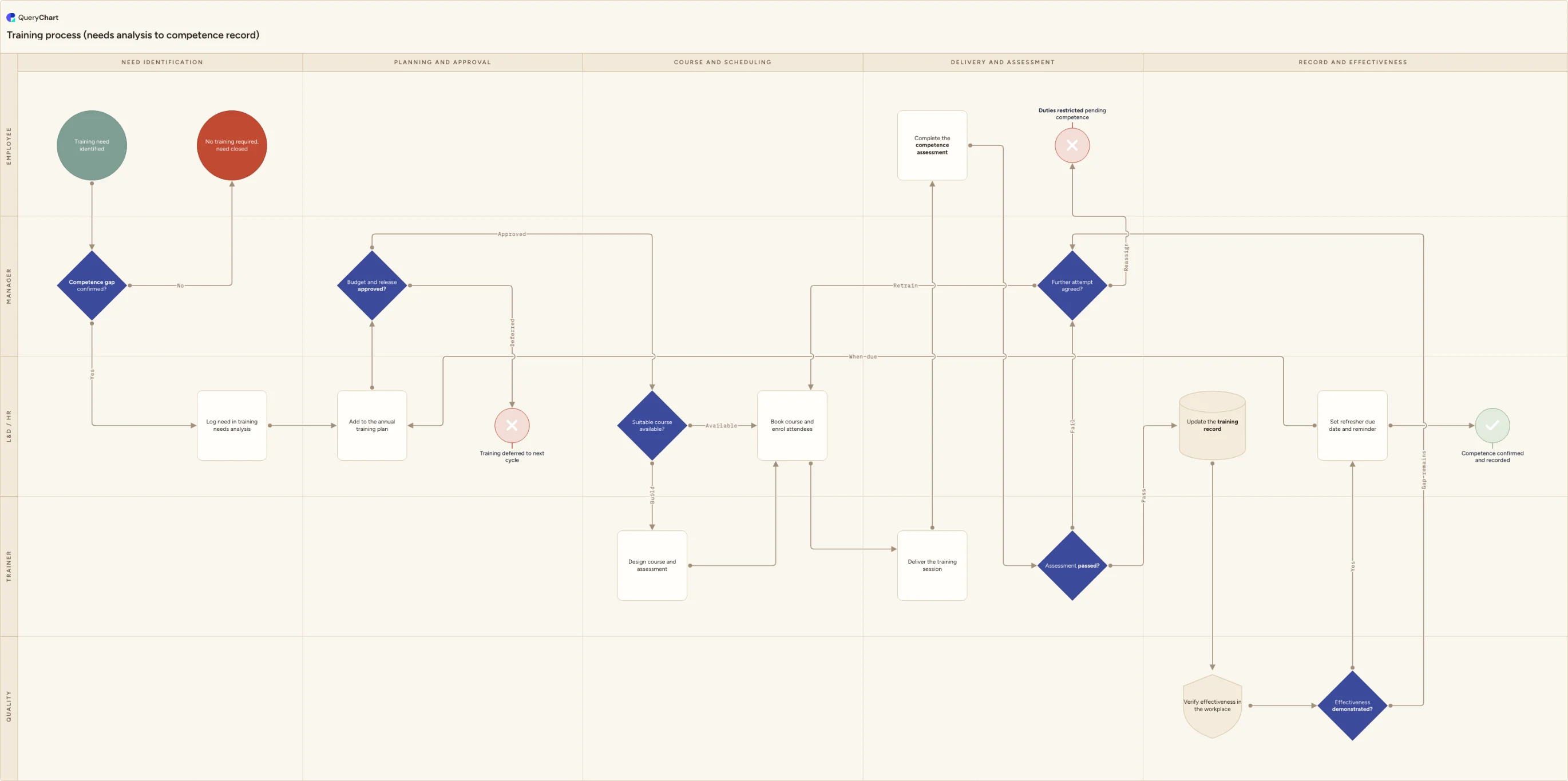
The example below is a training process: needs analysis through to a competence record. It is a good demonstration because the underlying text would say "where the assessment is not passed, further training may be arranged": one clause holding a decision, two outcomes and an owner, none of which survives contact with a diagram.
The same process, as text and as a chart
A training process from needs analysis to competence. The procedure text under the canvas is generated from the same rows.
Split the first paragraph
"Where a competence gap is confirmed the need is logged in the training needs analysis" is a decision and a step, with an outcome (no training required) that the sentence never bothered to state.
Find the approval hiding in a clause
"Subject to budget and release approval" is a gate with an owner and a deferral route. Written procedures routinely reduce a genuine decision to a prepositional phrase.
Name who does what
"A suitable course is identified and booked" names nobody, and "the training is delivered" names nobody else. Assigning lanes forces the question, and where two teams both assumed the other was booking, that is a finding rather than a formatting issue.
Close what the text left open
Failure routes to a retrain-or-reassign decision, effectiveness is verified in the workplace, and a refresher is scheduled that re-enters the process later. Text stops at "further training may be arranged"; the chart has to say what happens if it does not work.
How it works
Mark every action in the text
Read through and underline each distinct thing somebody does, including the ones inside narrative sentences. Split anything joined by "and". You will typically finish with half again as many steps as the document's own numbered list contains.
Circle every conditional word
Search for if, when, where, unless, should, otherwise, subject to, in the event that, and as required. Each is a decision. Write it as a question and note both answers, including the one the text does not give, which is the one worth chasing.
Resolve the passive voice
For each sentence of the form "the X is Y-ed", find out who does it. Where nobody can tell you, leave the step unassigned and put the question in its comment rather than picking the most likely team, because a guess drawn on a chart is indistinguishable from a fact.
Type the steps as rows and connect them
Put each action in a row's Box text, set the conditionals to Shape Decision, and use the Line to column to connect by row number with the answers in Line text. You now have a chart of what the text literally says, gaps and all.
Follow every unhappy route to an ending
Written procedures end at the failure and stop. Take each dangling branch and ask what really happens: rework, escalation, an exception approval, or a genuine end. Anything you cannot answer goes back to the author as a question.
Keep one source afterwards
Once the chart is agreed, make it the version people work from and generate the text view from it. Maintaining a paragraph and a diagram separately guarantees that within a year they describe two different processes and nobody knows which is current.
Mistakes to avoid
Turning headings into boxes
Section titles are topics, not actions. A chart made of headings looks organised and tells the reader nothing they could act on.
Inventing the missing outcome
When the text does not say what happens on failure, drawing something reasonable buries the gap. Mark it and ask.
Preserving the document's order
Written procedures are often ordered by topic rather than by sequence. Follow what actually happens first, not what is on page one.
Keeping both versions live
Two artefacts describing one process will diverge. Decide which one is the source before you finish the conversion, not after.
Turn your text into a flowchart
Open the training example as your own chart, or start blank and paste your description into the AI assistant.
Related guides
Frequently asked questions
How do I convert a written procedure into a flowchart?
Work in three passes. First, mark every action: one per step, splitting anything joined by "and". Second, mark every conditional word and turn each into a decision with both outcomes. Third, resolve the passive voice by naming who performs each step. Then type the steps into rows, connect them by row number and assign lanes. The chart that results is a picture of what the text says, including the parts it does not say, which is where the value is.
Can AI turn text into a flowchart?
It does the first pass well (splitting prose into steps, spotting conditionals, proposing an order and lanes) and QueryChart's assistant will draft a chart from pasted text. What it cannot do is resolve what the document leaves out: the unnamed actor, the branch that stops at a failure. It fills those with plausible defaults instead of flagging them, so a generated chart needs reviewing specifically for the things you did not supply.
What if the text describes several processes at once?
Split them. A long procedure usually contains two or three processes sharing a document, and converting them together produces a chart too large to use. Look for a natural boundary (a handoff, a change of trigger, a section that applies to a different team) and make each side its own chart with a cross-reference at the seam.
How long does converting a written procedure take?
An hour or two for a tightly written five pages, if you are only doing the translation. What takes longer is the follow-up: a typical conversion produces a handful of unassigned steps and unresolved branches that need a decision from the process owner. Budget for that conversation, because skipping it means republishing the same ambiguity in a new format.