WMS Receiving Process
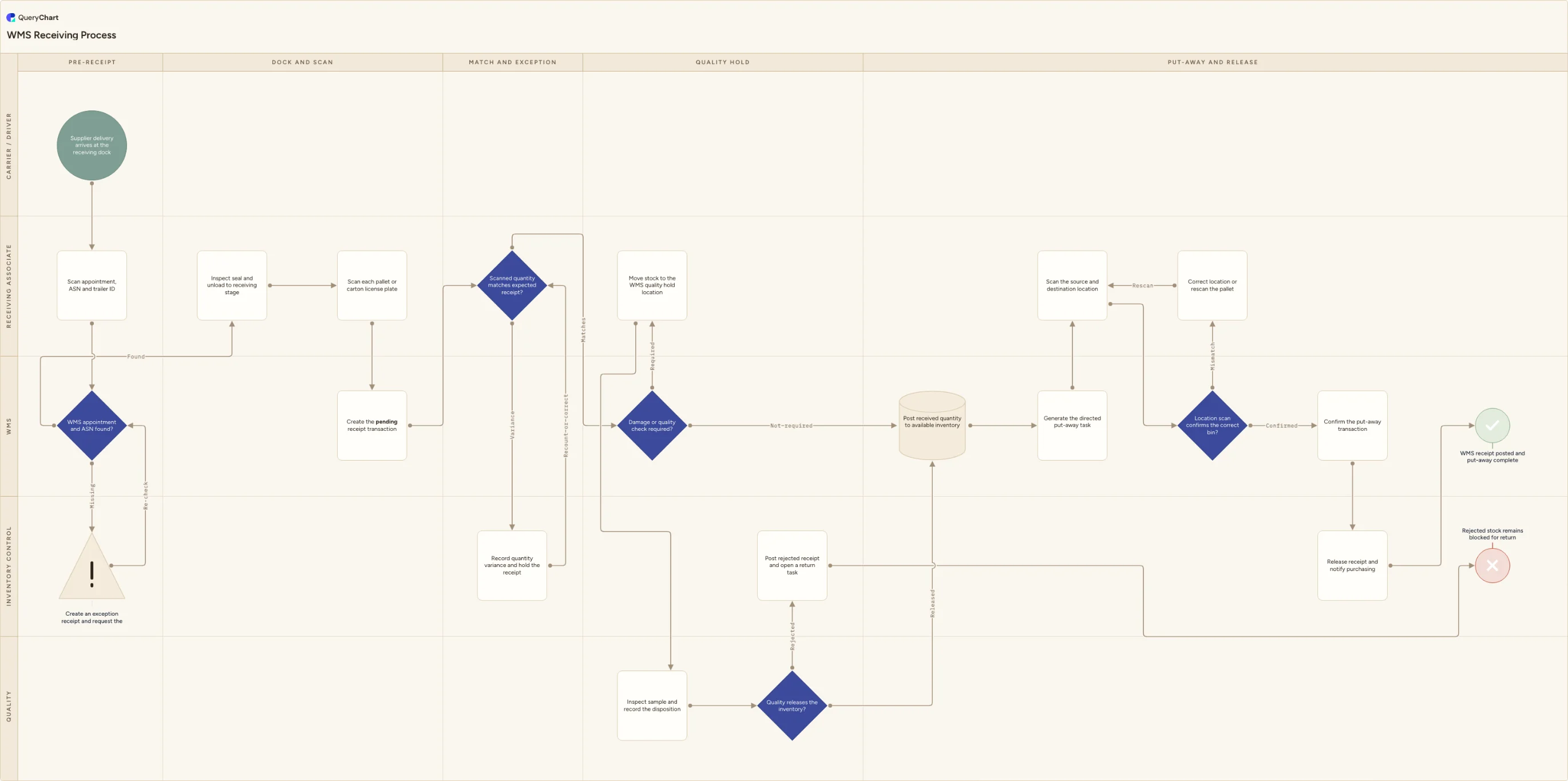
WMS receiving process template: scan appointments and license plates, create pending receipt transactions, resolve quantity exceptions, use quality holds, and confirm put-away.
What the WMS receiving process is
A WMS receiving process is more than unloading a truck and counting cartons. It builds the system record alongside the physical receipt: the associate scans the appointment, ASN and trailer ID, scans each pallet or carton license plate, and creates a pending receipt transaction before stock can be released. The pending state is important because it recognizes that the goods are physically on site while their quantity, condition and disposition may still be unresolved. This template carries that record through the quantity-match decision, a quality-hold branch when inspection is required, final receipt posting, a directed put-away task and the source and destination scans that make the stock findable in its assigned bin.
The chart owns the operational receiving transaction, not supplier onboarding, invoice matching or the entire return-to-vendor process. A missing ASN loops through an exception receipt until it can be identified, a quantity variance stays held until it is recounted or corrected, and failed quality stock is posted as rejected and blocked for return rather than quietly made available. The quality-hold location is a WMS control as well as a marked floor area: a pallet label alone does not stop another user from allocating the stock. Replace the lane names, receipt statuses, inspection criteria and notification rules with those configured in your WMS and quality system.
What this flowchart covers
In this template
- Five swimlanes for the carrier, receiving associate, WMS, inventory control and quality through pre-receipt, dock scan, exception, hold and put-away phases
- Appointment, ASN, trailer and license-plate scanning before a pending receipt transaction is created, so the physical delivery and system record start together
- A quantity-match decision with a held exception and recount or correction loop instead of posting a receipt at the expected quantity when the scanned count differs
- A WMS quality-hold route that moves stock to a blocked location, records inspection disposition and posts rejected stock to a return task when it cannot be released
- Receipt posting, directed put-away, source and destination scans, a location-mismatch loop and final release notification after the put-away transaction is confirmed
When to use this template
- You are configuring a new WMS receiving workflow and need the physical unload, scan and inventory-state changes agreed together
- Receiving associates can locate a delivery on the dock but cannot tell whether its receipt is pending, available, held or rejected in the system
- Quantity variances, damaged goods or inspection failures are being settled outside the WMS and leave inventory available by mistake
- Put-away is physically complete before the destination scan is confirmed, so pickers and cycle counts cannot rely on the recorded location
How it works
Map your receipt statuses
Replace pending receipt, available inventory, quality hold and rejected receipt with the exact statuses and locations your WMS uses. For each status, state whether stock can be allocated, counted, moved or returned so the floor team understands the consequence of a scan.
Set the scan identity standard
Decide whether the receipt is controlled at pallet, carton, serial or lot level, then name the barcode and label that identifies it. A license-plate scan only controls inventory if the identifier remains unique from the dock through the assigned bin.
Define the exception receipt authority
Name who may create an exception receipt, correct an ASN and accept a quantity variance. Include the evidence required for a recount, shortage, overage or damaged unit, and make sure the system keeps the receipt unavailable until that decision is recorded.
Configure the quality-hold route
List the product or supplier conditions that require inspection, the blocked location used for hold, who records the disposition and how a rejected receipt becomes a return or claim task. Do not make an inspection label the only control; the WMS allocation status must agree.
Rehearse a full receipt and a held receipt
Walk one matched delivery and one delivery with a variance or quality failure from the trailer to the final bin. Reconcile the handheld scans, pending receipt, physical location and inventory availability at each step before publishing the procedure.
Frequently asked questions
What are the main steps in a WMS receiving process?
The warehouse identifies the appointment and ASN, checks the trailer and unloads the delivery into a receiving stage. Each pallet or carton is scanned, creating a pending receipt transaction. The scanned quantity is matched to the expected receipt, and any variance is held for correction. If inspection is needed, the stock moves to a WMS quality-hold location until quality releases or rejects it. Released stock is posted, assigned a directed put-away task, scanned from source to destination and confirmed in the final bin before the receipt is closed.
Why use a pending receipt transaction?
A pending receipt reflects a real operational state: the goods have arrived and been identified, but the warehouse has not yet proved that the quantity, condition and disposition make them available inventory. It preserves traceability during recounts, quality checks and exception handling without allowing a picker or allocator to consume unverified stock. The status names vary between WMS products, but the separation between scanned arrival and released inventory is the control to preserve.
How should a receiving quantity variance be handled?
Keep the receipt in an exception or held status, record the actual scan result and perform the recount or correction defined by your procedure. Inventory control should decide whether the ASN, purchase order or receipt transaction needs correction and retain the evidence of that decision. Posting the expected quantity simply to clear the dock creates a later stock discrepancy and obscures whether the supplier, carrier or receiving team caused it.
Where this process fits
In most operations this process follows Warehouse Receiving Process and hands off to Warehouse Putaway Process.
It is one step in Warehouse inbound.
Step 1: Warehouse Receiving Process
Warehouse receiving process template for dock booking, ASN and PO matching, count and damage checks, inspection holds, putaway, and goods receipt posting.
Step 2: WMS Receiving Process You are here
WMS receiving process template: scan appointments and license plates, create pending receipt transactions, resolve quantity exceptions, use quality holds, and confirm put-away.
Step 3: Warehouse Putaway Process
Warehouse putaway process template covering stock restrictions, location-fit checks, pallet and bin scans, quantity confirmation, WMS posting, and exception escalation.