Security incident escalation process flowchart (SOC to CISO)
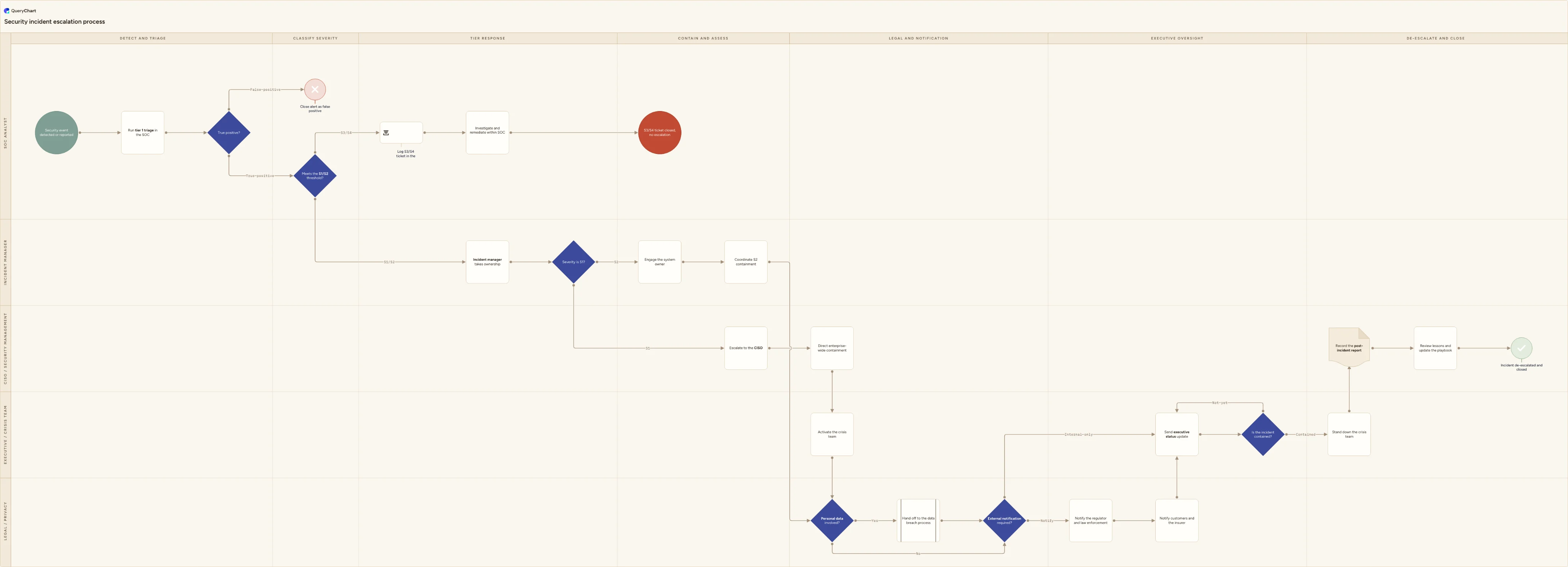
Security incident escalation process flowchart template: SOC triage, an S1/S2 severity gate, incident manager and CISO ownership, the crisis team, a personal data check and external notification.
What the security incident escalation process flowchart (SOC to CISO) process is
A security incident escalation process is the answer to one question repeated at every severity level: who needs to know about this now, and who is allowed to decide what happens next. It starts where a SOC analyst's shift starts, with an alert that has to be triaged and confirmed as a real event rather than noise. From there the chart below follows a single event up the ladder, through a severity gate that decides whether it stays with the SOC or moves to the incident manager, a second gate that decides whether the incident manager can handle it alone or the CISO and a crisis team are pulled in, a check for personal data that hands off to a dedicated breach process where it applies, a decision on whether anyone outside the organisation needs telling, and a cadence of executive updates that runs until the incident is confirmed contained and the ladder is climbed back down.
This chart is deliberately not the technical response itself: it does not contain detection engineering, evidence handling, containment mechanics or eradication steps, which belong to a dedicated cybersecurity incident response process running underneath it. It is also not the severity test that a generic IT service desk uses to grade an ordinary outage, and it is not the detailed regulatory workflow for a confirmed personal data breach, which has its own decisions and its own statutory clock in a separate process. What this chart owns is narrower and, in a live incident, just as important: the escalation path itself, who is told at each threshold, and the point at which the incident is safe to stand down from. Treat it as a starting point to adapt to your own incident response plan, regulatory obligations and the judgement of whoever holds the CISO or equivalent role in your organisation, not as a substitute for either.
Two decisions carry the weight of the ladder. 'Meets the S1/S2 threshold?' sits with the SOC analyst because it is the first person to see the evidence who can make that call, and getting it wrong in either direction either buries a serious event in the SOC queue or wakes the CISO for a phishing report. 'Is the incident contained?' sits with the executive and crisis team lane for the opposite reason: containment is a technical judgement made elsewhere on the org chart, but the decision to stand the crisis team down and stop the update cadence belongs to the people who convened it. Between those two, the 'Personal data involved?' and 'External notification required?' decisions sit in the Legal / privacy lane on purpose, because whether an obligation exists is a legal question even when the trigger was a technical one.
What this flowchart covers
In this template
- Five swimlanes (SOC analyst, Incident manager, CISO / security management, Legal / privacy and Executive / crisis team) across seven phases: detect and triage, classify severity, tier response, contain and assess, legal and notification, executive oversight, and de-escalate and close
- A 'True positive?' gate right after triage, so a confirmed false positive is routed back into tuning the detection rule rather than just closed, and only a real event carries on up the ladder
- The first escalation gate, 'Meets the S1/S2 threshold?', which splits the ladder in two: S3 and S4 events stay with the SOC, get a ticket and are resolved without ever reaching the incident manager
- A second gate inside the escalated branch, 'Severity is S1?', that decides whether the incident manager and system owner handle an S2 event alone or the CISO is brought in and a crisis team is activated for S1
- The 'Personal data involved?' decision in the Legal / privacy lane, whose yes branch hands the incident off to a dedicated data breach process rather than duplicating that assessment on this chart
- An 'External notification required?' decision feeding notification of the regulator, law enforcement, customers and the insurer where each applies, then an executive update cadence gated by 'Is the incident contained?' that loops until the crisis team can stand down
When to use this template
- You are writing or updating an incident response plan and the escalation path is described in prose nobody can follow at two in the morning
- Your SOC and your executives disagree about when the CISO should be woken up, and you need the threshold written down rather than argued case by case
- You are building a major incident or crisis communication runbook and need the point where legal and external notification enter the picture made explicit
- An auditor, insurer or board committee has asked how your organisation escalates and reports a security incident, separate from how it is technically contained
- You are onboarding a new incident manager or CISO and want the tiers, the handoffs and the stand-down decision on one page rather than learned from the last incident
How it works
Rename the lanes to your real escalation chain
Replace SOC analyst, Incident manager, CISO / security management, Legal / privacy and Executive / crisis team with the roles that actually hold each decision in your organisation. A smaller organisation often merges the incident manager into the CISO lane, or routes legal through outside counsel; delete or merge a lane rather than leaving it unowned.
Write your severity criteria onto the first gate
Open 'Meets the S1/S2 threshold?' and replace the placeholder with your own definitions: systems or data affected, number of users or customers, whether production is degraded, whether there is any safety impact. The S1 to S4 labels on this chart are illustrative, not a standard, so make the criteria specific enough that two analysts on different shifts reach the same call.
Name who is allowed to declare each tier
State on the chart, or in the linked plan, who can confirm an S2 without waking anyone else, and who can declare an S1 and trigger the crisis team activation. Add a deputy for both roles and a rule for what happens if neither can be reached within an agreed time, because escalation criteria that only one person can approve fail exactly when they are needed most.
Confirm your personal data and notification triggers
Work with legal or your data protection lead to write the real test behind 'Personal data involved?' and 'External notification required?': what counts as personal data for you, which regulators, customers, law enforcement bodies and insurers might need telling, and what the statutory or contractual timelines are in your jurisdiction. Point the personal-data branch at your actual breach procedure rather than leaving it as a label.
Set the executive update cadence
Decide how often the crisis team sends a status update while 'Is the incident contained?' keeps answering no, who receives it, and what it has to contain: current impact, actions taken, and the next decision point. Write the cadence down before an incident happens; deciding it live is how updates either stop going out or take over the response.
Define what contained and closed mean
Agree the evidence needed to answer 'Is the incident contained?' with yes, and separately what has to be true before the crisis team stands down and the incident is closed. The two are not the same moment: an incident can be technically contained well before communications, legal and the affected business owners are ready to stop treating it as live.
Walk it against a past incident
Take an incident you have actually run, ideally one that reached the CISO or beyond, and trace it through the chart. Note every point where the real escalation happened faster, slower, or through a different route than the chart shows, and use those gaps as the agenda for updating the plan before the next incident, not during it.
Frequently asked questions
What are the steps in a security incident escalation process?
A SOC analyst runs tier 1 triage on the alert and confirms it is a true positive; a false positive is closed and fed back into the detection rule. The confirmed event is checked against the S1/S2 threshold: S3 and S4 stay with the SOC, get a ticket and are resolved there. An S1 or S2 event moves to the incident manager, who checks whether it is specifically S1. An S2 is handled by the incident manager and the system owner. An S1 is escalated to the CISO, who directs containment while the crisis team is activated. Legal then checks whether personal data is involved, handing off to a breach process where it is, and decides whether the regulator, law enforcement, customers or the insurer need notifying. The crisis team sends updates on a set cadence until the incident is contained, then stands down and closes it out with a post-incident report.
How is this different from a cybersecurity incident response process?
They answer different questions about the same event. A cybersecurity incident response process is the technical lifecycle: triage the alert, scope it, contain it without destroying evidence, eradicate the threat, verify it is gone, and recover, usually run entirely inside the SOC and IT operations. This escalation process is about people and authority rather than technique: at what point does an event stop being the SOC's decision alone, who is told as it climbs, and who has to approve stepping back down. In a live S1 the two run side by side, with the technical team working the containment and eradication steps while this ladder decides who else is in the room and what gets communicated outward.
Why does 'Personal data involved?' hand off to another process?
Because the assessment behind that decision has its own tests and its own regulatory clock that deserve a chart of their own rather than being compressed into one box here. Whether a breach is notifiable to a supervisory authority, and separately whether the affected individuals themselves have to be told, are questions with different thresholds and different owners, typically the data protection lead and legal. Keeping that assessment on a dedicated data breach process means it can be detailed and kept current with your jurisdiction's rules without every change also having to be re-checked against the escalation ladder. This chart only needs to know that the handoff happened and that the case is being tracked.
What is the difference between severity and escalation tier?
Severity describes the impact of the incident itself: how much is affected, how badly, and for how many people. Escalation tier describes who is currently accountable for it and who has been told. The two are related but not identical, which is why this chart treats them as separate decisions rather than one. An incident can be confirmed as S1 in severity the moment it is understood, but the escalation only reaches the CISO and crisis team lane once that severity has actually been declared and passed up; conversely, an incident that looked minor at first triage can climb the same ladder later if 'Impact changed at the next update' style evidence comes in, without its original severity label ever being revisited.
Who decides when to stand the crisis team down?
Whoever convened it, working from evidence rather than from the pressure to move on. This chart puts 'Is the incident contained?' in the Executive / crisis team lane deliberately: containment in the technical sense is confirmed by the security and IT teams working the incident, but stepping the crisis structure back down, stopping the update cadence and telling the wider organisation the event is over is a separate call that sits with whoever owns the crisis response. Write the exit criteria down in advance, for example a defined observation period with no recurrence and every affected system verified, so the decision is not made purely on how tired the room is.
Where this process fits
In most operations this process follows Cybersecurity incident response process flowchart (SOC) and hands off to Data breach response process flowchart (GDPR 72-hour clock).
It is one step in Security incident response.
Step 1: Phishing incident response process flowchart (reported email)
Step 3: Cybersecurity incident response process flowchart (SOC)
Swimlane flowchart of the technical cybersecurity incident response lifecycle a SOC or CSIRT runs, from alert triage to eradication, recovery and rule tuning.
Step 4: Security incident escalation process flowchart (SOC to CISO) You are here
Security incident escalation process flowchart template: SOC triage, an S1/S2 severity gate, incident manager and CISO ownership, the crisis team, a personal data check and external notification.
Step 5: Security incident response process flowchart
A swimlane flowchart of the security incident response process, from detection and triage through containment, eradication, breach notification and review.
Step 6: Data breach response process flowchart (GDPR 72-hour clock)