Cybersecurity incident response process flowchart (SOC)
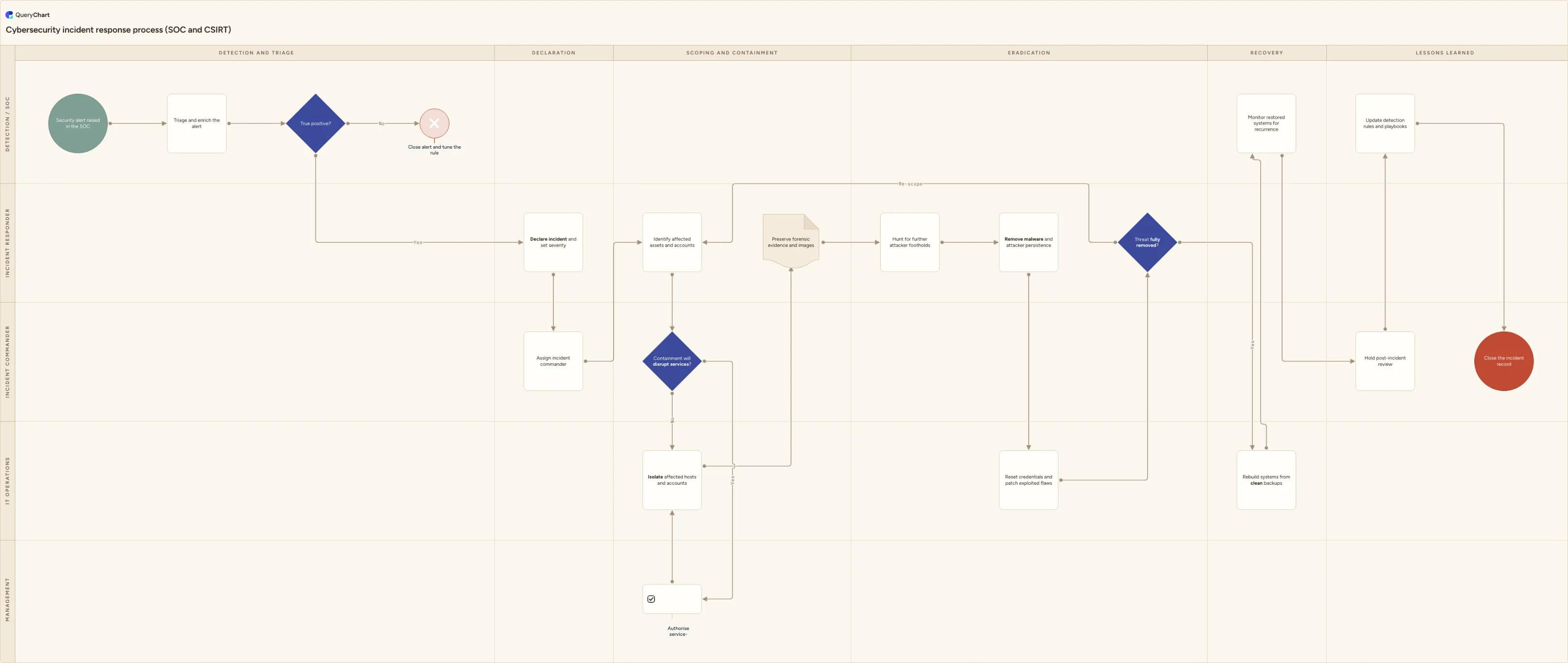
Swimlane flowchart of the technical cybersecurity incident response lifecycle a SOC or CSIRT runs, from alert triage to eradication, recovery and rule tuning.
What the cybersecurity incident response process flowchart (SOC) process is
A cybersecurity incident response process is the working lifecycle a security operations centre or CSIRT follows once a detection fires. Triage and enrich the alert, decide whether it is a true positive, declare an incident and set its severity, put a commander on it, find every asset and account the attacker touched, contain without destroying the evidence, remove the threat, prove it has gone, and only then restore. This template draws that sequence across five lanes: Detection / SOC, Incident responder, Incident commander, IT operations and Management.
It is worth being clear about what this process is not, because two neighbouring processes are often merged into it and both become weaker for it. It is not IT incident management, which is measured on restoring a disrupted service and closes once the user is working again; a security incident is not over when the service is back, because restoring early can hand the attacker their access back. It is also not breach notification. Deciding whether personal data was affected, whether a regulator or a customer has to be told, and on what clock, sits with legal, the data protection officer and communications, runs to statutory deadlines rather than technical ones, and belongs in the wider security incident response process. This chart runs alongside that work rather than absorbing it.
The shape follows the sequence most published guidance shares. The SANS six-step model - preparation, identification, containment, eradication, recovery, lessons learned - maps onto it directly, and NIST SP 800-61 Revision 2 groups the same work as detection and analysis; containment, eradication and recovery; and post-incident activity. Revision 3 reorganises the guidance around the Cybersecurity Framework 2.0 functions rather than a fixed phase list, but the order a responder actually works in is unchanged. Preparation is not drawn as a box because it is continuous work - tooling, rotas, retainers, exercises - rather than a step performed during an incident. What the diagram is really there to protect is the ordering: evidence before eradication, verification before restoration, and a named person who can authorise pulling a production system offline.
What this flowchart covers
In this template
- Five role lanes - Detection / SOC, Incident responder, Incident commander, IT operations and Management - across six phase columns: detection and triage, declaration, scoping and containment, eradication, recovery, and lessons learned.
- Triage in the SOC lane: 'Triage and enrich the alert' feeding a 'True positive?' decision, whose no branch runs 'Close alert and tune the rule' so a false positive changes the detection instead of just being dismissed.
- Handover and command: 'Declare incident and set severity' moves the work from the SOC to an incident responder, and 'Assign incident commander' names the person who owns decisions for the rest of the incident.
- A 'Containment will disrupt services?' decision owned by the incident commander, whose yes branch routes through 'Authorise service-disrupting containment' in the Management lane before IT operations runs 'Isolate affected hosts and accounts'.
- Evidence before clean-up: 'Preserve forensic evidence and images' sits between containment and the eradication column, which covers hunting for further attacker footholds, removing malware and persistence, and resetting credentials and patching the exploited flaws.
- A 'Threat fully removed?' verification decision that loops back to 'Identify affected assets and accounts' when it fails, then rebuild from clean backups, monitored restoration in the SOC lane, a post-incident review and 'Update detection rules and playbooks' before closure.
When to use this template
- You run or are standing up a SOC or CSIRT and want the technical lifecycle on one page, from the alert queue to the detection rule that fires next time.
- You are writing the runbook half of an incident response plan and need the containment, evidence and eradication ordering agreed before an incident rather than argued during one.
- You are preparing a tabletop exercise or a purple team test and want the decision points, loops and handoffs laid out to test against.
- You need security, IT operations and management to agree in advance who can authorise taking a production system offline, and what happens when that person is asleep.
- You are onboarding analysts and want the escalation path from triage to responder to incident commander drawn explicitly rather than learned by osmosis.
How it works
Rename the lanes to your real structure
Replace Detection / SOC, Incident responder, Incident commander, IT operations and Management with what you actually have: an outsourced MSSP, tier 1 and tier 2 split into separate lanes, a platform or cloud team instead of IT operations, a retained forensics supplier. Delete a lane rather than leaving it unstaffed, and merge the commander into the responder lane if one person genuinely does both.
Put your severity matrix on the declaration step
Open 'Declare incident and set severity' and replace the note with your own criteria: what makes an incident critical, who is allowed to declare one, and what each level commits you to in response time, staffing and out-of-hours callout. Severity is what drives every downstream decision on this chart, so it is worth being specific.
Set the containment authorisation rule
The 'Containment will disrupt services?' branch only works if someone can answer it at three in the morning. Write down which systems may be isolated on the responder's own authority, which need a business decision, who holds that decision, and what happens if they cannot be reached within an agreed time.
Fix the evidence rules before containment
Record your collection order on 'Preserve forensic evidence and images': memory and live network state before disk, disk before archived logs, following the order-of-volatility approach set out in RFC 3227. Note that hosts are isolated at the network layer rather than powered off, and say where images are stored and who signs for them.
Define what 'threat fully removed' means
Write the exit criteria next to the 'Threat fully removed?' decision: the observation window with no attacker activity, every indicator swept across the estate, every compromised credential rotated, the exploited vulnerability patched. Decide too whether the failure branch returns to scoping, as it does here, or to containment.
Connect it to the processes either side and version it
Add explicit links to your breach notification path, to problem or change management for the permanent fixes, and to cyber insurance or supplier notification if those apply. Then circulate the chart to the security lead, IT operations and management for sign-off and keep the approved version, because the plan you exercise should be the plan you publish.
Frequently asked questions
What are the stages of a cybersecurity incident response process?
This chart uses six columns: detection and triage, declaration, scoping and containment, eradication, recovery, and lessons learned. That maps onto the SANS six-step model of preparation, identification, containment, eradication, recovery and lessons learned, and onto NIST SP 800-61 Revision 2, which groups the work as detection and analysis; containment, eradication and recovery; and post-incident activity. Revision 3 reorganises the guidance around the Cybersecurity Framework 2.0 functions rather than a fixed list of phases. Preparation is not drawn as a step because it is continuous work - detection engineering, rotas, retainers, exercises - carried out before any alert, not during one.
How is this different from IT incident management and from breach notification?
IT incident management restores a disrupted service and closes when the user is working again. A security incident has an adversary in it, so restoring service is not the finish line: it is the point of maximum risk if the threat is still resident, which is why this chart puts a verification decision before recovery. Breach notification is the other neighbour. Deciding whether personal data was affected, whether a supervisory authority or a customer must be told, and within what statutory window, is legal and communications work on a legal clock, and it runs in parallel with the technical response rather than inside it.
Why does evidence preservation come before eradication?
Because the most common containment actions destroy the evidence you will need. Powering off a host loses memory-resident malware, live network connections, decrypted material and injected processes. Rebuilding a server before the scope is understood removes the artefacts that show how the attacker got in and what they reached. The order-of-volatility principle described in RFC 3227 is the practical rule: capture memory and live state first, then disk, then archived logs. In this chart the evidence step sits after isolation and before any eradication work, and hosts are isolated at the network layer so they stay running.
How do you decide the threat is fully removed?
With criteria written before the incident, not judged in the moment. Typically: no attacker activity observed across the estate for an agreed observation window; every indicator from the investigation swept across all hosts, not only the ones that alerted; every credential that could have been captured rotated, including service and machine accounts; and the vulnerability or misconfiguration that allowed initial access closed. When the answer is no it usually means the scope was wrong rather than the clean-up was sloppy, which is why the failure branch here returns to 'Identify affected assets and accounts' rather than to isolation.
Who authorises containment that takes a production service offline?
Somebody with the authority to accept the business impact, which is rarely the responder who spotted the problem. This chart routes that case through the Management lane, but the point is not the lane name: it is that the decision, the named role and the fallback if they are unreachable are agreed in advance. Many teams pre-authorise isolation for a defined list of systems and severities so the common cases never wait for a call, and reserve the escalation for revenue-bearing or safety-related services. Without that, the argument happens while the attacker is still working.
Where this process fits
In most operations this process follows Phishing incident response process flowchart (reported email) and hands off to Security incident escalation process flowchart (SOC to CISO).
It is one step in Security incident response.
Step 1: Phishing incident response process flowchart (reported email)
Step 2: Incident severity classification flowchart
An incident severity classification flowchart: a decision tree taking availability, scope, business impact and exposure tests through to P1, P2, P3 or P4.
Step 3: Cybersecurity incident response process flowchart (SOC) You are here
Swimlane flowchart of the technical cybersecurity incident response lifecycle a SOC or CSIRT runs, from alert triage to eradication, recovery and rule tuning.
Step 4: Security incident escalation process flowchart (SOC to CISO)
Security incident escalation process flowchart template: SOC triage, an S1/S2 severity gate, incident manager and CISO ownership, the crisis team, a personal data check and external notification.
Step 6: Data breach response process flowchart (GDPR 72-hour clock)