IT help desk process flowchart (incidents and requests)
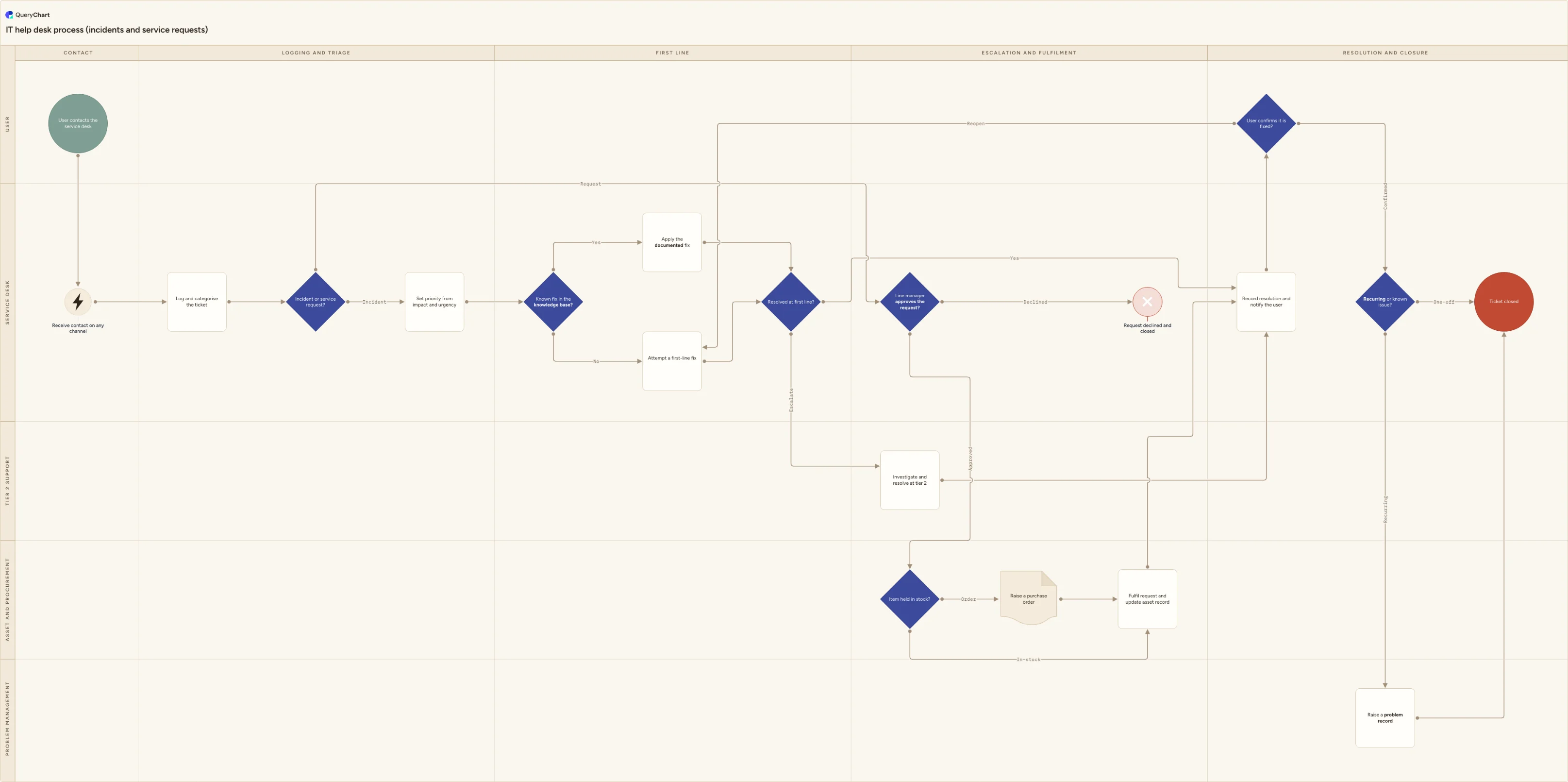
IT help desk process flowchart: one queue for incidents and service requests, with triage, priority, first-line fix, tier 2 escalation, fulfilment and closure.
What the IT help desk process flowchart (incidents and requests) process is
An IT help desk process is how a service desk runs its day: one front door for every user contact, whatever channel it arrives on, and one agreed route from that contact to a closed ticket. What makes it distinct from a single-purpose procedure is that it carries two kinds of work at the same time. Some tickets are incidents, where something that should work does not. Others are service requests, where nothing is broken and the user wants a standard, pre-agreed piece of work done, such as a licence, a new laptop or a piece of software. The two need different clocks and often different approvers, so the process splits them early rather than letting one queue treat everything as an outage.
This page covers the desk's day-to-day operating flow, not the internals of any one branch. If you need major incident declaration, a named incident manager, bridge calls and SLA breach escalation, that detail belongs to the incident management process. Suspected compromise follows the security incident response process instead. A fix that requires altering a live service hands off to change management, and a request for system access follows the access request process with its own approval chain and periodic recertification. Root cause work leaves this process entirely: the recurring-issue branch here raises a problem record rather than holding the user's ticket open while an engineer investigates.
The chart maps five lanes, namely User, Service desk, Tier 2 support, Asset and procurement, and Problem management, across five phases from contact to closure. It draws two things desks usually leave undocumented: the knowledge base check that decides whether first line applies a documented fix or diagnoses from scratch, and the procurement branch that decides whether a requested item is issued from stock or ordered. It also finishes where most written procedures stop short, with the user confirming the fix and a reopen branch for when they say it is still broken.
What this flowchart covers
In this template
- Five swimlanes with a named owner for every step, namely User, Service desk, Tier 2 support, Asset and procurement, and Problem management, arranged across five phases: contact, logging and triage, first line, escalation and fulfilment, and resolution and closure.
- Multi-channel intake, where "User contacts the service desk" feeds "Receive contact on any channel" so phone, email, self-service portal, chat and walk-up all land in the same queue before anything is logged.
- The "Incident or service request?" fork immediately after "Log and categorise the ticket", sending incidents to "Set priority from impact and urgency" and requests down a separate fulfilment branch.
- A first-line attempt built around "Known fix in the knowledge base?", where yes applies the documented fix and no goes to "Attempt a first-line fix", both meeting at "Resolved at first line?" with an escalate branch into "Investigate and resolve at tier 2".
- The service request branch: "Line manager approves the request?" with a declined branch ending at "Request declined and closed", then "Item held in stock?" routing an order through "Raise a purchase order" before "Fulfil request and update asset record".
- Closure in the final column: "Record resolution and notify the user", a "User confirms it is fixed?" decision with a reopen branch back to first line, and "Recurring or known issue?" raising a problem record before "Ticket closed".
When to use this template
- Documenting how your service desk actually runs, so a new agent can see where a ticket goes and who owns each stage without asking a colleague.
- Separating incidents from service requests when both currently sit in one undifferentiated queue and everything ends up treated as urgent.
- Configuring a service desk or ITSM tool, where the categories, priority matrix, approval rule and asset update in the chart map onto fields you have to set up anyway.
- Settling where first line stops and tier 2 starts, which in most teams is custom and practice rather than a written rule.
- Briefing an outsourced or newly hired desk on the handoffs, confirmations and record keeping you expect them to honour.
How it works
Rename the lanes to your real roles
Replace User, Service desk, Tier 2 support, Asset and procurement, and Problem management with the teams you have. Small organisations often merge asset and procurement into the service desk lane, and problem management may be a named person rather than a team. Keep one lane per decision-maker rather than per individual, so the chart survives someone changing job.
Write down the incident versus service request test
The "Incident or service request?" fork only works if agents can apply it in seconds. Write the test next to the decision: is something that should be working broken, or is the user asking for standard, pre-agreed work? List your genuine borderline cases, such as a slow laptop against a request for a new one, and say which way each goes.
Publish your priority matrix
Attach your impact and urgency definitions to "Set priority from impact and urgency", stating what each priority level means in terms of users affected and business consequence. Publishing the grid where users can read it is what turns priority into something derived rather than argued over per ticket.
Set the first-line boundary and what an escalation carries
Define what first line is allowed and equipped to fix, and what an escalation must contain before tier 2 accepts it: steps already tried, affected service, evidence and the user's availability. Decide whether you also want a time-based backstop that escalates a ticket that has made no progress, and say who owns it after the handoff.
Decide what needs approval and what is pre-approved
Mark low-cost, low-risk catalogue items as pre-approved so they bypass "Line manager approves the request?" entirely, and reserve the gate for spend, licences and anything that changes what a person can access. Where the request is for system access, hand off to your access request process rather than approving it here.
Agree closure, reopen and problem referral, then publish one version
State what counts as user confirmation, how long a resolved ticket waits before auto-closing, and the criteria on "Recurring or known issue?" that raise a problem record. Then walk the chart with each lane, correct the steps they actually perform, and publish it as the current version with a recorded sign-off so everyone is reading the same revision.
Frequently asked questions
What is the difference between an IT help desk process and incident management?
The help desk process is the operating flow of the desk itself: every contact that arrives, on any channel, routed to the right kind of handling. Incident management is one strand inside it, dealing only with unplanned interruptions to a service. ITIL 4 treats service desk, incident management, service request management and problem management as separate practices for exactly this reason, though a small team usually runs all of them from one queue with the same people. This chart is the desk-level view that shows how the strands share an intake and a closure, and hands the deep incident detail, such as major incident declaration and SLA breach escalation, to the incident management process.
What is the difference between an incident and a service request?
An incident is something that should be working and is not: a failed login, a printer offline, an application throwing errors. A service request is standard, pre-agreed work with no fault involved: new software, a licence, a replacement device, a mailbox for a new starter. The distinction matters because it changes almost everything downstream. Incidents get a priority from impact and urgency and are measured on restoration; requests get an approval and a fulfilment path and are measured on delivery. Mixing them means either routine requests sit on an outage clock, or genuine outages queue behind laptop orders.
When should a help desk ticket be escalated to tier 2?
Escalate when the work has passed the boundary of first line's skills, tooling or access, which is a functional escalation. That is a different thing from a hierarchic escalation, where a manager is pulled in because the impact or the delay has become a business issue rather than a technical one. Many desks add a time-based backstop so a ticket that has made no progress is escalated automatically, which is useful as a safety net but a poor primary rule on its own. Whatever triggers it, the handoff needs to carry what has already been tried, or tier 2 spends its first hour repeating first line's work.
Should a ticket be closed before the user confirms the fix?
Resolved and closed are two different states, and this chart keeps them apart. An agent marks a ticket resolved when the fix is applied; it is closed only after "User confirms it is fixed?" returns a yes. If the user says the problem is still there, the ticket reopens to first line rather than starting a fresh one, which keeps the history and the original clock together. Because some users never reply, most desks set an auto-close window of a few working days with a reminder first, and state that period in the service description so closure is not a surprise.
How do service requests that involve buying something fit into the process?
They follow the fulfilment branch: approval where the catalogue requires it, then "Item held in stock?" which either issues from existing stock or raises a purchase order before fulfilment. The step people skip is updating the asset record, which is why it sits in the same node as fulfilment here. If the asset register is not updated at the point of issue, licence counts and hardware refresh planning drift out of date within months. For larger or non-catalogue purchases the desk raises the need and the wider purchase order process takes over, with its own sourcing and invoice matching.
Where this process fits
In most operations this process hands off to Change management process flowchart (ITIL).
Comes after
- Change management process flowchart (ITIL) — An ITIL change management process flowchart covering RFC intake, standard, normal and emergency triage, CAB approval, scheduling, rollout and rollback.
- Access request process flowchart — Access request process flowchart: role-based request, line manager and system owner approval, segregation of duties check, provisioning and recertification.
- Security incident response process flowchart — A swimlane flowchart of the security incident response process, from detection and triage through containment, eradication, breach notification and review.