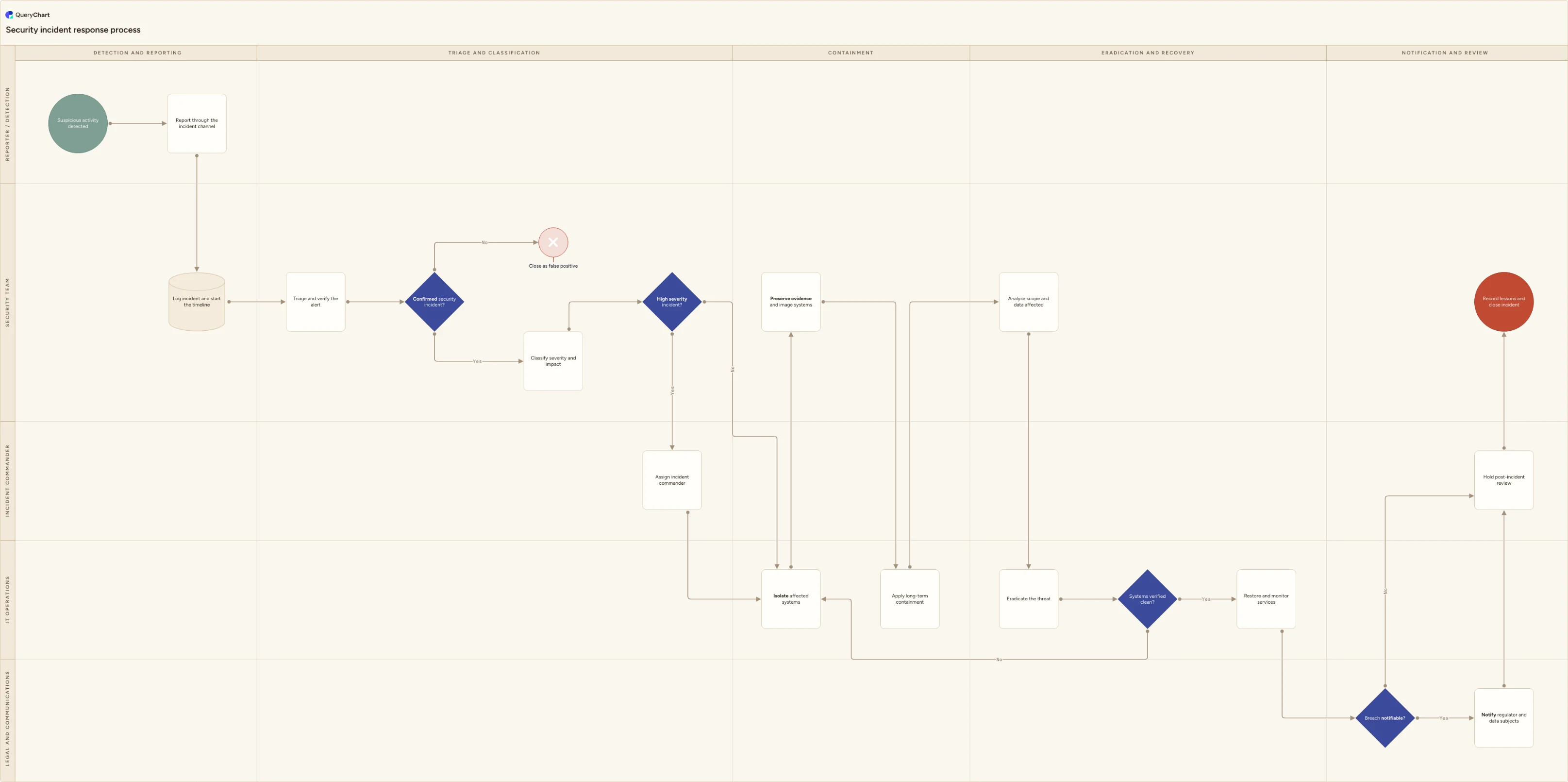
Security incident response process flowchart
A swimlane flowchart of the security incident response process, from detection and triage through containment, eradication, breach notification and review.
What the security incident response process is
A security incident response process is the sequence an organisation follows from the moment something suspicious is spotted to the moment the incident record is closed. It is deliberately not the same as an IT service incident process. The aim is not only to restore service, but to work out what an attacker did, stop them doing more of it, keep the evidence intact, and decide whether the incident has to be reported to a regulator.
Most published processes share the same skeleton. NIST SP 800-61r2 splits it into preparation, detection and analysis, containment, eradication and recovery, and post-incident activity. ISO/IEC 27035 uses plan and prepare, detection and reporting, assessment and decision, responses, and lessons learnt. This chart follows that shape and draws out the two decisions that cause the most argument in a live incident: is this actually a security incident, and is the breach notifiable.
The things teams get wrong under pressure are usually the ordering rules. Containing a host by powering it off destroys volatile memory evidence. Rebuilding a server before the scope is analysed means you can no longer prove what was taken. Restoring service before systems are verified clean reinfects the estate. Agreeing the sequence in advance, with one lane per role, is how those rules survive a call at three in the morning.
What this flowchart covers
In this template
- Five role lanes (reporter and detection, security team, incident commander, IT operations, legal and communications) across five phase columns: detection and reporting, triage and classification, containment, eradication and recovery, and notification and review.
- Detection and reporting: suspicious activity raised through a single incident channel, then logged by the security team with the incident timeline started.
- A "Confirmed security incident?" decision after triage, sending false positives to a closed record and confirmed incidents on to severity and impact classification.
- A "High severity incident?" decision that assigns a named incident commander for high-severity cases and routes everything else straight to containment.
- Containment split into short-term (isolate affected systems) and long-term, with evidence preservation and system imaging in between, followed by scope analysis, eradication and a "Systems verified clean?" check that loops back to isolation when it fails.
- A "Breach notifiable?" decision owned by legal and communications, routing to regulator and data-subject notification inside the statutory window, then a post-incident review and closure with lessons recorded.
When to use this template
- You are writing or refreshing an incident response plan and need a single page that shows who does what, in what order.
- You are preparing for an ISO 27001 audit or a customer security review and have been asked to show a documented response process (the diagram evidences the process, it does not by itself demonstrate conformity).
- You are running a tabletop exercise and want the decision points, handoffs and notification clock laid out to test against.
- You are onboarding new analysts, or an on-call rota that includes people outside the security team.
- You want security, IT operations and legal to agree their handoffs before an incident rather than during one.
How it works
Rename the lanes to your actual roles
Replace the five lanes with the roles you really have: SOC or MSSP, service desk, security lead, platform team, DPO, external forensics or breach counsel. If a role does not exist, delete the lane rather than leaving it unstaffed.
Set your severity criteria
Open the "Classify severity and impact" box and replace the note with your own matrix: what makes an incident high severity, who is allowed to declare it, and what response time each level commits you to.
Fix the notification window and regulator
Edit the "Breach notifiable?" decision so it names the regimes that apply to you: UK or EU GDPR (72 hours to the supervisory authority), NIS2, HIPAA, sector rules, and any contractual customer notice periods, which are often shorter than the statutory ones.
Add the contact points people need at 3am
Put the incident channel, the on-call number, the incident commander rota and the evidence storage location into the box comments, so the diagram is usable during an incident and not only during a review.
Adjust the loops and add missing steps
Decide whether the "Systems verified clean?" branch back to isolation matches how you work, and add anything specific to your estate, such as engaging a retained forensics supplier, cyber insurance notification, or a customer communications approval step.
Circulate for approval and keep the version
Share the chart with the security lead, IT operations and legal for sign-off, then keep the approved version. An incident response plan is a controlled document, and the version you exercise should be the version you publish.
Frequently asked questions
What are the stages of the incident response process?
This chart uses five: detection and reporting, triage and classification, containment, eradication and recovery, and notification and review. That maps closely onto NIST SP 800-61r2, which uses detection and analysis; containment, eradication and recovery; and post-incident activity. NIST also has a preparation phase, but preparation is continuous work (tooling, rotas, exercises, retainers) rather than a step you carry out during an incident, so it is not drawn on the flow.
How is security incident response different from IT incident management?
An IT service incident is finished when service is restored. A security incident is not, because there is an adversary. Restoring too early can reinstate the attacker's access, and there are obligations an ITIL incident process does not carry: preserve evidence before rebuilding, determine what data was affected, and notify regulators and individuals where required. That is why this chart puts evidence preservation and imaging before eradication, and adds a notification branch after recovery.
Who should be the incident commander, and when is one appointed?
The incident commander should be whoever has the authority to make decisions (take a production system offline, engage external counsel, contact customers), not necessarily the most technical person available. They coordinate rather than investigate. In this chart the commander is assigned only when the "High severity incident?" decision returns yes; lower-severity incidents stay with the security team. In a long incident the role is handed over explicitly at each shift change.
When does the 72-hour breach notification clock start?
Under UK and EU GDPR the 72 hours runs from when the organisation becomes aware that a personal data breach has occurred, not from when the attack began or when the investigation concludes, and you can notify in phases if the full picture is not yet available. Notifying affected individuals is a separate test: it is required without undue delay where the breach is likely to result in a high risk to them. Other regimes run different clocks, so set the one that applies to you on the decision box.
Where this process fits
In most operations this process follows IT help desk process flowchart (incidents and requests) and hands off to Data breach response process flowchart (GDPR 72-hour clock).
It is one step in Security incident response.
Step 1: Phishing incident response process flowchart (reported email)
Step 3: Cybersecurity incident response process flowchart (SOC)
Step 4: Security incident escalation process flowchart (SOC to CISO)
Security incident escalation process flowchart template: SOC triage, an S1/S2 severity gate, incident manager and CISO ownership, the crisis team, a personal data check and external notification.
Step 5: Security incident response process flowchart You are here
A swimlane flowchart of the security incident response process, from detection and triage through containment, eradication, breach notification and review.
Step 6: Data breach response process flowchart (GDPR 72-hour clock)
A swimlane flowchart for personal data breach response: containment, the risk-to-individuals test, the 72-hour regulator notification and the breach register.