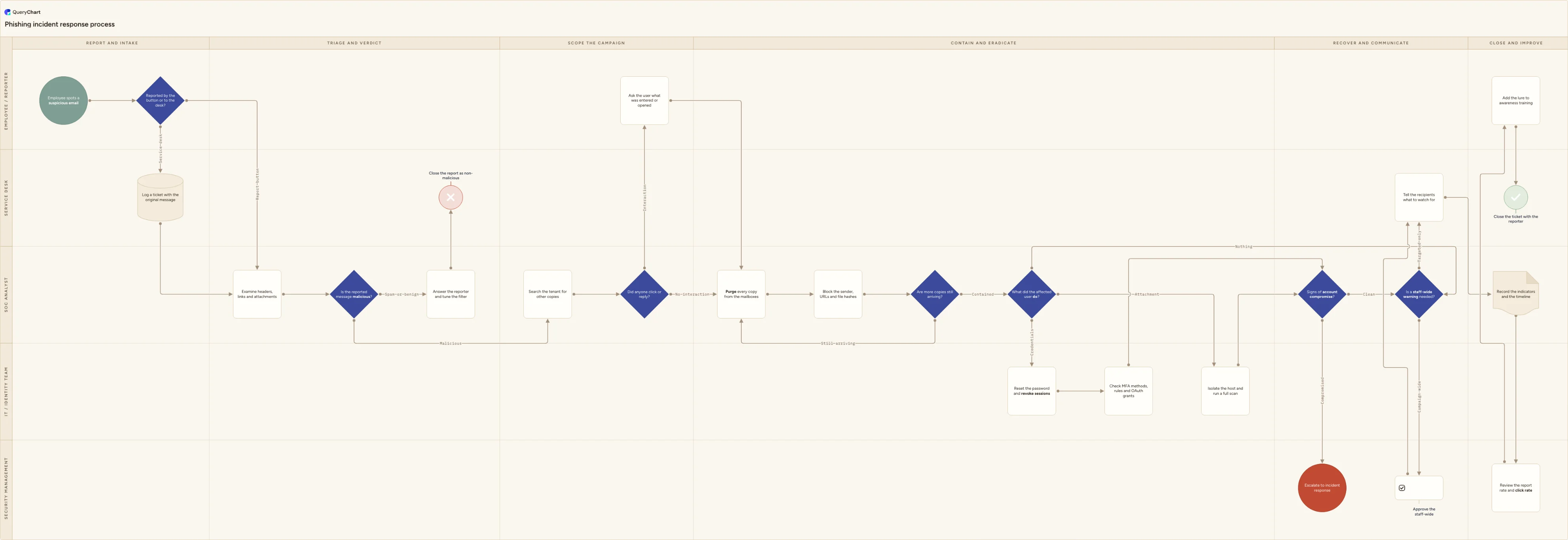
Phishing incident response process flowchart (reported email)
Phishing incident response flowchart template: user report, SOC triage verdict, tenant-wide mail search, purge and indicator blocking, credential reset with session revocation, compromise escalation and awareness follow-up.
What the phishing incident response process flowchart (reported email) process is
Phishing incident response is what happens after one person forwards one email. The trigger is a report rather than an alert: somebody presses the report button in their mail client, or rings the service desk about a message that does not look right. From there the work is a short, repeatable loop. Triage the sample to a verdict, find every other copy of it that reached the organisation, remove those copies and block what they pointed at, undo whatever the recipients already did, and tell people what happened. The chart below follows one report end to end across six phases, from intake through triage, scoping, containment and recovery to the metrics and awareness work that decide how many reports you get next month.
This is the mail-borne case and only the mail-borne case. It is not the general cybersecurity incident response lifecycle a security operations centre runs from a detection alert: that process starts from telemetry rather than from a person, and this chart hands over to it at 'Signs of account compromise?' when a mailbox turns out to be under someone else's control. It is not the severity ladder of a security incident escalation process, and it is not a routine password reset either, because the reset here is containment for a credential an attacker already holds and it travels with session revocation attached. It is also not breach notification: if personal data has reached an attacker, the assessment, the statutory clock and the conversation with a regulator belong to legal and the data protection officer and run alongside this chart rather than inside it. Treat the diagram as an educational starting point to be adapted under your own incident response procedures, the regulations that apply to you, and your security lead's review.
Four decisions carry the process. 'Is the reported message malicious?' is the verdict that separates a nuisance from an incident, and it sits with the SOC analyst rather than the service desk because a look-alike domain and a failed sender authentication check are not a first-line judgement. 'Did anyone click or reply?' turns a mail hygiene job into an identity job, and everything expensive on the chart hangs off it. 'What did the affected user do?' is drawn as one three-way branch rather than a queue of yes and no questions, because credential entry, an executed attachment and a near miss need different teams working to different clocks. 'Is a staff-wide warning needed?' sits in the Security management lane on purpose: a message to every employee is a communications decision with a cost attached, and the analyst who found the campaign should not be the only person making it.
What this flowchart covers
In this template
- Five swimlanes (Employee / reporter, Service desk, SOC analyst, IT / identity team and Security management) across six phases: report and intake, triage and verdict, scope the campaign, contain and eradicate, recover and communicate, and close and improve
- Two intake routes feeding one queue: a report button press that lands the sample with the security team directly, and a service desk ticket for the person who rings instead, logged with the original message attached rather than described
- A verdict decision, "Is the reported message malicious?", whose benign branch answers the reporter, tunes the mail filter and closes the report as non-malicious rather than dropping it silently, because the reply is what keeps people reporting
- Scoping before deletion with "Search the tenant for other copies" and "Did anyone click or reply?", then a containment sweep that purges every copy, blocks the sender, URLs and file hashes, and loops on "Are more copies still arriving?" while the campaign is still landing
- A three-way "What did the affected user do?" branch: credential entry goes to "Reset the password and revoke sessions" in the identity lane, an opened attachment goes to host isolation and a full scan, and "Signs of account compromise?" escalates instead of closing
- Communication and close-out: "Is a staff-wide warning needed?" is approved in the Security management lane, recipients are told what to watch for, and the report closes only after the indicators, the timeline, the report rate and click rate, and an awareness follow-up are recorded
When to use this template
- You have a report button in Outlook or Gmail and no agreed playbook behind it, so what happens to a reported email depends on which analyst picks it up
- Users are forwarding suspicious mail to a shared inbox nobody really owns, and you need the intake, the verdict and the reply to the reporter drawn as one path
- A credential-phishing campaign has just landed and you want the purge, the reset, the session revocation and the mailbox rule check ordered before the next one arrives
- You are writing the phishing section of an incident response plan and need it to hand off cleanly to the wider security incident process rather than duplicate it
- An auditor has asked how staff report a suspected security event and what happens next, which is the reporting mechanism ISO/IEC 27001:2022 Annex A control 6.8 asks for
How it works
Rename the lanes to your roles
Replace Employee / reporter, Service desk, SOC analyst, IT / identity team and Security management with the roles you actually have. Plenty of organisations have no service desk lane at all because the report button goes straight to security, and plenty run identity work inside the SOC. Delete a lane rather than leaving it unstaffed, and split one if a managed service provider owns part of it.
Write down every intake channel
List every way a phishing report can arrive: the report button, a shared mailbox, the service desk telephone, a manager forwarding on someone's behalf, a customer telling you their invoice was redirected. Then mark which of them lands in the triage queue automatically and which depends on a person remembering to forward it, because that gap is where reports are quietly lost.
Set the triage verdict criteria
Open 'Is the reported message malicious?' and write down the checks your analysts really run: sender authentication alignment, look-alike and newly registered domains, URL detonation, attachment sandboxing, and whether the message asks for credentials, payment or urgency. Say what happens to a nuisance message too, so spam is a decision rather than a shrug.
Fix the scoping search before the purge
The purge is only as good as the search in front of it. Record what you search on, which should include the sender address, the display name, the subject, the URL and the attachment hash, and how far back your tooling reaches, which is usually a short retroactive window over cloud mailboxes only. Note separately how you find copies in on-premises mailboxes, archives and anything already forwarded outside.
Agree the identity response and who orders it
Decide what 'Reset the password and revoke sessions' commits you to and who may order it at three in the morning. A reset on its own leaves a stolen session token working, so revocation and the check on MFA methods, mailbox rules and consented applications belong on the same step. State how the new credential reaches the user through a channel the attacker does not control.
Decide who authorises a staff-wide warning
Put a name against 'Is a staff-wide warning needed?' and a threshold underneath it: how many recipients, which brands or executives are impersonated, whether anyone has already paid or entered credentials. Draft the advisory in advance, because the version written under pressure is the one that tells staff to watch for a subject line the attacker changed an hour ago.
Walk it against a real reported email
Take two recent reports, one that turned out to be spam and one that became a real incident, and trace each through the chart with the people who handled them. The steps nobody can name an owner for, and the steps that clearly happened but are not drawn, are the findings worth fixing before you publish the playbook and exercise it.
Frequently asked questions
What are the steps in a phishing incident response process?
An employee spots a suspicious email and reports it, through the button in their mail client or by raising a ticket at the service desk with the original message attached. An analyst examines the headers, links and attachments and reaches a verdict. A nuisance message earns a reply to the reporter, a filter change and a closed report. A malicious one is scoped: search the tenant for other copies, and establish whether anyone clicked or replied. Containment then purges every copy, blocks the sender, URLs and file hashes, and repeats while copies keep arriving. What the affected user did decides the rest. Credential entry means a password reset with session revocation and a check on MFA methods, mailbox rules and consented applications; an opened attachment means host isolation and a scan; signs of account compromise escalate to incident response. Otherwise the team weighs a staff-wide warning, tells recipients what to watch for, records the indicators and the metrics, and closes with the reporter.
How does phishing response differ from cybersecurity incident response?
Scope and trigger. Phishing response is a high-volume, largely repeatable process that starts with a person reporting a message, and most cases end without an incident ever being declared: the mail is purged, the indicators are blocked and the reporter is answered. A cybersecurity incident response process starts from a detection or a confirmed compromise and runs declaration, severity, an incident commander, forensics, eradication and recovery. The two meet at one point on this chart. When the identity checks show a mailbox is no longer under its owner control, phishing response has done its job and hands over. Keeping them separate matters in both directions: running every reported email through a full incident lifecycle exhausts the team, and treating a live account takeover as a mailbox clean-up loses the attacker.
Is a password reset enough after someone enters credentials on a phishing page?
Usually not. Modern credential-phishing kits work as an adversary in the middle: the fake page proxies the real sign-in, so the password and the multi-factor prompt are both relayed to the genuine service and the attacker captures the session and refresh tokens that come back. Those tokens keep working after the password changes, which is why this chart pairs the reset with session revocation in the same step and follows it with a check on enrolled MFA methods, mailbox forwarding rules and consented OAuth applications, the three places attackers usually leave a way back in. Longer term, the control that removes the attack rather than cleaning up after it is phishing-resistant authentication. CISA guidance names FIDO/WebAuthn authenticators and PKI-based methods such as smart cards as the phishing-resistant forms, because they bind the login to the real domain and fail on a proxy.
Can you remove a phishing email from every mailbox after it has been delivered?
Partly, and it is worth knowing the limits before you promise it. Cloud mail platforms provide retroactive removal for messages that turn out to be malicious after delivery. Microsoft's zero-hour auto purge, for example, acts on already-delivered mail in cloud mailboxes, its search covers the last 48 hours of delivered email, and it does not work in on-premises mailboxes protected by Microsoft 365. Analyst-driven search and purge from the security portal gives you a wider net but still only over the mailboxes that platform holds. What no purge reaches is a copy the recipient already forwarded outside, a message pulled down to a local archive, or a screenshot in a chat thread. That is why the chart loops on 'Are more copies still arriving?' rather than treating the purge as a single event, and why telling recipients what to watch for stays on the critical path.
Does a phishing incident have to be reported to a regulator?
It depends on what the attacker got, and it is not the analyst decision to make alone. Under the UK and EU GDPR a controller must notify its supervisory authority of a personal data breach without undue delay and, where feasible, not later than 72 hours after becoming aware of it, unless the breach is unlikely to result in a risk to the rights and freedoms of individuals; a late notification has to carry the reasons for the delay. Sector regimes, contracts and cyber insurance policies set their own clocks on top of that. The practical rule is that the moment this chart reaches signs of account compromise, legal and the data protection officer are engaged in parallel while the technical work continues. Separately, several national authorities take the sample itself: in the UK the NCSC Suspicious Email Reporting Service accepts messages forwarded to report@phishing.gov.uk.
Where this process fits
In most operations this process hands off to Cybersecurity incident response process flowchart (SOC).
It is one step in Security incident response.
Step 1: Phishing incident response process flowchart (reported email) You are here
Phishing incident response flowchart template: user report, SOC triage verdict, tenant-wide mail search, purge and indicator blocking, credential reset with session revocation, compromise escalation and awareness follow-up.
Step 2: Incident severity classification flowchart
An incident severity classification flowchart: a decision tree taking availability, scope, business impact and exposure tests through to P1, P2, P3 or P4.
Step 3: Cybersecurity incident response process flowchart (SOC)
Step 4: Security incident escalation process flowchart (SOC to CISO)
Step 6: Data breach response process flowchart (GDPR 72-hour clock)