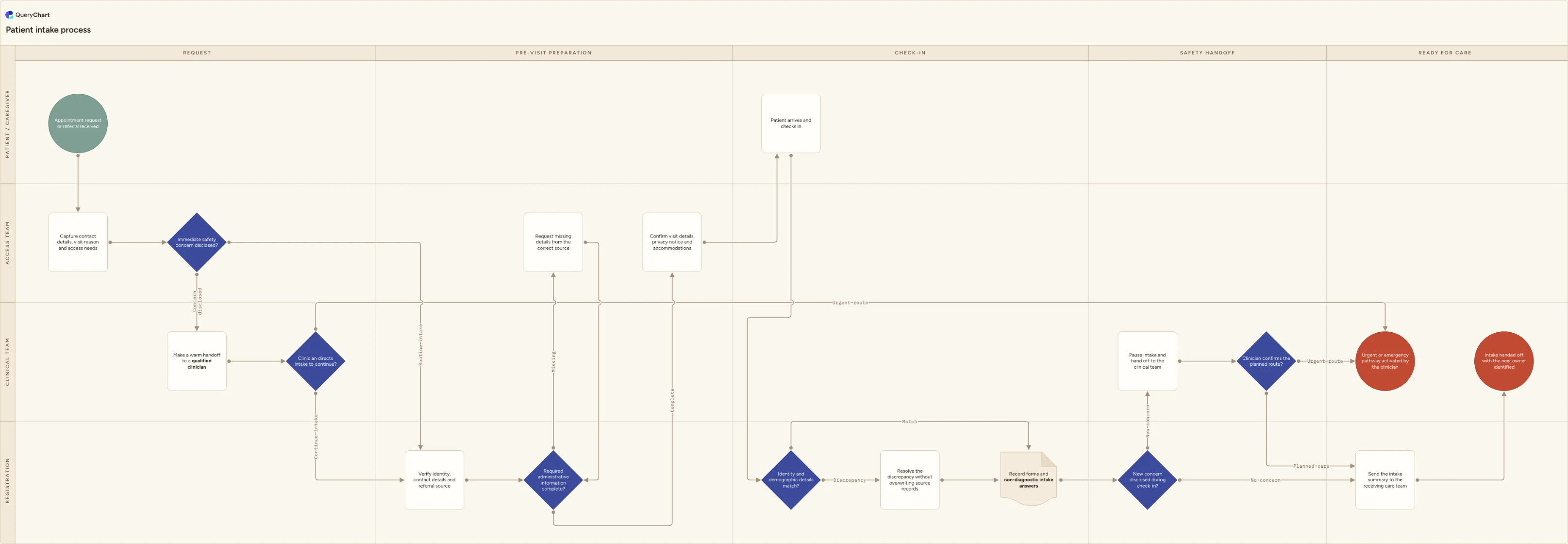
Patient intake process flowchart (request to clinical handoff)
Patient intake flowchart template for appointment requests, identity and information checks, accessibility needs, safe clinician escalation, check-in and a named handoff to the receiving care team.
What the patient intake process flowchart (request to clinical handoff) process is
Patient intake begins before someone reaches the front desk. The access team captures the reason for the visit, contact details, language and accessibility needs; a qualified clinician receives any immediate concern instead of leaving it in an administrative queue. Registration then verifies identity and source information, requests what is missing, confirms the privacy notice and accommodations, and records non-diagnostic intake answers. At check-in, discrepancies are resolved without silently overwriting source records. Any new concern pauses the routine path, and the intake ends only when the receiving care team or an urgent pathway has a named owner.
Use this chart as an adaptable operational starting point, not as a clinical screening instrument. It does not tell staff how to diagnose, triage or treat a patient, and it is not medical advice. It also does not prove HIPAA compliance or compliance with any other privacy rule: your organization must decide what information is necessary, which notices and permissions apply, how identity is verified, which channels are approved, how records are retained and which clinician escalation protocol governs each setting.
What this flowchart covers
In this template
- Four swimlanes for Patient / caregiver, Access team, Registration and Clinical team across request, preparation, check-in, safety handoff and readiness for care
- Two safety checkpoints that keep symptom interpretation out of administrative roles and make a warm handoff to a qualified clinician when a concern is disclosed
- Identity, referral and administrative completeness checks with a loop for missing details and a separate route for resolving demographic discrepancies
- A closed finish in which the intake summary reaches the receiving care team and the next owner is visible rather than the form merely being marked complete
When to use this template
- You are redesigning front-desk, call-center or digital intake and need the handoffs between access, registration and clinicians on one page
- Patients repeat information because request, preregistration and check-in use different records or owners
- An urgent concern can sit in a routine message queue because staff lack a clear clinician escalation route
- You need to plan language, communication or accessibility support before arrival instead of discovering the need at the appointment
How it works
Rename the lanes to your actual roles
Replace Access team, Registration and Clinical team with the functions that really own each step. Merge lanes when one role performs both tasks, but keep clinical decisions visibly assigned to appropriately qualified staff.
Define the minimum intake data
List the identifiers, contact fields, referral details and access needs required for each visit type. Remove fields that are collected by habit but do not support routing, preparation, care or a defined obligation.
Write the clinician escalation route
Specify how staff keep the patient connected, which qualified clinician receives the concern, what happens after hours and who owns the patient until the handoff is accepted. Do not turn the administrative script into a diagnostic checklist.
Test the handoff with real scenarios
Walk through a routine referral, a missing record, a demographic mismatch, an interpreter request and a concern disclosed during check-in. Revise every step whose owner, system or completion signal is unclear.
Frequently asked questions
What are the main steps in a patient intake process?
Receive the appointment request or referral, capture contact and access needs, escalate immediate concerns to a qualified clinician, verify identity and source details, obtain missing administrative information, confirm visit arrangements, check the patient in, record non-diagnostic intake answers and hand the summary to the receiving care team.
Should registration staff triage symptoms during intake?
Registration staff can ask an approved routing question and accurately pass on what the patient says, but they should not diagnose or independently determine clinical urgency. The chart sends a disclosed concern to a qualified clinician who owns the assessment and next route.
What information should an intake form collect?
Collect only information your organization has defined as necessary for identification, contact, access, routing, preparation and care. Typical categories include reliable identifiers, contact preferences, referral source, communication or accessibility needs and approved administrative questions. Clinical content and permissions vary by setting.
Does this patient intake template make a workflow HIPAA compliant?
No. A process map cannot establish HIPAA compliance. Compliance depends on your role, policies, safeguards, contracts, systems, workforce practices and the facts of each use. Adapt the chart with your privacy, security, legal and clinical owners before using it operationally.
Where this process fits
In most operations this process follows Patient referral process flowchart (send, triage and close the loop) and hands off to Prior authorization process flowchart (request, denial and appeal).
It is one step in Patient journey.
Step 1: Patient referral process flowchart (send, triage and close the loop)
Patient referral flowchart template for patient choice, complete records, confirmed receipt, qualified clinical triage, rejected-referral recovery, scheduling and closed-loop ownership.
Step 2: Patient intake process flowchart (request to clinical handoff) You are here
Patient intake flowchart template for appointment requests, identity and information checks, accessibility needs, safe clinician escalation, check-in and a named handoff to the receiving care team.
Step 3: Prior authorization process flowchart (request, denial and appeal)
Prior authorization flowchart template for requirement checks, complete submissions, payer questions, approvals, denials, clinician-led appeals and a clear handoff to patients and scheduling.
Step 5: Medication reconciliation process flowchart (compare and hand off)
Step 6: Patient discharge planning flowchart (safe transition and follow-up)