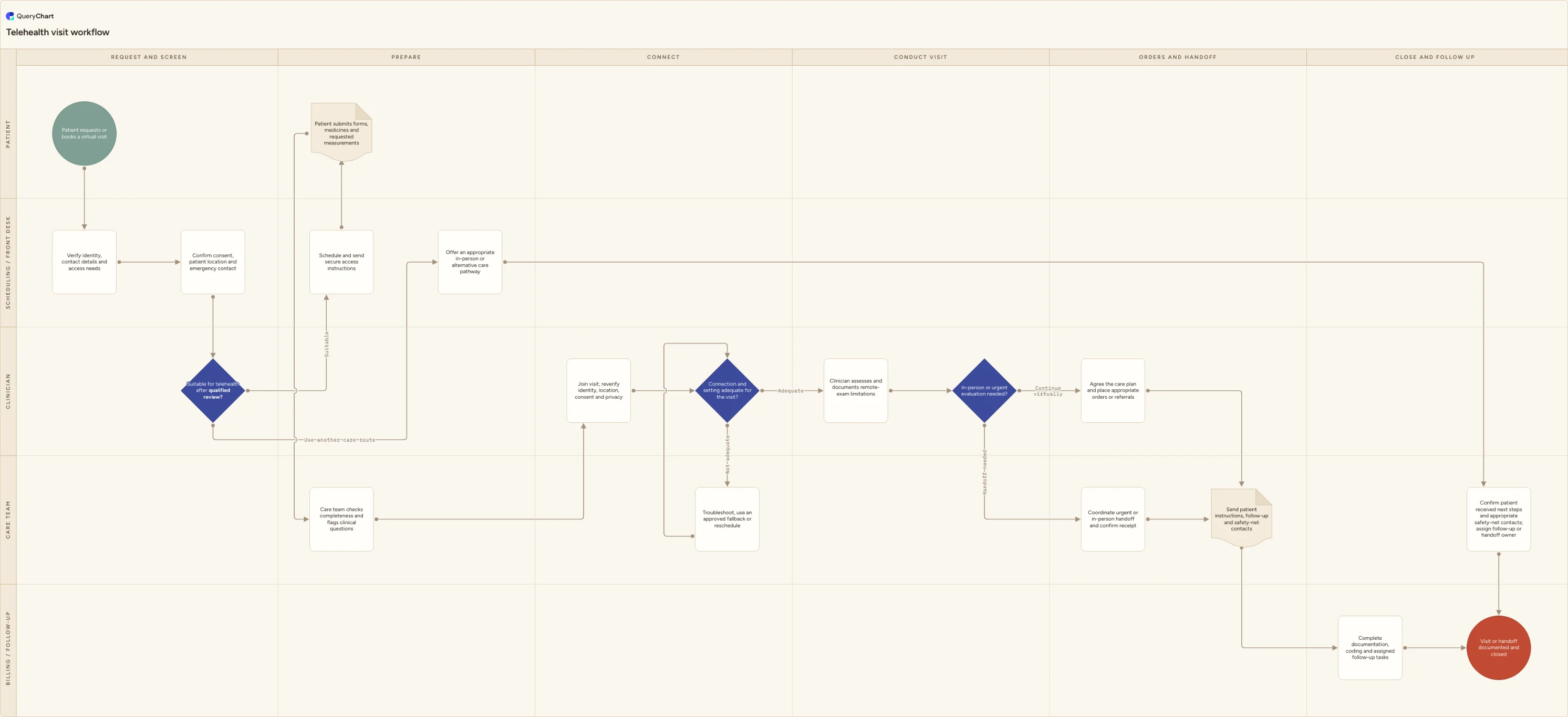
Telehealth visit workflow flowchart
Telehealth visit workflow from request and suitability review through secure connection, clinician assessment, in-person handoff, orders and follow-up.
What the telehealth visit workflow process is
A telehealth visit starts before the video link opens. Scheduling verifies identity, contact details, accessibility needs, consent, current location and an emergency contact, then a qualified clinician decides whether the available information and service criteria support a virtual visit. The patient receives secure access instructions and submits the requested forms, medicine list and measurements. At connection, the clinician reverifies identity, location, consent and privacy, handles any failed connection through an approved fallback, conducts the encounter while documenting remote-exam limitations, and decides whether care can continue virtually or needs an urgent or planned in-person handoff.
This chart is visit operations, not a clinical triage algorithm, diagnosis guide, prescribing protocol, emergency plan or statement that telehealth suits a particular symptom or patient. The two clinical decisions, "Suitable for telehealth after qualified review?" and "In-person or urgent evaluation needed?", stay in the Clinician lane because only an appropriately qualified professional with the patient context should make them. Licensure, consent, privacy, accessibility, prescribing and reimbursement requirements vary by location, service and payer. Customize the chart under current organizational policy and qualified clinical, privacy, billing and legal review. It is not medical or legal advice and does not guarantee regulator, payer or accreditation compliance.
Five lanes keep patient tasks, front-desk administration, care-team preparation, clinical judgment and billing or follow-up from collapsing into one appointment status. The unsuitable branch offers another care route, confirms that the patient received next-step instructions and any appropriate safety-net contacts, and records a follow-up or handoff owner before closure. The connection-failure loop names approved fallback and rescheduling options. The completed-visit branches converge on patient instructions and assigned follow-up so an escalation is not complete merely because a referral was placed; receipt and next steps must be clear.
What this flowchart covers
In this template
- Five swimlanes across request, preparation, connection, encounter, handoff and closure, including both patient-facing and back-office work
- Identity, contact, accessibility, consent, physical location and emergency-contact checks before the appointment link is sent
- The qualified decision "Suitable for telehealth after qualified review?" with an alternative-care branch rather than an automated symptom rule
- A connection-quality and privacy gate with approved troubleshooting, fallback and rescheduling options instead of improvised channels
- Clinician documentation of remote-exam limits and the decision "In-person or urgent evaluation needed?" during the encounter
- Orders or referrals, confirmed handoff, patient instructions, coding, documentation and assigned follow-up before closure
When to use this template
- You are launching or standardizing scheduled virtual visits across a clinic, specialty service or care network
- Patients reach the appointment without completed forms, location details, interpreter arrangements or a usable connection
- Administrative screening is drifting into clinical triage and you need suitability decisions visibly owned by qualified clinicians
- Failed connections and in-person escalations are recorded inconsistently, leaving patients unsure which service is responsible next
- You are configuring scheduling, video, clinical-record and billing tasks and need the cross-system handoffs agreed first
How it works
Rename the lanes and define visit types
Replace the generic front desk, care team, clinician and follow-up roles with the people who perform them. List which appointment types enter this workflow and which are always booked through another route under your clinical policy.
Write qualified suitability criteria
Have clinical governance define who may review suitability, what information they require and how uncertainty is escalated. Keep symptom-specific thresholds and treatment decisions in controlled clinical guidance, not in a generic booking rule.
Configure location, consent and accessibility checks
Specify when identity and location are captured and reverified, what consent is required, and how interpreters, captions, carers or other accommodations are arranged. Validate local licensure and privacy implications with qualified owners.
Approve connection fallback routes
Name supported platforms, troubleshooting ownership and any approved telephone fallback. Define when poor privacy or repeated connection failure requires rescheduling or in-person care rather than an improvised channel.
Make handoff completion observable
For urgent and routine in-person routes, state who contacts the destination, what information is transferred, how receipt is confirmed and what the patient is told to do while waiting. A referral order alone should not count as a completed handoff.
Test common and exception journeys
Walk a routine virtual visit, an unsuitable booking, a failed connection and an encounter escalated to in-person care through the map. Check that documentation, coding, patient instructions and open follow-up tasks land with a named owner every time.
Frequently asked questions
What are the steps in a telehealth visit workflow?
The patient requests a virtual appointment; scheduling verifies identity, contact, access needs, consent, location and emergency contact. A qualified clinician reviews suitability. If suitable, the visit is scheduled, forms and requested information are collected, and the care team checks completeness. At the visit, identity, location, consent, privacy and connection are rechecked. The clinician assesses the patient, documents remote limitations and either continues with a virtual plan or coordinates an urgent or planned in-person handoff. Instructions, orders, referrals, coding, documentation and follow-up tasks are completed before closure.
Who decides whether telehealth is appropriate?
An appropriately qualified clinician should apply service-specific criteria to the patient information available and remain able to change the route during the encounter. Scheduling staff can collect required information and identify obvious operational barriers, but this chart does not ask them or software to diagnose urgency or clinical suitability. Local clinical governance should define reviewer qualifications, escalation and the conditions that require another care route.
Why verify the patient's physical location during a virtual visit?
The patient's current location can affect professional licensure, prescribing authority, emergency response and the services available for a handoff. It also gives the care team a usable starting point if the connection fails during an urgent situation. Requirements vary by jurisdiction and service, so the workflow captures and reverifies location but does not claim which rule applies. Qualified legal and clinical owners should define the local procedure.
Is a consumer video or phone call always acceptable as fallback?
No universal answer applies. The organization should approve platforms and fallback channels after reviewing privacy, security, consent, documentation and service requirements. Temporary enforcement policies used during the COVID-19 public health emergency should not be assumed to remain available. Staff need a clear route to troubleshoot, switch to an approved option, reschedule or arrange in-person care without improvising with personal accounts.
Does this workflow establish compliant or clinically safe telehealth care?
No. It is a customizable operational map, not medical or legal advice, a clinical protocol, a privacy assessment or proof of regulator, payer or accreditation compliance. Suitability, consent, licensure, prescribing, privacy, emergency response, coding and reimbursement all depend on the service and location. Review the adapted workflow with qualified clinical, privacy, legal and billing owners and test it with real scenarios before use.
Where this process fits
In most operations this process follows Prior authorization process flowchart (request, denial and appeal) and hands off to Medication reconciliation process flowchart (compare and hand off).
It is one step in Patient journey.
Step 1: Patient referral process flowchart (send, triage and close the loop)
Step 2: Patient intake process flowchart (request to clinical handoff)
Step 3: Prior authorization process flowchart (request, denial and appeal)
Prior authorization flowchart template for requirement checks, complete submissions, payer questions, approvals, denials, clinician-led appeals and a clear handoff to patients and scheduling.
Step 4: Telehealth visit workflow flowchart You are here
Telehealth visit workflow from request and suitability review through secure connection, clinician assessment, in-person handoff, orders and follow-up.
Step 5: Medication reconciliation process flowchart (compare and hand off)
Medication reconciliation flowchart template for a best possible medication history, source checks, discrepancy review, qualified clinical decisions, patient teach-back and closed-loop handoff.
Step 6: Patient discharge planning flowchart (safe transition and follow-up)