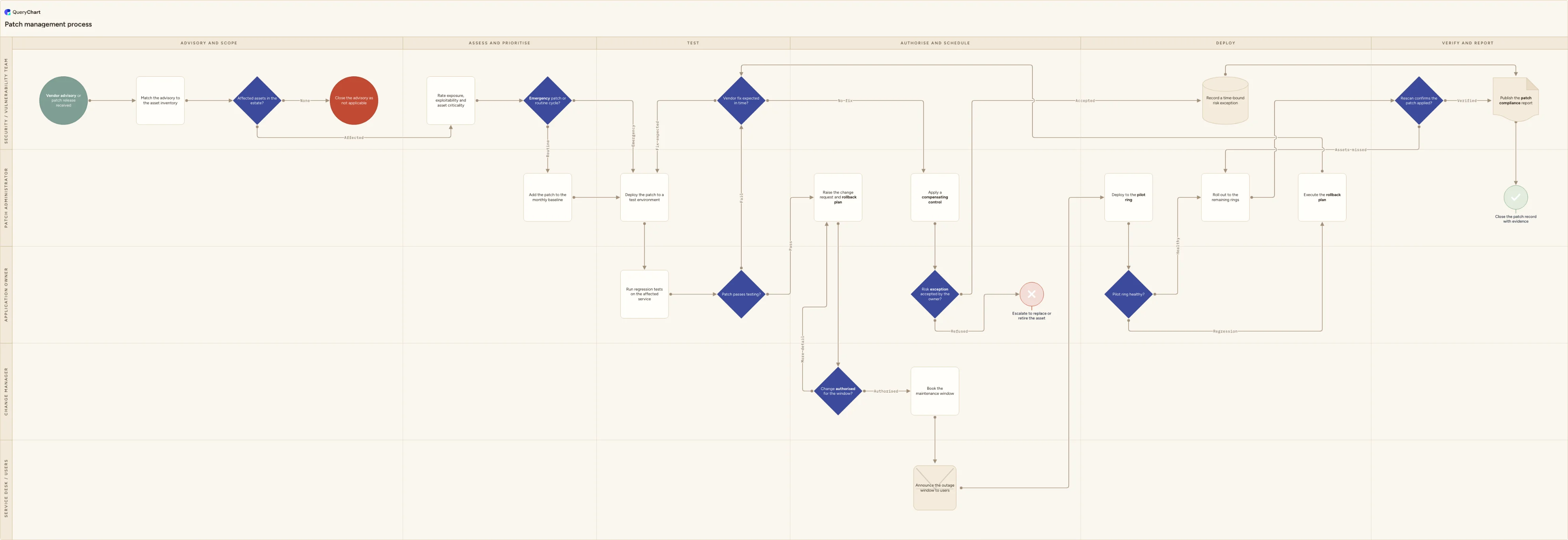
Patch management process flowchart (test, approve, deploy in rings)
Patch management flowchart template: advisory intake and applicability, emergency or routine triage, regression testing, change authorisation, ring rollout, rollback, rescan verification and risk exceptions.
What the patch management process flowchart (test, approve, deploy in rings) process is
Patch management is the standing cycle that turns a vendor advisory into an update installed, verified and evidenced on every asset it applies to. The trigger is external: a supplier publishes a fix, a security feed carries an advisory, or a scan reports a missing update, and the clock starts whether or not the timing is convenient. NIST's guide to enterprise patch management planning frames the whole activity as preventive maintenance for technology, which is the honest description of it — routine work with a deadline attached. The chart below follows one advisory end to end: matched against the asset inventory, rated for exposure and criticality, routed to either the emergency path or the monthly cycle, tested against the service it touches, authorised as a change, announced, deployed in rings with a rollback path, then rescanned, reported and closed.
This is the patch pipeline, not the vulnerability programme that feeds it and not the change process that authorises it. Vulnerability management owns the scanning schedule, the finding inventory, the risk ratings and the remediation deadlines across every kind of fix, of which patching is only one; when it decides that a particular update must be applied, this chart is what happens next. Change management owns the request, the board and the calendar in general, and appears here as two steps rather than as the subject. Software deployment covers your own build artefacts moving from a pipeline into production; patching moves someone else's binary onto a system you did not write and cannot debug, which is why testing and rollback carry so much of the weight in this diagram. Treat it as a starting point to adapt under your own procedures, regulatory obligations and security review rather than as a control you can adopt unchanged.
Four decisions carry the process. 'Emergency patch or routine cycle?' sits in the security lane because the people who understand the exposure should set the pace, and it is what stops the routine cycle being suspended every time an advisory is loud. 'Patch passes testing?' and 'Pilot ring healthy?' both sit with the application owner rather than the patch administrator, because the tool that installs an update cannot tell you whether the service still works afterwards. 'Risk exception accepted by the owner?' is drawn as a decision with a refusal branch on purpose: a system that cannot be patched is a business decision with an owner and an expiry date, not a ticket that quietly ages. The verification step at the end closes the loop, because a deployment report and a clean rescan are different claims about the same estate.
What this flowchart covers
In this template
- Five swimlanes (Security / vulnerability team, Patch administrator, Change manager, Application owner and Service desk / users) across six phases: advisory and scope, assess and prioritise, test, authorise and schedule, deploy, and verify and report
- Intake that begins with an advisory rather than a scan result: the security lane matches the release against the asset inventory and answers "Affected assets in the estate?", with a "Close the advisory as not applicable" terminator so a considered no is recorded rather than assumed
- The criticality split at "Emergency patch or routine cycle?", which sends an actively exploited flaw down an accelerated path and batches everything else into the monthly baseline, so the scheduled cycle is not suspended every time an advisory is loud
- A test loop no tooling can shortcut: the patch goes to a test environment, the application owner runs regression tests and answers "Patch passes testing?", and a failure lands on "Vendor fix expected in time?" rather than on a blind retry
- Authorisation before deployment: "Change authorised for the window?" sends a thin request back to be reworked, the change manager books the maintenance window, and the service desk announces the outage before anything is installed
- Ring rollout with two ways out: "Pilot ring healthy?" routes a regression to "Execute the rollback plan", "Rescan confirms the patch applied?" chases the assets a deployment report missed, and an unpatchable system reaches "Record a time-bound risk exception"
When to use this template
- You are writing or rewriting a patch management procedure and need one picture of who assesses, who tests, who authorises and who verifies
- Patching keeps slipping past its deadline and you need to see whether it stalls at testing, at the change board or at the maintenance window
- You are configuring patch groups, rings and maintenance windows in a management tool and want the process agreed before the tool encodes one for you
- A bad update took a service down and the rollback was improvised, so the rollback trigger and the person allowed to call it now need to be on the chart
- An auditor or a customer has asked how security updates reach your systems, how exceptions are approved, and how you evidence that patches actually landed
How it works
Rename the lanes to your roles
Replace Security / vulnerability team, Patch administrator, Change manager, Application owner and Service desk / users with the roles you genuinely have. In a small team the security analyst and the patch administrator are the same person, so merge those lanes rather than drawing a handoff that never happens. Keep the application owner separate, because that lane is where the testing decisions live.
Write your emergency trigger onto the triage decision
Next to 'Emergency patch or routine cycle?', write what makes a patch an emergency in terms an on-call engineer can apply: evidence of active exploitation, an internet-facing asset, no usable workaround. A severity score describes the flaw, not your exposure, so name the other inputs you use — CISA's Known Exploited Vulnerabilities catalogue is a common one — and say who may make the call out of hours.
Set a remediation deadline per severity band
Write the deadline for each band beside the assessment step. Some are set for you: if you take card payments, PCI DSS requires critical security patches on in-scope systems within one month of release and everything else within a time frame you define and justify, and the CIS Controls ask for automated operating system and application patching at least monthly. Pick numbers you can meet in a bad month.
Say what the test estate is and what a pass means
State what the test environment contains, how close it is to production and what the application owner is actually checking at 'Patch passes testing?'. Name the transactions that must still complete, the interfaces that must still authenticate and the reports that must still run. A patch that installs cleanly and breaks a nightly job has failed the test, and only a named check catches that.
Define the rings, the bake time and the window
Say which machines sit in the pilot ring and why they are representative, how long you wait before promoting to the next ring, and which maintenance window each ring uses. Vendors on a fixed cadence make this easier to plan: Microsoft's monthly security updates land on the second Tuesday, with out-of-band releases when something cannot wait for the next one.
Agree the rollback trigger and the exception rule
Decide the rollback trigger before you need it — which symptoms, measured how, and who may call it without convening a meeting — and write the steps beside 'Execute the rollback plan'. Then set the exception rule: what a compensating control has to achieve, who may accept the residual risk, the maximum life of an exception, and what happens on the day it expires.
Walk it against two real advisories
Take two recent advisories, one routine and one you handled as an emergency, and trace both through the chart. Every step someone describes that is not drawn, and every box that in practice gets skipped, is a finding worth acting on before you publish. Then read your exception register against it: a live exception with no review date is the gap this process exists to close.
Frequently asked questions
What are the steps in a patch management process?
An advisory or patch release arrives from the vendor or a security feed, and the security team matches it against the asset inventory; an advisory that touches nothing in the estate is closed as not applicable rather than ignored. Affected assets are rated for exposure, exploitability and criticality, and the patch is routed either down the emergency path or into the monthly baseline. It is deployed to a test environment and the application owner runs regression tests. A pass produces a change request with a rollback plan; a failure asks whether a vendor fix is expected in time, and if it is not, a compensating control and a time-bound exception are considered instead. Once the change is authorised the window is booked and announced, the patch goes to a pilot ring and then to the remaining rings. A rescan confirms it actually landed, missed assets are chased, and the cycle ends with a compliance report.
What is the difference between patch management and vulnerability management?
Vulnerability management is the programme: an asset inventory, a scanning schedule, findings triaged and rated, remediation deadlines by severity, owners assigned and metrics reported to management. Patch management is one of the ways a finding gets fixed, and the largest one. The distinction matters in both directions. Not every vulnerability has a patch, since configuration changes, disabling a feature, network segmentation and version upgrades all close findings; and not every patch is driven by a vulnerability, because functional and stability fixes come through the same pipeline. In practice the two share an asset inventory and a risk rating and hand over at a single point: vulnerability management decides that this update must be applied by this date, and patch management is everything between that decision and a verified installation.
How quickly should security patches be applied?
Set deadlines by severity band and by exposure, and set ones you can meet in a bad month rather than aspirational ones. Some are set for you. PCI DSS requires critical security patches on in-scope systems to be installed within one month of release, with other applicable patches applied within a time frame the entity defines and justifies. The CIS Controls ask for automated operating system and application patch management on a monthly or more frequent basis. US federal civilian agencies work to binding CISA directives with much shorter, risk-based deadlines for vulnerabilities in the Known Exploited Vulnerabilities catalogue; those directives do not bind private organisations, but the catalogue is a useful prioritisation input for anyone. Whichever deadlines you adopt, measure compliance from a rescan rather than from the deployment tool's success report.
What do you do about systems that cannot be patched?
Some systems genuinely cannot take the update: an appliance the vendor no longer supports, an instrument whose supplier has not qualified the patch, an application whose support contract forbids modification, or a machine whose downtime costs more than the risk it carries. The answer is not to leave the ticket open. Apply a compensating control that reduces the exploitability of that specific weakness — segmentation, removing the exposed service, tighter access, additional monitoring — and record a time-bound exception naming the control, the residual risk, the person who accepted it and the date it is reviewed. If nobody will accept the risk, the system moves onto a replacement or decommissioning plan, which is why the exception decision on this chart has a refusal branch. Exceptions that never expire are how an estate accumulates permanently unpatched systems.
Is patch management an ITIL process, and who authorises a deployment?
Not under that name. ITIL 4 describes 34 management practices rather than processes, and patch management is not one of them; the work sits across change enablement, release management and deployment management, with information security management setting the risk appetite. That is a naming point rather than a reason to redraw anything. Authorisation to install on production systems normally comes through change enablement, which is what the 'Change authorised for the window?' decision represents here. The arrangement most teams settle on is a pre-approved standard change model for routine, tested patching that follows a published cycle, a normal change for anything unusual or high-impact, and an emergency change route for actively exploited flaws, with the emergency record written up immediately afterwards rather than skipped.
Where this process fits
In most operations this process follows Vulnerability management process flowchart (scan to verified closure).
Comes before
- Vulnerability management process flowchart (scan to verified closure) — Vulnerability management flowchart template: scan scope and coverage, authenticated scans, triage and false positives, CVSS and exploit rating, SLA bands, rescan verification, exceptions and overdue escalation.