CSV parent child hierarchy template (product catalogue breakdown)
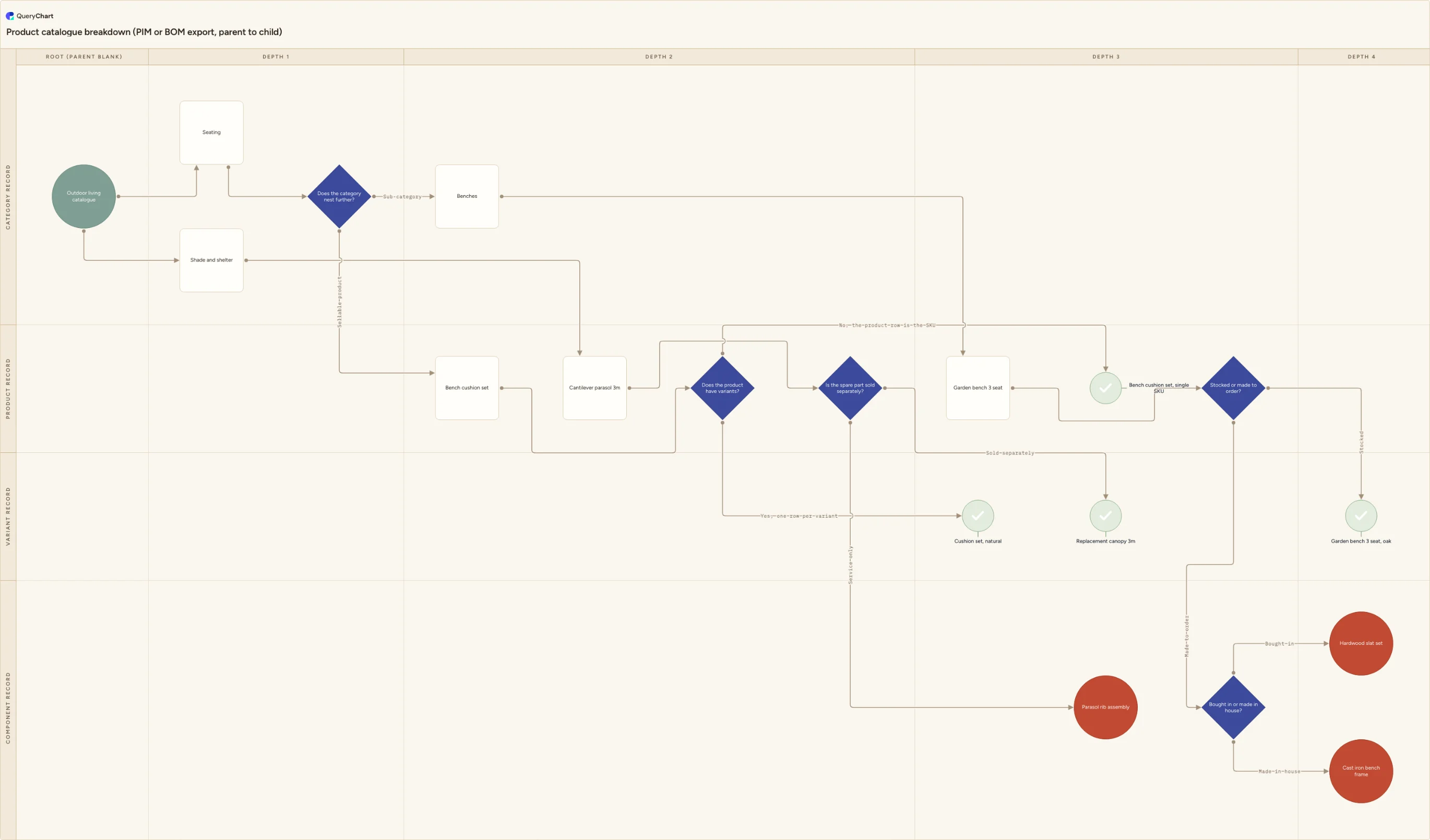
A PIM or BOM export names each row's parent, so its arrows point up. The Line to column names children, so they point down. This template is that inversion drawn out: five depth levels, five decisions, seven leaves.
What the CSV parent child hierarchy template (product catalogue breakdown) process is
A product catalogue export and a bill of materials arrive in the same shape. One row per item, an id column, a name column, and a column naming that row's parent: parent_id, parent_sku, belongs_to, whatever the system that wrote the file happens to call it. The hierarchy is all there. It is simply stored pointing the wrong way for a diagram: each row names the one row above it, and no row anywhere names the rows below it. That is the right design for a database, where a cell holds one value and never a list, and the wrong one for a chart, where an arrow leaves a parent and arrives at a child. It is also not a file you built. A CSV is what comes out of a system, already flattened: no formulas left to recalculate the lookup for you, no second sheet holding the variant table, no colour coding to say which rows were the finished goods.
The QueryChart sheet stores the opposite relation. Line to holds the rows this row points at (its children) as a comma-separated list of row numbers, and Line text holds the connector labels in matching order. So the translation is one inversion, done once. Group the export by its parent column, and each group becomes the Line to value of the row it names. A parent with four children ends up with four numbers in a single cell; every child ends up with nothing in its own Line to and its position counted in its parent's. The rows whose parent cell is blank are the roots, and you want exactly one of them: three blank parents is three trees, and three trees is three charts.
Two things catch people out. Line to holds positions, not identifiers: the value is the row's number in the sheet, so a parent of SKU-1042 has to be resolved to the number of the row carrying that code, and inserting one row renumbers everything below it. A number naming no row is dropped when the chart is drawn, and nothing tells you. The second is that depth is not a column: you get it by walking the parent chain upwards until you reach a blank, which is why the same kind of record can sit at different depths in different branches of the same file. The chart below is a small outdoor furniture catalogue drawn exactly that way: nineteen rows across five depth columns and four record lanes, one root, seven leaves, and five decisions at the points where a catalogue genuinely forks: whether a category nests again, whether a product carries variant rows, whether an item is stocked or made to order, and whether a component is bought in or made.
What this flowchart covers
In this template
- Five depth columns: "Root (parent blank)" and Depth 1 through Depth 4, crossed with four record lanes: "Category record", "Product record", "Variant record" and "Component record", so the export's type column becomes a position on the page while the parent chain becomes the column.
- A single root, "Outdoor living catalogue", which in the file is the only row whose parent cell is empty, fanning to the two depth-1 categories "Seating" and "Shade and shelter".
- The reason depth and record type never quite line up: "Does the category nest further?" splits a nested sub-category from "Bench cushion set", a sellable product sitting at the same depth as a category, so "Garden bench 3 seat" ends up a level lower than "Cantilever parasol 3m" although both are products.
- "Does the product have variants?" answered the way the file answers it: yes produces "Cushion set, natural", a variant row carrying the orderable code, and no produces "Bench cushion set, single SKU", where the product row is the sellable row and has no children at all.
- The bill-of-materials branch, reachable only through "Stocked or made to order?": a stocked item ends at "Garden bench 3 seat, oak", while a made-to-order one carries on into "Bought in or made in house?" and down to "Hardwood slat set" and "Cast iron bench frame".
- Seven leaf rows, each one a row with a blank Line to cell, separated by shape rather than by depth: sellable leaves such as "Replacement canopy 3m" against internal ones such as "Parasol rib assembly", which is what "Is the spare part sold separately?" decides.
When to use this template
- Somebody has sent you a catalogue export (a CSV out of a PIM, an ERP or an e-commerce back office) and asked what the range actually contains.
- A bill of materials runs to several hundred lines and nobody can see which finished items one component reaches without filtering the file by hand.
- Two systems disagree about the catalogue structure, and you want the two exports drawn as two trees rather than compared row by row in a diff.
- The export has orphans in it, rows whose parent id appears nowhere in the file, and you need to find them before the hierarchy is loaded into anything else.
- You are handing the range to a supplier, an auditor or a new starter, and a column of ids beside a column of parent ids is not something anyone can read.
The CSV that produces this diagram
One row per step. The numbers in Line to are row numbers — that is what draws the connectors, and it is the column most files are missing.
| # | Shape | Box text | Line to | Line text | Horizontal lane | Vertical lane |
|---|---|---|---|---|---|---|
| 1 | Start | Outdoor living catalogue | 2, 3 | Root (parent blank) | Category record | |
| 2 | Process | Seating | 4 | Depth 1 | Category record | |
| 3 | Process | Shade and shelter | 7 | Depth 1 | Category record | |
| 4 | Decision | Does the category nest further? | 5, 6 | Sub-category, Sellable product | Depth 1 | Category record |
| 5 | Process | Benches | 10 | Depth 2 | Category record | |
| 6 | Process | Bench cushion set | 8 | Depth 2 | Product record | |
| 7 | Process | Cantilever parasol 3m | 9 | Depth 2 | Product record | |
| 8 | Decision | Does the product have variants? | 11, 12 | Yes, one row per variant, No, the product row is the SKU | Depth 2 | Product record |
| 9 | Decision | Is the spare part sold separately? | 13, 14 | Sold separately, Service only | Depth 2 | Product record |
| 10 | Process | Garden bench 3 seat | 15 | Depth 3 | Product record | |
| 11 | Success | Cushion set, natural | Depth 3 | Variant record | ||
| 12 | Success | Bench cushion set, single SKU | Depth 3 | Product record | ||
| 13 | Success | Replacement canopy 3m | Depth 3 | Variant record | ||
| 14 | End | Parasol rib assembly | Depth 3 | Component record | ||
| 15 | Decision | Stocked or made to order? | 17, 16 | Stocked, Made to order | Depth 3 | Product record |
| 16 | Decision | Bought in or made in house? | 18, 19 | Bought in, Made in house | Depth 3 | Component record |
| 17 | Success | Garden bench 3 seat, oak | Depth 4 | Variant record | ||
| 18 | End | Hardwood slat set | Depth 4 | Component record | ||
| 19 | End | Cast iron bench frame | Depth 4 | Component record |
#,Shape,Box text,Line to,Line text,Horizontal lane,Vertical lane
1,Start,Outdoor living catalogue,"2, 3",,Root (parent blank),Category record
2,Process,Seating,4,,Depth 1,Category record
3,Process,Shade and shelter,7,,Depth 1,Category record
4,Decision,Does the category nest further?,"5, 6","Sub-category, Sellable product",Depth 1,Category record
5,Process,Benches,10,,Depth 2,Category record
6,Process,Bench cushion set,8,,Depth 2,Product record
7,Process,Cantilever parasol 3m,9,,Depth 2,Product record
8,Decision,Does the product have variants?,"11, 12","Yes, one row per variant, No, the product row is the SKU",Depth 2,Product record
9,Decision,Is the spare part sold separately?,"13, 14","Sold separately, Service only",Depth 2,Product record
10,Process,Garden bench 3 seat,15,,Depth 3,Product record
11,Success,"Cushion set, natural",,,Depth 3,Variant record
12,Success,"Bench cushion set, single SKU",,,Depth 3,Product record
13,Success,Replacement canopy 3m,,,Depth 3,Variant record
14,End,Parasol rib assembly,,,Depth 3,Component record
15,Decision,Stocked or made to order?,"17, 16","Stocked, Made to order",Depth 3,Product record
16,Decision,Bought in or made in house?,"18, 19","Bought in, Made in house",Depth 3,Component record
17,Success,"Garden bench 3 seat, oak",,,Depth 4,Variant record
18,End,Hardwood slat set,,,Depth 4,Component record
19,End,Cast iron bench frame,,,Depth 4,Component record
How it works
Find the two columns that carry the hierarchy
Everything else in the export is decoration for this purpose. You need the column holding each row's own identifier and the column naming its parent. They are rarely called id and parent_id: look for parent_sku, belongs_to, category_path or assembly. If the parent is a path rather than a code, such as Home > Seating > Benches, the last segment is the parent and the rest is the depth. If the export has no parent column at all but has a level number, see the note on indented bills of materials below.
Invert the parent column into Line to
This is the whole job. Sort or group the export by its parent column so that every parent's children sit together, then write those children's row numbers into the parent's Line to cell, comma-separated. The direction reverses here: the export said child names parent, the sheet says parent names children. One consequence is worth stating out loud — the parent column has one value per row, and Line to has as many values as that row has children, so the information moves from many rows onto fewer.
Number the rows last, and only once the order is final
Line to holds the row's position in the sheet, not its identifier, so SKU-1042 has to become the number of the row that carries it. Insert a row afterwards and every number below the insertion point is now one out. Get the rows into their final order first, then resolve the ids to numbers in one pass. A Line to value naming a row that does not exist is dropped silently when the chart is drawn, which looks like a box that simply forgot to connect to anything.
Quote the Line to cell and confirm the delimiter
Line to and Line text hold comma-separated lists, so in a comma-delimited file those cells have to be wrapped in double quotes — "4,5" and "Yes,No" — or the row gains a field and every column after it shifts one to the left. European exports are frequently semicolon-delimited, which makes commas inside cells harmless but means the whole file has to be read as semicolon-delimited. Product names bring their own quoting problems: a comma in Bench, 3 seat or an inch mark in a 3" pole has to be escaped the same way. If a column looks ignored on import, check the first header name, since a file written as UTF-8 with a byte order mark carries three invisible bytes in front of it.
Set Shape from what the row is, and Horizontal and Vertical lane from where it sits
One row gets Start: the one with the blank parent. Rows with a blank Line to are leaves, and a leaf needs a terminator shape — End, Success or Reject — because a non-terminal row with no outgoing connector is a dead end. Use the split this template uses if it helps: Success for rows a customer can order, End for rows that only exist inside an assembly. Then fill Horizontal lane with the depth you walked and Vertical lane with the export's own type column. An unrecognised shape name normalises to Process without complaint, so check the spelling of Decision in particular.
Clear the orphans, the extra roots and the loops before importing
Three checks, each with a distinct symptom. Every value in the parent column must appear in the id column; the ones that do not are orphans, usually because the export was filtered to one category while the parents live above it. Exactly one row should have a blank parent, and if several do you are looking at several trees. And no row may reach itself through its parents, which happens after a bad merge and, once inverted, draws a connector that loops back on itself.
Frequently asked questions
How do you turn a parent and child column into a flowchart?
By inverting the relation and then numbering it. The export gives you child names parent; the sheet wants parent names children. Group the rows by the parent column, and for each parent write its children's row numbers into that parent's Line to cell, separated by commas. Every row whose parent cell is blank is a root and takes the Start shape; every row that appears in nobody's parent column is a leaf, gets a blank Line to and takes a terminator shape. Fill Box text from the name column, Horizontal lane from the depth you get by walking the parent chain, and Vertical lane from the type column the export already has. Then drop the .csv onto the spreadsheet area of the editor, or paste the CSV text straight into it. The import matches on header names, so the column order in your file does not matter and any columns it does not recognise are carried along and ignored.
What is the difference between a parent column and a Line to column?
Direction, cardinality and what the value refers to. A parent column points up: each row names the single row above it, so there is exactly one value per row and leaves are the rows nobody names. A Line to column points down: each row names the rows beneath it, so a parent with four children holds four values in one cell and leaves are the rows whose cell is empty. And the values are different in kind. A parent column holds an identifier, something like SKU-1042 that stays with the row wherever it moves. Line to holds a position, the row's 1-based number in the sheet, which changes the moment a row is inserted above it. That is why the identifiers have to be resolved to numbers after the row order is settled rather than before.
My columns shifted halfway across the file. What happened?
Almost always an unquoted comma. A CSV row is split on the delimiter before anything else looks at it, so a Line to cell containing 4,5 in a comma-delimited file is read as two fields, the row ends up one field longer than the header, and every column after Line to lands under its neighbour's heading. Wrap those cells in double quotes and the parser puts them back together. The same applies to Line text, which is also a comma-separated list, and to any product name with a comma in it. If the shift starts at the very first column instead, the cause is usually the opposite problem: the file is semicolon-delimited, as most European system exports are, and is being read as comma-delimited, or an encoding mismatch has attached a byte order mark to the first header name so that it no longer matches.
What happens to a row whose parent is missing from the export?
It becomes an orphan, and it is the most common defect in a filtered export. You asked the system for one category, or for active items only, and it gave you exactly those rows — including their parent ids, which point at rows the filter excluded. Nothing in the file is marked as wrong. When the hierarchy is inverted, that row is simply never listed in anybody's Line to, so it draws as a box with nothing arriving at it, sitting outside the tree. Decide per row which it is before you import: a row whose parent was filtered out should be reattached to whatever the nearest included ancestor is, and a row whose parent no longer exists in the source system is a data fault to send back rather than to draw.
Can I use a bill of materials that has a level column instead of a parent column?
Yes, and it converts to the same thing, but the conversion depends on the row order rather than on any value in the row. An indented bill of materials repeats the levels 1, 2, 2, 3, 1 down the file, and the rule is that a row's parent is the nearest row above it whose level is exactly one lower. That means the export's original order is load-bearing — sort the file by part number first and the hierarchy is gone, with no error and nothing left to recover it from. Walk the file top to bottom keeping the last row seen at each level, assign parents as you go, and only then invert into Line to. Quantities, units and supplier codes can stay where they are in their own columns, which are carried through the import and ignored, or move into the Notes column if you want them visible.