CSV vs Excel for flowcharts: which file to build from
CSV is one plain-text table with no formulas, no second sheet and no formatting. Excel has all three and is rarely what a system exports. Which format to build a flowchart from, and what each one costs you.
Excel is the better place to prepare a process by hand; CSV is usually the file a system actually hands you. Either becomes a flowchart, but they fail in different places, and knowing which one you are holding decides what you check first.
The short version
- CSV is one table of plain text: no formulas, no second sheet, no formatting, nothing to recalculate.
- CSV does not declare its delimiter. Comma, semicolon and tab are all in circulation and the file looks the same.
- Leading zeros survive in the file and die in the viewer: 00742 is intact until Excel opens the CSV and saves it back.
- Excel keeps types and formulas, but a formula is a value by the time it is a box, and .xlsx is rarely what a system exports.
- Both import identically: drop the file on the spreadsheet area or paste the rows in, and matching is on header names, not column order.
What each format can and cannot carry
The two formats are not two versions of the same thing. A CSV is a text file: one table, one row per line, fields separated by a delimiter, quotes around any field that contains that delimiter. There is nothing else in it: no formulas, no cell types, no second tab, no colour, no column widths. An .xlsx is a zipped bundle of XML that carries all of those, which is why it is the better place to draft a process by hand and why almost no system emits one. Ask an ERP, a PIM, a ticketing tool or a database for your process data and what comes back is a .csv.
A flowchart needs less than either format provides. One row per box, a label, the row numbers each row connects to, the connector labels in matching order, and optionally a shape and two lane columns. That is the whole requirement, and all of it is text. Everything Excel adds on top has to be resolved to a value before it can become a box anyway: a formula becomes the number it produced, a lookup against a second sheet becomes the string it returned, a conditional format becomes nothing at all. If you want that requirement in full, /guides/how-to-structure-csv-for-flowcharts sets out the columns; this page is only about the container.
So the honest comparison is about what each container costs you. CSV costs you a delimiter that the file never declares (comma in the United States, semicolon across most of Europe, tab often enough to matter) plus an encoding that is only sometimes UTF-8 and sometimes carries a byte order mark in front of the first header name. It has no types, so a product code and a quantity look identical, and the moment Excel opens the file it guesses: 00742 becomes 742, 3-4 becomes a date, a long SKU becomes scientific notation. Excel costs you the opposite set. It is a binary blob you cannot diff or grep, it invites merged cells and a two-row header and colour used as data, and the file you are given is usually not the file the system produced: someone opened the export and saved it, which is where most of the damage in a CSV happens.
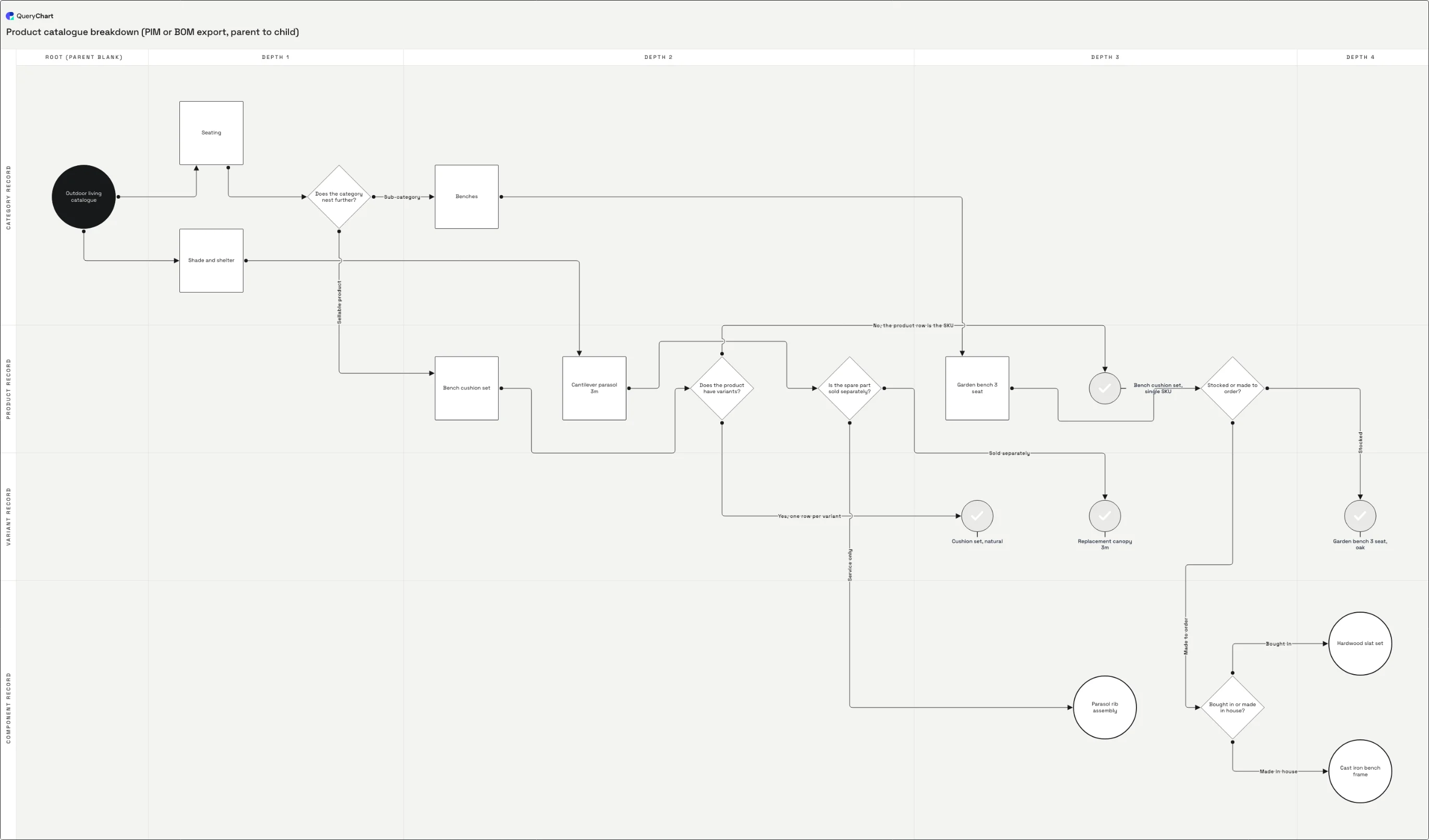
The example below is a product catalogue breakdown, the kind of parent-and-child export that only ever arrives as a CSV. Nineteen rows, one root whose parent cell is blank, five decisions where a catalogue genuinely forks, seven leaves. Watch the walkthrough fill in one column at a time and note which stages would have been easier in Excel and which would have been no different at all; the template itself is at /templates/csv-parent-child-hierarchy.
A CSV export becoming a chart, one column at a time
A product catalogue export at four stages of completeness. Open the spreadsheet panel to see which column each stage fills in.
What the export gives you
A PIM export arrives as names and a type column, not as arrows. The first four rows here are "Outdoor living catalogue", "Seating", "Shade and shelter" and the question "Does the category nest further?". Only Shape is filled in, and Shape is the one column a CSV usually already implies through its type or level field, this stage costs you nothing in either format.
Invert the parent column into Line to
The export said each row's parent; Line to says each row's children, as row numbers. "Outdoor living catalogue" now holds "2,3" and the arrows appear. This is the one stage Excel would genuinely have shortened, because resolving a parent code to a row number is a lookup, and it is also the stage where a comma-delimited file needs that cell wrapped in double quotes or the row gains a field.
Label the branches in Line text
"Does the product have variants?" takes "Yes - one row per variant" and "No - the product row is the SKU", paired by position with its two Line to numbers, 11 and 12. Note the dashes. A comma inside a branch label is not a quoting problem you can solve: Line text is split on commas after the CSV quotes come off, so a label containing one becomes two labels and the pairing with Line to shifts. Excel will not warn you about this either; it is a property of the column, not of the file format.
Add the lane columns
Horizontal lane holds the depth walked up the parent chain, Root through Depth 4, and Vertical lane holds the export's own type column: category, product, variant, component. Type was already in the file and depth had to be derived, which is the split in miniature: the data the system gave you against the data you compute. After the import there is nothing left to recompute, so the advantage stops mattering.
How it works
Work out which file you actually have
If the process came out of a system, you have a CSV whatever the icon says, and the safest thing you can do with it is not open it in Excel. If somebody typed the process by hand, you have a workbook, and it will have merged cells in it. The two starting points need different first moves, and treating an export like a workbook is what puts dates in your product codes.
Open the CSV in a text editor before a spreadsheet
Look at the first two lines. They tell you the delimiter, whether fields are quoted, and whether the first header name has three invisible bytes in front of it from a UTF-8 byte order mark. Thirty seconds here saves the two failures that look like software bugs and are not: a file that imports as one enormous column, and a first column that is silently ignored because its header no longer matches.
If Excel is your source, flatten it down to one table
Paste the sheet over itself as values so every formula becomes the string it produced. Unmerge everything, delete the title block above the header, delete blank separator rows, and move anything encoded as fill colour or bold into a real column, because none of it survives the trip. One header row, one row per step, one sheet. CSV is one table by definition, so this is the step that makes the two sources equivalent.
Add the connection columns as row numbers
Line to holds the 1-based number of the row each row connects to, comma-separated where there is more than one, and Line text holds the connector labels in the same order. In a comma-delimited file both cells have to be quoted ("5,6" and "Yes,No") or the row ends up one field longer than the header and every column after it shifts left. This is the only genuinely new data you have to supply in either format.
Import it
Drop the .csv onto the spreadsheet area of the editor, or paste the CSV text straight into it. Columns are matched on header name, so their order in your file does not matter and anything unrecognised is carried along and ignored. From a workbook, either select the range and paste it in, or save the sheet as CSV first: the second is worth doing when the sheet has anything unusual in it, because saving as CSV shows you what actually survives.
Check the three things that only break in one direction
Codes that lost a leading zero, values that became dates, and a column that shifted somewhere in the middle of the file. All three come from a CSV having been parsed by something that guessed, and all three are invisible until you look for them. Fix them in the rows, not in the original export, because after this point the chart is the master and the file is a snapshot.
Mistakes to avoid
Opening the export in Excel to "check it"
Excel parses on open and saves what it parsed. 00742 comes back as 742, 3-4 comes back as a date, a sixteen-digit code comes back in scientific notation, and the original values are gone from the file. If you must look at it, look in a text editor or import it as text.
Assuming the delimiter is a comma
Most European system exports are semicolon-delimited, and a tab-delimited file often arrives named .csv. Nothing in the file declares which it is. A whole export landing in a single column means the delimiter was guessed wrong, not that the file is broken.
Meaning carried by formatting
Bold for decisions, yellow for the exception path, a merged cell spanning a phase. This is an Excel-only habit and CSV deletes all of it without a warning. Anything that carries meaning has to be a column (Shape, Line text, or a lane) before the file is exported.
Exporting the wrong sheet
A workbook keeps the steps on one tab and the owner list or the code lookup on another, and CSV takes one table. Resolve the lookups to values first, then export the tab with the steps. /guides/how-to-define-flowchart-connections-in-csv covers what the connection columns need once you are down to a single table.
Import your CSV as a flowchart
Open the catalogue example as your own chart to see the columns filled in, then paste your own export over the rows.
Related guides
Drawing quantities instead of steps?
The same choice applies to Sankey diagrams: a CSV or a tab-separated copy from Excel both work as a source, target, value list.
Frequently asked questions
Should I export CSV or XLSX to make a flowchart?
Take whichever the source system already produces, which in practice means CSV. Converting an export to a workbook adds a parse step that can only lose information, and the workbook features you would gain (formulas, types, a second sheet) are all things that have to be resolved to plain values before a row can become a box. Excel is the better choice in one case: when the process does not exist anywhere yet and you are writing it out by hand, because a formula that turns a step code into a row number is genuinely quicker than doing it manually. That path is covered in /guides/how-to-create-a-flowchart-from-excel. Once the rows are settled, the two formats converge completely.
Does CSV lose anything a flowchart actually needs?
No. Every column a chart is built from is text: the label, the row numbers in Line to, the connector labels in Line text, the shape name, and the two lane names. None of that needs a type, a formula or a second sheet, so a CSV carries a complete flowchart with nothing missing. What CSV loses is everything around the chart: the formatting, the notes in a comment, the pivot on the next tab, the column that was calculated rather than stored. If any of that is load-bearing for your process, it was meaning encoded outside the data, and it has to become a column before the export rather than after it.
Why did my product codes change when I opened the file?
Because a CSV has no types and the program that opened it had to guess. A field reading 00742 is just those five characters in the file; Excel reads it as a number, drops the leading zeros and displays 742, and if you save at that point the file itself now says 742. The same guess turns 3-4 into a date, turns a long numeric code into scientific notation, and reinterprets 01/02 according to the locale of whoever opened it. The file was correct until it was viewed. Import the CSV directly rather than round-tripping it through a spreadsheet, or if you have to open it, import the columns as text.
Which format is better when several people maintain the process?
CSV, for as long as the process lives in a file at all. It is plain text, so it diffs line by line, greps, merges, and sits in version control showing exactly which steps changed between two revisions. An .xlsx is a zip of XML: a one-cell edit rewrites most of the archive, so a diff tells you the file changed and nothing else. That said, the answer stops mattering after import, because the chart becomes the master and its own revision history takes over. Keeping the CSV as a parallel copy that people also edit reintroduces the drift the conversion was meant to end.
My columns shifted halfway across the row. What happened?
Almost always an unquoted comma in a comma-delimited file. The row is split on the delimiter before anything looks at the headers, so a Line to cell containing 4,5 is read as two fields, the row ends up one field longer than the header, and every column after it lands under its neighbour's heading. Wrap those cells in double quotes and the parser puts them back. The same applies to Line text and to any label with a comma in it, such as a product name. If the shift starts at the very first column instead of the middle, the cause is different: the file is semicolon-delimited and is being read as comma-delimited, or a byte order mark is attached to the first header name so it no longer matches.