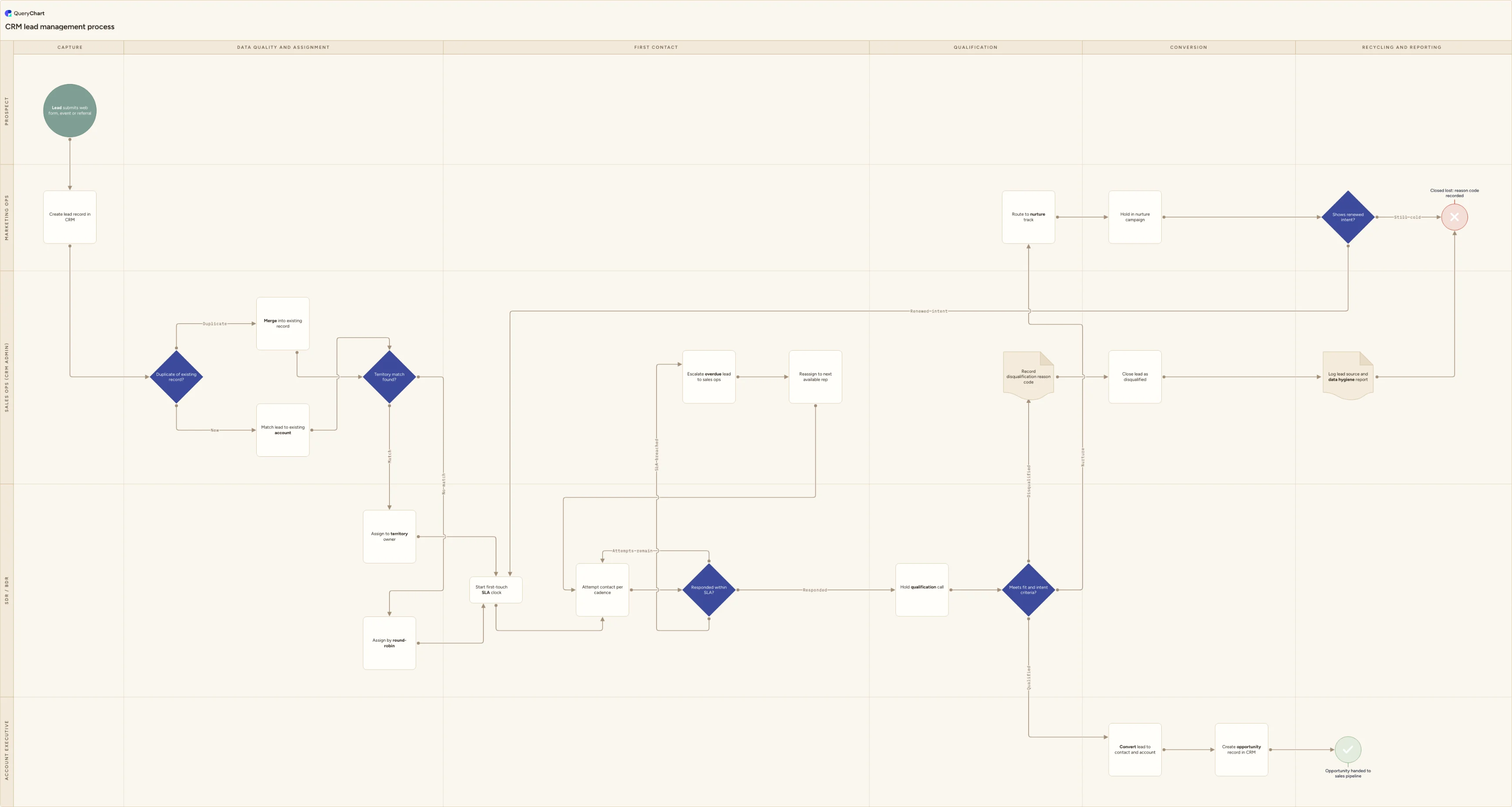
CRM lead management process flowchart (dedupe to conversion)
CRM lead management process flowchart template: duplicate check, territory or round-robin assignment, first-touch SLA, contact cadence, qualification and conversion, nurture or disqualification.
What the CRM lead management process flowchart (dedupe to conversion) process is
CRM lead management is the operational layer underneath any sales funnel: the discipline of what happens to a lead record inside the CRM itself, as distinct from the judgement calls about whether the lead is any good. It starts the moment a lead is captured, from a web form, an event list, a bulk import or a partner referral, and the chart below follows the record rather than the person: created, checked against the database for a duplicate, matched to or created against an account, assigned to an owner, worked to a first-touch service level, contacted on a defined cadence, and finally resolved into a converted contact and opportunity, a nurture track, or a closed record carrying a reason code. Where the process loops, as a nurtured lead re-entering contact or an overdue lead being reassigned, the chart draws the loop explicitly rather than leaving it as something that just happens in the CRM's default views.
This is the record's journey through the system, not the judgement of whether it deserves the seller's time. The scoring and framework work, deciding whether a lead clears the marketing-qualified bar and is accepted by an account executive using BANT or MEDDIC, belongs to the sales lead qualification process, and this chart deliberately compresses that into one 'Meets fit and intent criteria?' decision rather than re-drawing it. Downstream, once a lead has converted into an opportunity and a contact, the commercial steps of quoting, ordering and invoicing belong to the lead-to-order process; this chart stops at the opportunity being handed to the pipeline. The boundary matters because a chart that tries to be both a CRM data-hygiene map and a deal-scoring model ends up doing neither job well, and the people who own dedupe rules are rarely the people who own qualification criteria.
Four decisions carry the process, and each sits in the lane of the person who actually has to answer it. 'Duplicate of existing record?' sits with sales ops (CRM admin) because a rep chasing a quota has every incentive to skip a duplicate check that a data owner does not. 'Territory match found?' also sits there, because assignment rules are a system configuration decision, not a judgement call. 'Responded within SLA?' sits with the SDR or BDR actually working the cadence, with a third branch for a breach that routes to escalation rather than leaving the lead to age silently. 'Shows renewed intent?' closes the loop: it is what turns nurture from a place leads go to be forgotten into a genuine re-entry point, and it deliberately sits with marketing ops rather than the original rep, since ownership of a cold lead usually needs to be renegotiated on reassignment.
What this flowchart covers
In this template
- Five swimlanes (Prospect, Marketing ops, Sales ops (CRM admin), SDR / BDR and Account executive) across six phases: capture, data quality and assignment, first contact, qualification, conversion, and recycling and reporting
- A 'Duplicate of existing record?' decision immediately after capture, with a merge branch that preserves activity history and a match against an existing account, so the process addresses record hygiene before anything is assigned or worked
- A 'Territory match found?' assignment decision covering both rule-based routing and round-robin as the fallback, so the chart shows how a lead actually reaches an owner rather than assuming assignment just happens
- A first-touch SLA clock and a three-way 'Responded within SLA?' decision: 'Responded' books the qualification call, 'Attempts remain' loops back through the cadence, and 'SLA breached' escalates to sales ops for reassignment
- A combined 'Meets fit and intent criteria?' decision with three honest exits, 'Qualified' into conversion, 'Nurture' into a marketing-owned campaign, and 'Disqualified' into a coded reason record, so nothing simply vanishes from the pipeline
- Recycling and reporting as a real phase rather than an afterthought: a 'Shows renewed intent?' decision that re-enters a nurtured lead into first contact, and a lead-source and data-hygiene record that both the disqualified and the recycled paths pass through
When to use this template
- You are configuring lead assignment, deduplication or SLA rules in your CRM and want the target process settled before it becomes field logic and automation
- Duplicate lead records keep appearing and you need to see exactly where the check is meant to happen and who is meant to be doing it
- Leads are stalling somewhere between capture and a worked opportunity and you need to see whether it is assignment, the SLA or an undefined nurture loop
- You are auditing lead source reporting and the numbers do not reconcile, because merges, reassignments and disqualifications were never drawn as steps that get logged
- You are onboarding an SDR, BDR or CRM admin and want one page covering assignment rules, the cadence, escalation and what happens to a lead that goes cold
How it works
Rename the lanes to your roles
Replace Prospect, Marketing ops, Sales ops (CRM admin), SDR / BDR and Account executive with the roles that actually exist in your organisation. On a small team the CRM admin function is often a part-time responsibility held by a sales manager or an ops generalist: merge that lane into the one that genuinely owns it rather than drawing a handoff nobody performs.
Write your deduplication rule onto the first decision
'Duplicate of existing record?' is only a real gate if the matching logic is defined: which fields it matches on (email domain, company name, phone), whether it runs automatically or is a manual check, and what happens when it is uncertain rather than a clean match. Record the account-matching step too, since a lead can be a genuinely new person at an existing account.
Fix your assignment rule and its fallback
State exactly what 'Territory match found?' checks against, region, industry, company size or named accounts, and what round-robin means in practice: a fixed queue order, load-balanced by open lead count, or something else. An assignment rule with an undefined fallback is the most common reason leads sit unowned.
Set the SLA and the cadence
Put a real number on the first-touch SLA and define the cadence behind 'Attempts remain', the number of touches, the channels and the working days between them, so that a breach has an unambiguous trigger. Agree what escalation actually does: reassign immediately, or flag for review first.
Define fit and intent, and the nurture rule
Write down what 'Meets fit and intent criteria?' is actually checking, most teams separate a firmographic fit signal from a behavioural intent signal, and state how long a lead sits in nurture before 'Shows renewed intent?' is even asked. An undated nurture track is where leads go to be quietly forgotten.
Publish the disqualification reason codes
Fix a short, closed list for 'Record disqualification reason code' and stop free text at the field. Review the distribution with marketing on a set interval: a cluster of 'no budget' reasons points at targeting, a cluster of 'no response' points at the SLA, the cadence or the source itself.
Walk it against a real batch of leads
Pull a week's worth of leads, including at least one duplicate, one reassignment and one that went to nurture, and trace each through the chart. Any step people describe verbally that is not drawn, or drawn but skipped in practice, is the finding worth fixing before you publish the process.
Frequently asked questions
What are the steps in a CRM lead management process?
A lead is captured from a web form, event, import or referral and a record is created in the CRM. Sales ops checks it against existing records: a duplicate is merged, preserving activity history, and a new lead is matched to an existing account or left to create one. The record is assigned, by a territory rule where one matches or by round-robin where none does, and a first-touch SLA clock starts. The rep works a defined cadence; a response books a qualification call, unanswered attempts loop through the cadence, and a breach escalates to sales ops. Qualification resolves into three outcomes: a qualified lead converts to a contact, account and opportunity handed to the pipeline; a lead worth another chance goes into nurture, where renewed intent re-enters first contact; and the rest close with a coded reason, logged into lead-source reporting.
What is the difference between CRM lead management and lead qualification?
Lead management is the record's operational path through the CRM: capture, deduplication, assignment, the SLA clock and the contact cadence, and what finally happens to the record. Lead qualification is the judgement layer sitting inside that path, the scoring against an ideal customer profile, the MQL threshold, and a defined framework such as BANT or MEDDIC that decides whether a lead is worth an account executive's time. This chart treats qualification as a single decision, 'Meets fit and intent criteria?', because the scoring mechanics are a separate process with its own decisions and its own owner. Teams that conflate the two usually end up with a CRM admin who is expected to own scoring criteria, or a marketing team expected to fix duplicate records, and neither works well.
How should duplicate leads be handled in a CRM?
Decide the matching logic before the volume makes it a crisis: most systems match on email domain plus company name, or on phone number, with a manual review queue for near matches that are not clean. When a duplicate is confirmed, merge into the existing record rather than deleting the new one outright, and keep the original creation date and the full activity history rather than resetting either. The source and campaign fields deserve a rule of their own: overwrite them only when the new touch is a genuinely better attribution, not simply because it is more recent. Whichever tool runs the check, treat unmatched near-duplicates as a queue for a person to resolve rather than a silent auto-merge, since a wrong automatic merge can attach one company's activity history to another's contact.
How is lead assignment usually decided: territory or round-robin?
Most CRMs run both, in a defined order rather than as a free choice. Territory rules, by region, industry, company size or a named-account list, are tried first because they route the lead to whoever already has the context or the relationship. Round-robin is the fallback for leads that match no territory rule, distributing them evenly, or weighted by current open-lead count, across the pool of reps who can take unassigned work. The two need to be documented together, because an undefined fallback is one of the most common reasons a lead ends up sitting unowned in a queue nobody is checking. Statutory or contractual assignment rules, where they apply to your territories or accounts, sit outside this chart and should be confirmed with whoever owns your sales operations policy.
What should happen to a lead that goes cold in nurture?
It should be re-checked on a schedule rather than left to expire silently, which is what the 'Shows renewed intent?' decision in this chart exists to force. Renewed intent, a new form submission, a pricing page visit, a reply to a nurture email, sends the lead back into first contact rather than starting an entirely new record, so its history is not lost. A lead that stays cold past the review point is closed with a reason code rather than deleted, since a closed record with a documented reason is far more useful to lead-source reporting than one that simply vanished. How long a lead should sit in nurture before that check runs depends on your sales cycle and is a number your own data should set, not a figure borrowed from elsewhere.
Where this process fits
In most operations this process hands off to Sales lead qualification process flowchart: MQL to SAL.
It is one step in Sales pipeline.
Step 1: CRM lead management process flowchart (dedupe to conversion) You are here
CRM lead management process flowchart template: duplicate check, territory or round-robin assignment, first-touch SLA, contact cadence, qualification and conversion, nurture or disqualification.
Step 2: Sales lead qualification process flowchart: MQL to SAL
A swimlane sales lead qualification process flowchart: lead capture, ICP scoring, the MQL decision, SDR cadence, discovery, BANT or MEDDIC and AE handover.
Step 3: Opportunity management process flowchart (stage exit criteria)
Step 4: Sales pipeline process flowchart: opportunity to closed won
Step 5: Lead-to-order process flowchart (lead capture to booked order)