Microsoft Visio alternatives for process mapping
Choosing a process-mapping tool, or deciding whether to renew Visio: which tier a cross-functional map actually needs, where the macOS and browser limits land, what Visio still does better than anything else, and how to run a fair trial.
Visio maps processes perfectly well; whether it is the right tool for process work depends on which tier a cross-functional map pushes you onto, which operating systems your editors use, and whether the map needs an approval and a revision history the product does not have.
The short version
- The bundled "Visio in Microsoft 365" web app has no cross-functional flowchart; a process that crosses teams needs Plan 1 or Plan 2.
- Plan 1 is US$5 and Plan 2 US$15 per user per month, list prices paid yearly at the time of writing, and only Plan 2 includes the desktop app.
- There is no Visio desktop app for macOS, and data-connected diagrams cannot be edited in Visio for the web at all.
- Visio files stored in OneDrive or SharePoint use file version history; retention depends on the account and library settings. Check those settings and any separate approval workflow before relying on them for controlled documents.
- Visio for the web caps a diagram at 1,000 shapes per page and 50 pages; Check Diagram validation is Professional or Plan 2 only.
Process mapping is one thing Visio does, not the thing Visio is
Visio is a diagramming tool with an unusually large shape library, and process mapping is one of the many things it draws. That distinction decides the question. If your diagrams are network racks, floor plans and engineering schematics as well as process maps, Visio's breadth is the reason to keep paying for it. If almost everything you draw is a process (an approval route, a handover, a controlled procedure somebody has to sign), then shape count is not the axis you are choosing on, and comparing tools on it will take you to the wrong answer. The axes that matter for process work are which tier you land on, which operating systems your people use, how many of them need to edit rather than read, and whether the map needs a reviewer and a revision history.
Start with the tier, because process work reaches past the bundled app almost immediately. "Visio in Microsoft 365" (the lightweight web app included with Microsoft 365 commercial plans, though not with Personal or Family) covers flow charts, block diagrams, Venn diagrams and pyramid diagrams, and cross-functional flowcharts are not among them. The moment your process crosses a team boundary you are on Visio Plan 1 or Plan 2, US$5 and US$15 per user per month, list prices paid yearly at the time of writing; a value stream map, a BPMN model or an audit diagram is Professional or Plan 2. Platform matters as much: there is no Visio desktop app for macOS and Microsoft says it has no plans to include one in Microsoft 365, so Mac users work in the browser, where data-connected diagrams cannot be edited at all.
Collaboration and governance are the remaining axes, and they pull in opposite directions. Anyone can view and comment on a Visio diagram without a licence, which is genuinely good and solves most of the problem of circulating a map. Editing needs a licence; desktop co-authoring needs Plan 2 for every author; a file open in the browser and the same file open in the desktop app cannot be co-edited; and conflict resolution is last-write-wins: "The last change is the one that stays." Governance is thinner still. Visio files stored in OneDrive or SharePoint use file version history; retention depends on the account and library settings. Check those settings and any separate approval workflow before relying on them for controlled documents. Nothing in the product reviews or approves a process map.
None of that makes Visio the wrong tool, and some of what it does has no real equivalent anywhere else. Check Diagram, on the Process tab, validates a flowchart or a BPMN 2.0 model against a rule set and lists every finding in an Issues window; most alternatives have nothing of the kind. Subprocesses turn a shape into a linked page. The ShapeSheet lets you build shapes that behave. The desktop app works offline, and Plan 2's content ecosystem runs to roughly 250,000 shapes. If you draw more than processes, if your reviewers care about BPMN conformance, or if you work disconnected on Windows, stay where you are. The worked example below is the case that argues the other way: one process, five phases, four teams, two ways out that are not success.
The process that decides the question
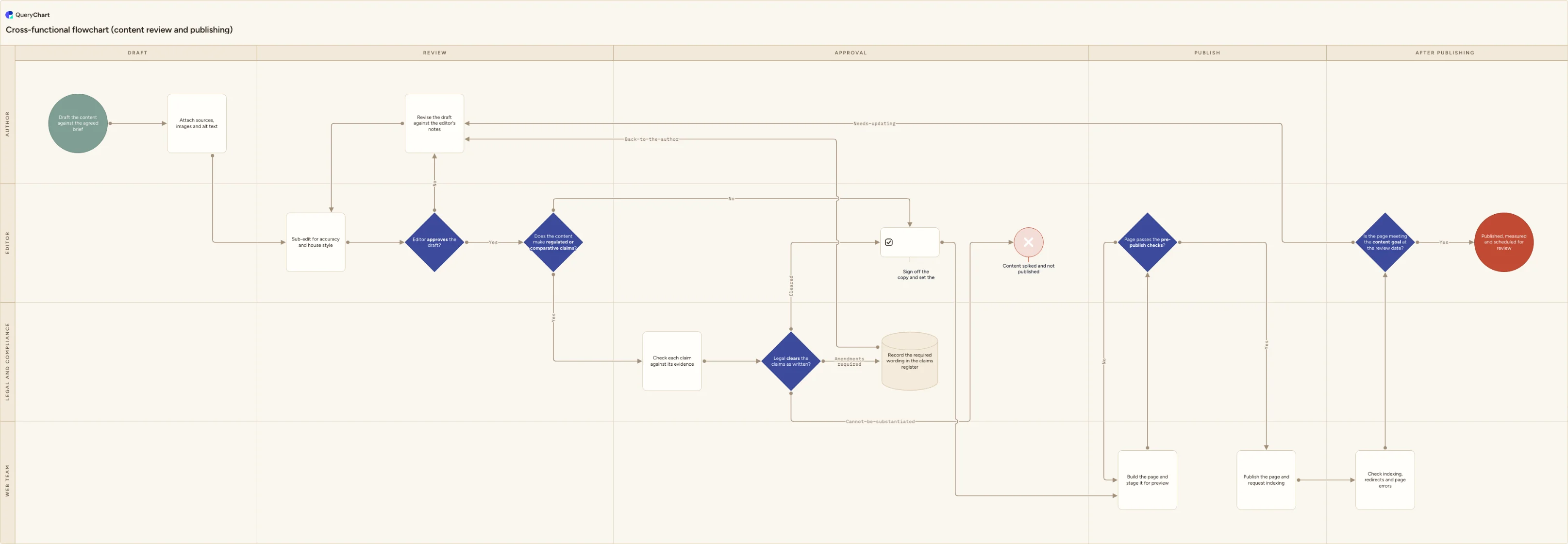
A content review and publishing route across four teams and five phases: the kind of map where tier, editing and approval matter more than the shape library.
One process, two owners
"Draft the content against the agreed brief" sits in the Author lane and the work crosses into Editor for "Sub-edit for accuracy and house style" and the first decision, "Editor approves the draft?". Four rows in, the map already needs lanes, which in Visio is the point at which the bundled web app stops being enough.
Rework, and a third party
"Revise the draft against the editor's notes" points back to the sub-edit rather than forward, and "Does the content make regulated or comparative claims?" hands the piece to Legal and compliance. "Legal clears the claims as written?" has three labelled exits, not two, and the amendments route writes to a claims register before it returns.
The handover nobody documents
Sign-off sets a publication date, the Web team lane builds and stages the page, and "Page passes the pre-publish checks?" fails back to the web team rather than to the author. That distinction is the whole reason the lanes are there: it says who picks up a failure, and a flat flowchart cannot express it.
The routes that are not success
Post-publish checks, then "Is the page meeting the content goal at the review date?" sending an underperforming page back into the same editorial and legal route. Alongside the published ending sits "Content spiked and not published": the branch a map drawn only for the good day leaves out, and the one an auditor asks about.
How it works
Write down what your process maps are actually for
Audit evidence, training, a handover, or improvement work. They are four different requirements. Evidence needs to show who approved which revision and when. Training needs to be readable by someone who was not in the room. Improvement needs the map to be cheap to change. Decide this first, because every later question resolves differently depending on the answer, and a tool that suits training can be useless for evidence.
Count the people who must edit, separately from the people who must read
In Visio, reading is free: anyone can view and comment on a diagram without a licence, including in the browser. Editing always needs one. So the number that drives cost is the editor count, and if those editors need to work in the desktop app at the same time, every one of them needs Visio Plan 2: US$15 per user per month, list price paid yearly at the time of writing.
Check what operating systems those editors use
There is no Visio desktop app for macOS, and Microsoft states it has no plans to include one in Microsoft 365; the published desktop system requirements list Windows only. Mac editors work in Visio for the web, which cannot edit data-connected diagrams at all, and where cross-functional flowcharts require Plan 1 or Plan 2. If half your reviewers are on Macs, the desktop-only features are not available to your team, whatever the licence says.
Decide whether the map needs an approval and a revision history
This is the question most tool comparisons skip and most process work turns on. Visio files stored in OneDrive or SharePoint use file version history; retention depends on the account and library settings. Check those settings and any separate approval workflow before relying on them for controlled documents. If you need to answer "who signed this off, against which revision", you either build that outside the diagram or you choose a tool that records it.
Find out where the steps come from: a document or a table
If the steps live in prose, somebody is going to draw them either way and the drawing tool is the choice. If they live in a spreadsheet, the tool should generate the diagram from the rows. In Visio that route is the Data Visualizer templates in the desktop app, documented as Visio Plan 2 only; if the Excel add-in is what you were relying on, /guides/visio-data-visualizer-alternatives covers that specific case.
Trial two tools on one real cross-functional process, not a sample
Pick a process with a rework loop, a handover between teams and at least one route that ends in a refusal: a sample diagram hides exactly the things that make process maps hard. Then time the second edit rather than the first, because maintenance is where these tools separate. Finally price the trial at your real editor count, on the tier that the diagram type you just drew actually requires.
Mistakes to avoid
Comparing on shape count when the job is a twelve-step approval
Plan 2's content ecosystem runs to roughly 250,000 shapes, and for an electrical schematic that is decisive. For a process map it is close to irrelevant: Microsoft's own flowchart guidance says most flowcharts "tend to use only three or four of the shapes". Count how many distinct shapes your last ten maps actually used before you let the library decide.
Assuming the bundled web app is Visio
"Visio in Microsoft 365" comes with Microsoft 365 commercial plans and covers flow charts, block diagrams, Venn diagrams and pyramid diagrams. It has no cross-functional flowchart (those are available to Plan 1 and Plan 2 subscribers only), and Microsoft says outright that it is not a replacement for either plan. Teams evaluate it, conclude Visio cannot do swimlanes, and are wrong; see /guides/how-to-create-cross-functional-flowchart-in-visio for what the paid tiers actually give you.
Choosing on a roadmap rather than on what ships
Two recent data points are worth weighing before a three-year commitment. The BPMN-to-Power-Automate export is gone: "Effective July 14, 2026, the ability to map BPMN shapes to Power Automate triggers and actions and export them as cloud flows will be removed", with the article now flagged deprecated and users pointed at make.powerautomate.com; existing diagrams and previously exported flows are unaffected. And there is no shipping Copilot diagramming capability in Visio at all: the product and pricing pages do not mention Copilot or AI, and a Microsoft Q&A answer of 24 November 2025 says "At this time, Microsoft has not announced any official plan, and this feature is not currently on the roadmap." Evaluate the tool in front of you.
Treating file versioning as a revision history for an approved map
Visio files stored in OneDrive or SharePoint use file version history; retention depends on the account and library settings. Check those settings and any separate approval workflow before relying on them for controlled documents. It will not tell you which revision a reviewer approved, because nothing recorded that a reviewer approved anything.
Try this process map in the browser
Open /templates/cross-functional-flowchart as your own chart, edit the rows, and see what the process looks like when the lanes, the approvals and the revision history are part of the tool.
Related guides
Frequently asked questions
Is Visio worth it for process mapping?
It depends on what else you draw. If process maps are a minority of your diagrams, Visio's breadth pays for itself, and features like Check Diagram (which validates a flowchart or a BPMN 2.0 model against a rule set and lists every finding in an Issues window) have no real equivalent elsewhere. If process maps are nearly all of it, you are paying per seat for a drawing practice you do not have, and the things process work needs most, a review step and a diagram-level revision history, are not in the product at any tier.
Can I use Visio for process mapping on a Mac?
In the browser only. Microsoft states there is no desktop version of Visio for macOS and that it has no plans to include a Visio desktop app in Microsoft 365; the published desktop system requirements list Windows alone. Visio for the web can create and edit flowcharts and cross-functional flowcharts on Plan 1 or Plan 2, but not data-connected diagrams, and it has no offline mode. So a Mac-based team can map processes in Visio, but not with the Data Visualizer templates or data linking, which are desktop features.
Does Visio have approvals or version history for a process map?
No approval step, and version history that is not really Visio's. Visio files stored in OneDrive or SharePoint use file version history; retention depends on the account and library settings. Check those settings and any separate approval workflow before relying on them for controlled documents. If a process map has to carry a sign-off, that is the gap to test for. QueryChart is built the other way round: approval is a workflow on the chart, and each revision is checkpointed with its author and timestamp.
Will I have to redraw my diagrams if I move off Visio?
Some of them, but less than it looks. What a process map contains is a list of steps, an owner for each, and the branches between them: that transfers as a table, and typing it is usually faster than untangling an imported canvas. Your existing files stay readable: viewing and commenting in Visio for the web need no licence, and .vsdx opens there even though legacy .vsd does not. Diagrams built on desktop-only solutions, and files in formats such as .vsdm, .vssx or .vstx, will not open in the browser at all.