How to create a flowchart with AI
How to create a flowchart with AI: describe the process in plain language, let the model draft the steps and branches, then correct what it invented. With a live recruitment example.
Creating a flowchart with AI works best as a drafting step: describe the process in plain language, let the model produce the steps, decisions and lanes, then correct what it assumed.
The short version
- AI is a drafting tool: it converts a description into steps, branches and lanes.
- Describe your process specifically (roles, thresholds, exceptions) or you get a generic one.
- Everything the model added that you did not say is an assumption to check.
- Review the branches first: invented happy paths are obvious, invented exceptions are not.
- The chart is yours after the first edit: keep it in the editor, not in the prompt.
What AI is genuinely good at here, and what it is not
The tedious part of making a flowchart has never been the thinking. It is the transcription: turning a description into discrete steps, deciding which sentences are decisions, numbering the connections, assigning owners. That is exactly the kind of structured rewriting a language model does well, and it is why an AI first draft can save an hour on a process you could already describe out loud.
What it cannot do is know your organisation. A model asked for a recruitment process will produce a competent generic one, complete with the approval gate your company does not have and without the one it does. It will also quietly resolve ambiguity by inventing something plausible, and an invented step looks exactly like a real one on the canvas, which is the specific risk worth managing.
So the workflow is: describe, generate, then correct against reality. The example below is a recruitment process of the kind an AI draft lands on. Step through it and treat each stage as a review question: is that gate real here, does that loop exist, is that the function that actually does it?
An AI-shaped first draft, reviewed
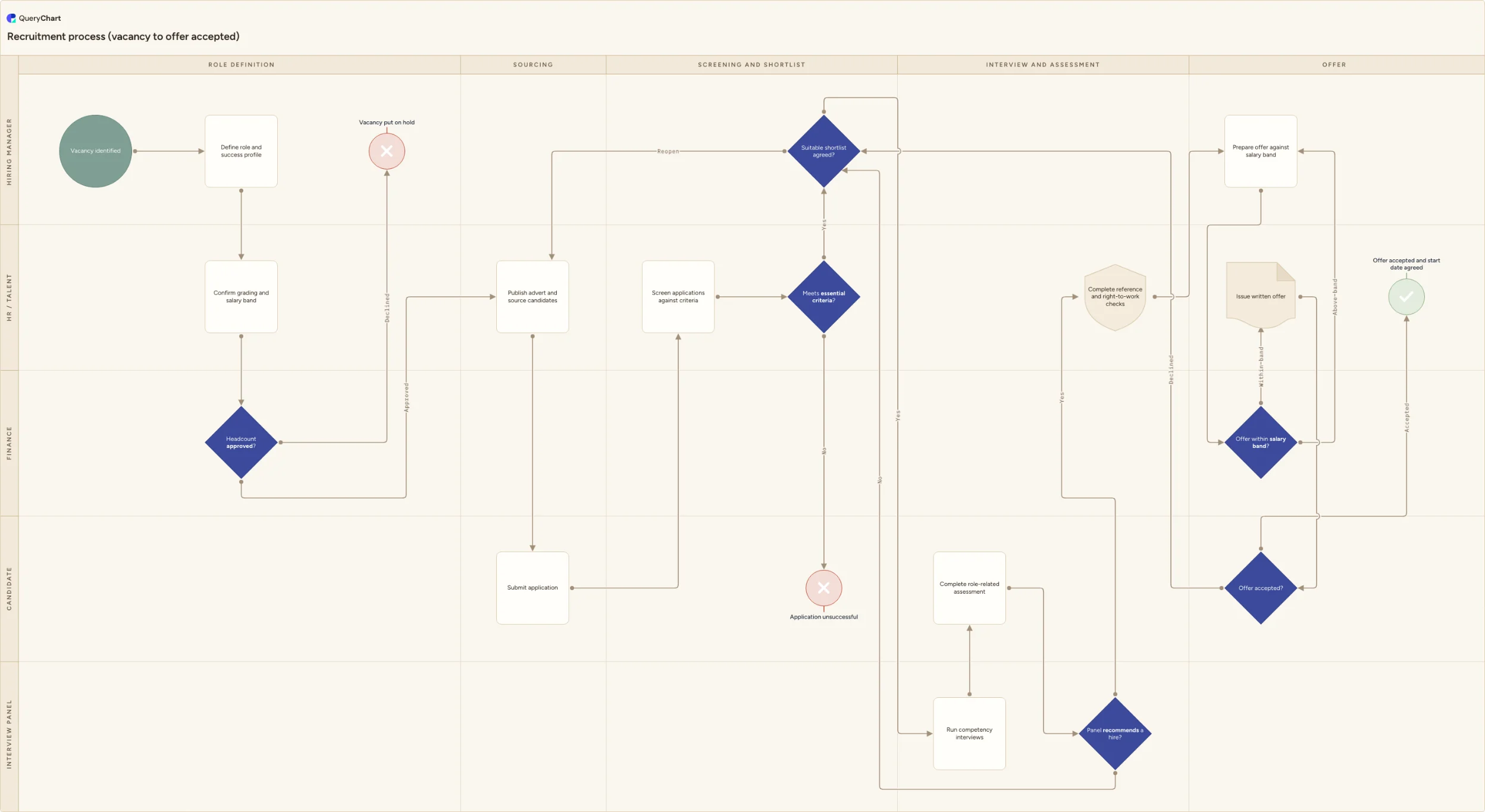
A recruitment process of the kind a first generation produces. Read each stage as a question about your own organisation.
The part AI gets right
Define the role, confirm the band, approve headcount, with a route for a declined vacancy. Structurally sound and instantly recognisable: this is the section where a generated draft saves you real transcription time.
The gate you have to check
Screening against essential criteria, then a shortlist decision that can reopen sourcing. Ask whether your shortlist really has a gate, and who holds it. A model will happily insert an approval that exists in most companies but not in yours.
The steps that need your specifics
Competency interviews, a role-related assessment, then references and right-to-work checks. Generated steps are always plausible and rarely precise: your assessment has a name, your checks have a legal basis, and both belong on the chart.
Where a draft is usually thin
The offer band decision loops back to prepare a revised offer, and a declined offer returns to the shortlist. Exception routes are where a generated chart is weakest, because the description it was given rarely mentioned them.
How it works
Describe the process, not the diagram
Write a few sentences in plain language: what starts it, who is involved, what has to be approved and by whom, and what happens when something is refused. Naming roles and thresholds is what separates a draft you can use from a generic one: the model can only be as specific as your description.
Generate the first draft in the chart
In QueryChart, open a new chart and describe the process to the AI assistant. It writes the steps as rows, sets the decision shapes, connects them by row number and assigns lanes, so what comes back is an editable chart rather than an image you would have to rebuild.
Read it as a reviewer, not a reader
Go through step by step asking which of these you actually said. Everything else is an assumption. Assumptions are often useful (they surface steps you forgot), but each one needs a decision from you rather than a nod.
Fix the branches before the wording
Check every decision: are the criteria yours, do both exits exist here, is anything missing? Generated charts are strongest on the happy path and weakest on exceptions, which is the inverse of where the value is.
Correct the lanes
Reassign each step to the function that genuinely performs it in your organisation. A model guesses lanes from convention (HR screens, finance approves) and conventions vary more between companies than anything else in a process.
Take it to the people who do the work
Walk the corrected draft with the practitioners. An AI draft shortens the blank-page phase; it does not shorten the agreement phase, and treating a generated chart as agreed because it looks finished is the one failure mode worth guarding against.
Mistakes to avoid
Accepting the draft because it looks complete
A generated chart is uniformly confident. The steps you supplied and the steps it invented are rendered identically, so the review has to be deliberate rather than impressionistic.
A vague prompt
"Make a recruitment process" returns the average of every recruitment process. Name your roles, your gates and your thresholds and the draft becomes worth correcting instead of worth deleting.
Iterating in the prompt instead of the chart
After the first draft, editing a row is faster and more precise than re-describing the whole process. Regenerating also throws away the corrections you already made.
Skipping the practitioner review
The purpose of a process chart is agreement. A draft nobody who does the work has seen is a hypothesis, however well written.
Related QueryChart feature
Create your own flowchart with AI
Open the recruitment example as your own chart, or start blank and describe your process to the assistant.
Related guides
Frequently asked questions
Can AI create a flowchart from a description?
Yes. QueryChart's assistant takes a plain-language description and produces a real chart (steps as rows, decisions with labelled branches, connections by row number, and swimlanes by role) which you then edit like any other chart. The quality tracks the specificity of what you give it: a description naming the roles, the approval thresholds and the exceptions produces a draft worth correcting, while a one-line request produces a textbook process.
How accurate are AI-generated flowcharts?
Structurally reliable, factually only as good as your input. Models are consistently good at splitting prose into steps, spotting conditionals and proposing a sensible order. They are unreliable about anything specific to your organisation (who approves what, at which threshold, and what happens when it is refused) and they fill those gaps with plausible defaults rather than flagging them. Treat every element you did not supply as an open question.
Should I use AI or draw the flowchart myself?
Use it for the first draft and do the review yourself. The generation replaces transcription, which is the part with no judgement in it; the review is where you decide what is actually true, which is the part that makes the chart worth having. For a process you cannot yet describe out loud, though, drafting by interview beats prompting, because the missing information is not in your head either.
Can AI convert an existing document into a flowchart?
Yes: pasting a written procedure is usually a better prompt than describing one from memory, because the document already contains the sequence and the conditionals. What it will not contain is the answer to what happens when a step fails, since written procedures habitually stop at the failure. Those gaps come back as questions for the process owner rather than as anything the model can resolve.