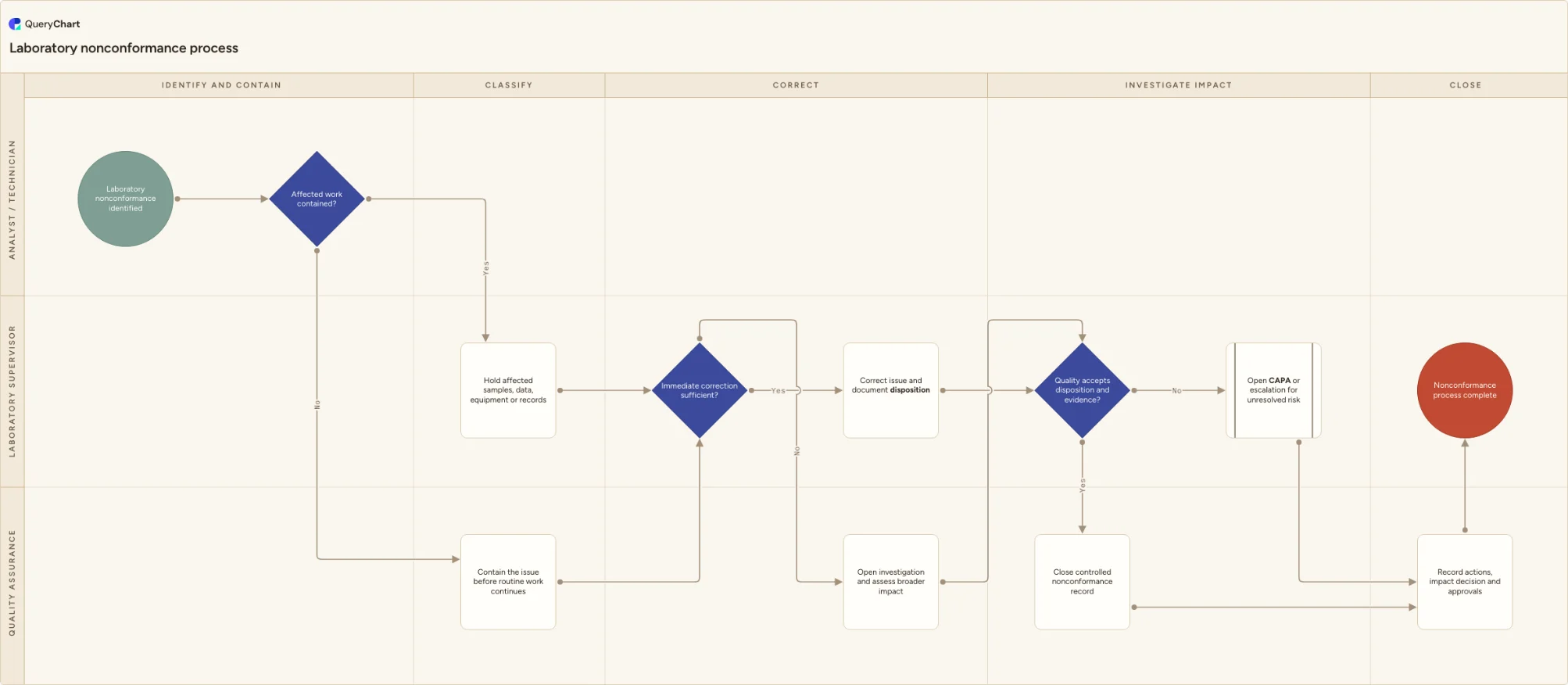
Laboratory nonconformance process flowchart
A laboratory nonconformance workflow for containment, classification, correction, investigation, sample or data impact assessment, corrective action and quality-approved closure.
What the laboratory nonconformance process is
The chart makes the difference between immediate correction and a deeper investigation visible, while preserving a route to assess affected samples, data and previously issued work. It is deliberately a starting point: adapt the roles, criteria, records and escalation thresholds to the services and risks your laboratory actually manages.
The meaningful branches are not footnotes. Affected work contained?, Immediate correction sufficient? and Quality accepts disposition and evidence? decide whether routine work can proceed or whether the laboratory must hold, clarify, investigate or escalate the work.
This template does not establish compliance with any standard or regulation. Confirm the procedure, safety controls, authorization roles and retention requirements that apply at your site before making it effective.
What this flowchart covers
In this template
- Five stages from identify and contain through close across the roles that own this workflow.
- A documented positive and negative path for affected work contained?, so an exception stays visible rather than disappearing from the flow.
- The immediate correction sufficient? gate before routine work continues, with a hold, investigation or remediation path where it does not.
- A final quality accepts disposition and evidence? decision that routes both outcomes through controlled records and closure.
- Editable swimlanes and labels that can be aligned with the laboratory's approved methods, local forms and quality-system terminology.
When to use this template
- You need a common process for laboratory procedural departures, equipment events, documentation failures or quality findings without labeling every event as a major investigation.
- You are revising an SOP, training material or audit-ready process map and need the failure paths visible alongside the routine path.
- Several teams own parts of the workflow and need a shared view of the handoffs, evidence and escalation points.
How it works
Set the real roles and records
Replace the example lanes with the people who actually perform Analyst / Technician, Laboratory Supervisor, Quality Assurance. Add the SOP, form, system or logbook that provides evidence at each handoff.
Define the decision criteria
Write the site-specific rule behind each decision, especially affected work contained?, immediate correction sufficient? and quality accepts disposition and evidence?. Do not leave a result-dependent decision to informal judgement.
Test the exception paths
Walk a recent non-routine case through the hold, clarification, investigation or remediation branches. Change the chart wherever the real response differs from the draft.
Approve and review the procedure
Route the completed process through your document-control and approval process, train the affected roles and review it when methods, systems, responsibilities or risks change.
Frequently asked questions
What does this laboratory nonconformance process flowchart cover?
The chart makes the difference between immediate correction and a deeper investigation visible, while preserving a route to assess affected samples, data and previously issued work. It includes the decision points and exception routes needed to prevent a failed check or unclear handoff from being treated as routine work.
Can this template be used in a regulated laboratory?
It is an editable starting point, not a compliance claim. Regulated and accredited laboratories should align the roles, records, acceptance criteria, method controls and approvals to their applicable framework and approved quality system.
How should we adapt the workflow?
Start with the actual records and roles used at the site, define the criteria behind each decision, then test the exception branches against a recent real case. Remove steps that do not occur and add required local controls before approval.
Where this process fits
In most operations this process follows Quality event triage process flowchart and hands off to Laboratory deviation investigation process flowchart.
Comes before
- Quality event triage process flowchart — An editable quality event triage workflow for logging facts, applying immediate safeguards, classifying an event, routing investigation or correction work and escalating material impact.
Comes after
- Laboratory deviation investigation process flowchart — An editable laboratory deviation investigation workflow for containment, evidence gathering, cause assessment, impact review, CAPA or escalation follow-up, and quality-approved closure.
- Laboratory CAPA process flowchart — A laboratory CAPA workflow for problem definition, containment, root-cause analysis, corrective-action planning, implementation, effectiveness checks, QA review and closure.