Sankey Chart Unconnected Nodes: Why a Node Floats Alone
A node that appears in the data but has no flows is drawn dashed and flagged. See what causes it, usually a misspelt name, and how to connect or remove it.
A node with no ribbon in or out is not part of any flow. The editor draws it dashed and, once the chart has at least one flow, flags it so it does not pass for an empty result.
The usual cause is a name that does not match: Marketing in one row and Marketting in another create two nodes, each with half the connections. The second one looks isolated.
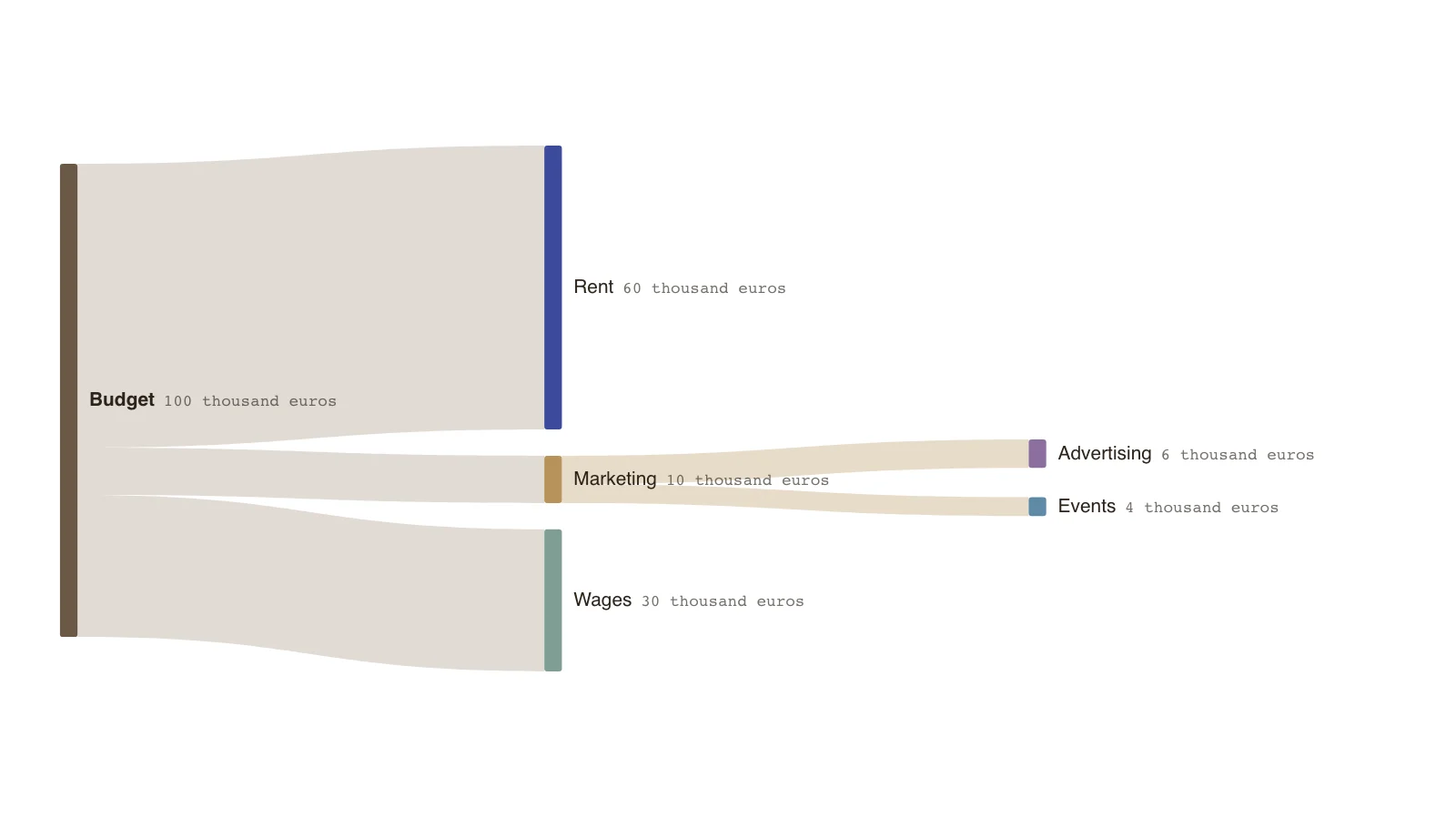
The example is a clean three-column budget. Add a row with a misspelt destination and the new node will appear dashed on its own.
Common causes
Names are the only link between rows, so any difference creates a new node.
- A typo or an extra space in a name.
- A different capitalisation or spelling.
- A flow row deleted but the node kept.
- A node typed but its flows not entered yet.
How it shows
An unconnected node is drawn dashed. It is flagged only after the chart has a flow, because when you start every node is unconnected and a warning on the first name you type would look like a mistake.
Fixing it
Correct the name so it matches, add the missing flow, or delete the node if it should not be there.
Key points
- The budget of 100 sends 60 to rent, 30 to wages and 10 to marketing.
- Marketing passes its 10 on: 6 to advertising and 4 to events.
- Every node has at least one flow, so none is flagged.
- The figures are invented.
The example’s data
Invented figures, balanced at every node.
| From | To | Amount (thousand euros) |
|---|---|---|
| Budget | Rent | 60 |
| Budget | Wages | 30 |
| Budget | Marketing | 10 |
| Marketing | Advertising | 6 |
| Marketing | Events | 4 |
The same data as CSV
source,target,value
Budget,Rent,60
Budget,Wages,30
Budget,Marketing,10
Marketing,Advertising,6
Marketing,Events,4
How it works
Look for dashed nodes
They have no ribbon in or out.
Compare names
Check for typos, spaces and capitalisation against the nodes they should join.
Fix or add the flow
Make the name match, or enter the missing amount.
Delete leftovers
Remove nodes that should not be in the chart.
Frequently asked questions
Why is my first node not flagged?
Until the chart has a flow, every node is unconnected, so nothing is flagged. The flags begin with the first flow.
Can I keep an unconnected node on purpose?
Yes. It is drawn dashed and the warning is a prompt, not a block.
Edit this budget Sankey
Open the example as your own chart and add a row to see how an unconnected node looks.