Sankey Chart Loops and Cycles: How to Handle Rework
Some flows go back to an earlier step, such as rework or returned goods. See how a loop is drawn as a return flow and how the totals count it.
A Sankey reads left to right, but real processes loop: items fail inspection and go back for rework. The editor draws the flow that closes a loop as a return flow and counts it in the totals.
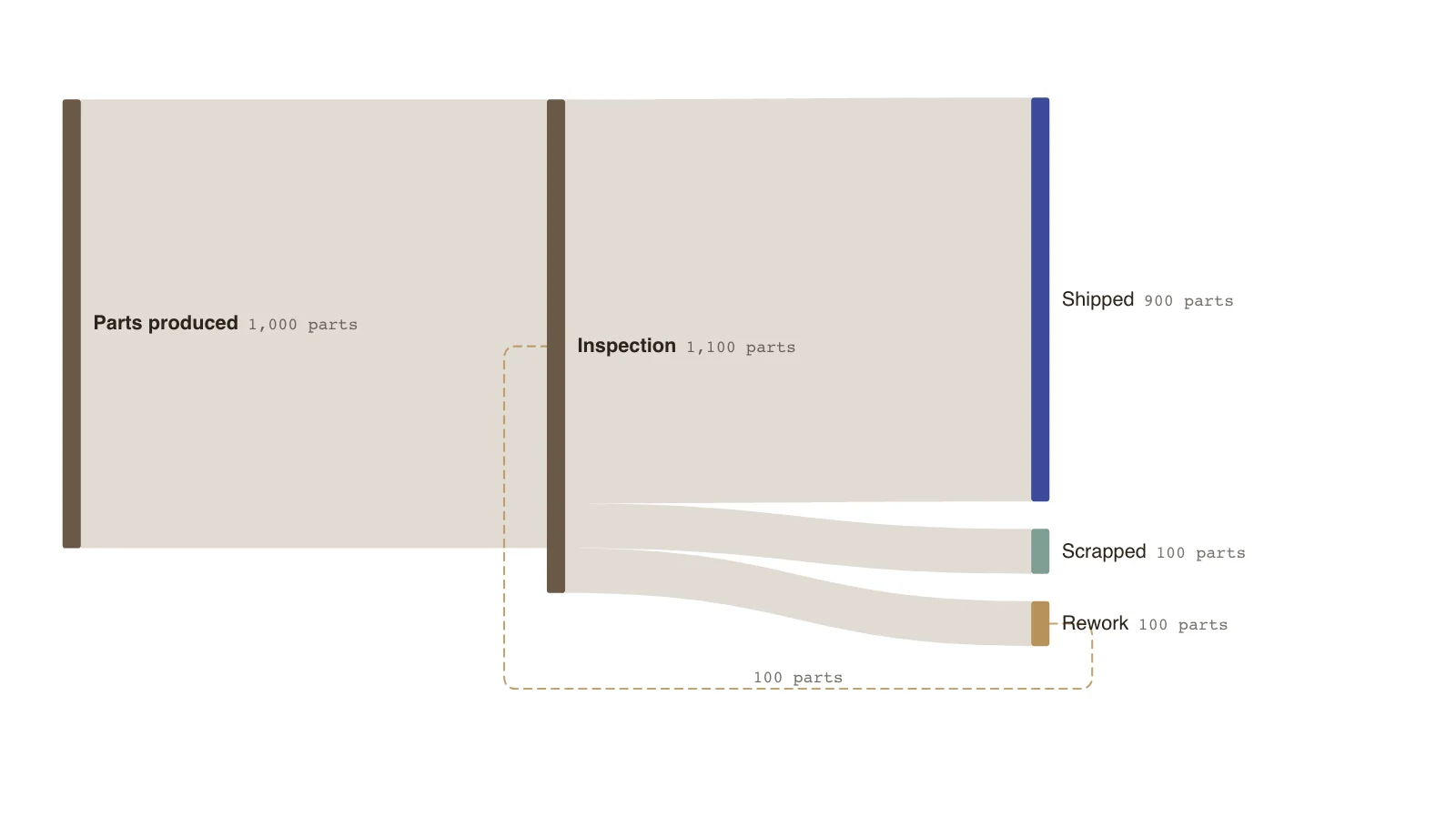
The example is a line where 1,000 parts enter inspection. 100 fail, go to rework and return to inspection, so inspection handles 1,100 in total: 1,000 new and 100 returned.
Each pass through inspection is counted. If you want first-time quality rather than total throughput, draw the chart in two stages instead of using a loop.
How a loop is drawn
The editor visits nodes in the order they appear in the sheet. A flow that leads back into a node already on the path is treated as the way back and is drawn as a return flow, with a warning that it is a loop. Put the nodes in the order of the process so the right flow is the one that is drawn back.
How the totals count it
Return flows count in a node's totals. Inspection receives 1,000 from production and 100 from rework, and sends on 1,100: 900 shipped, 100 scrapped and 100 to rework. A node that sends out more than it receives is warned about, so the loop only balances when the return flow is entered.
When to avoid a loop
Loops are harder to read than a single pass. If repeated passes do not matter, show rework as a node that ends in Shipped or Scrapped, which keeps every flow moving left to right.
Key points
- 1,000 parts are produced and inspection handles 1,100 because 100 come back from rework.
- 900 are shipped and 100 scrapped; the 100 reworked parts are inspected again.
- Rework receives 100 and returns 100, so it balances.
- The figures are invented; a loop is drawn as a return flow and flagged as a loop.
The example’s data
Invented counts. Balanced at every node, return flow included.
| From | To | Amount (parts) |
|---|---|---|
| Parts produced | Inspection | 1000 |
| Inspection | Shipped | 900 |
| Inspection | Scrapped | 100 |
| Inspection | Rework | 100 |
| Rework | Inspection | 100 |
The same data as CSV
source,target,value
Parts produced,Inspection,1000
Inspection,Shipped,900
Inspection,Scrapped,100
Inspection,Rework,100
Rework,Inspection,100
How it works
List the nodes in process order
Production first, then inspection, then the places a part can go.
Enter the forward flows
Production to inspection, inspection to shipped, scrapped and rework.
Enter the way back
Rework to inspection, which closes the loop.
Check the balance
Inspection receives new and returned parts, and sends on the total.
Frequently asked questions
Is a loop an error?
It is flagged as a warning because it is drawn differently, but it is a valid flow and its amount counts in the totals.
Why does the wrong flow come back?
The editor starts from the nodes in the order they are listed. Reorder the rows so the process starts at the top, and the later flow is the one drawn back.
Edit this rework Sankey
Open the example as your own chart and add your own return flow.